Google Drive Updated to Play Friendly With Apple's Files App - MacRumors
Skip to Content

Google Drive Updated to Play Friendly With Apple's Files App

by

Google Drive no longer hijacks file opening duties in Apple's Files and iCloud Drive apps on iPhone, iPad, and iPod touch.
google drive apple files
The app was updated today with a fix for the issue. Microsoft Word documents and other file types can now be viewed directly in in Apple's Files and iCloud Drive apps on iOS 11 and iOS 10 respectively.

Since a previous update to Google Drive earlier this month, the app became the default opener for many file types due to an open-in-place issue.
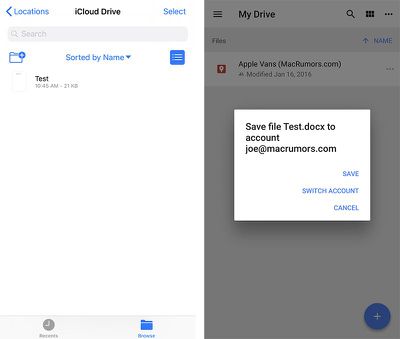
google drive docx files
When users with the Google Drive app installed attempted to open a DOCX file in Files or iCloud Drive, for example, the Google Drive app would automatically open and prompt the user to save the file in that app.

Google Drive version 4.2017.37510 is available on the App Store [Direct Link].

Top Rated Comments

gobikerider Avatar
111 months ago
The new version still hijacks files
Lmao damn google drive nvr plays nice
Score: 2 Votes (Like | Disagree)
Howl's Castle Avatar
111 months ago
works for me...
Score: 1 Votes (Like | Disagree)
111 months ago
Still getting this on my end. I’m not sure what the issue is now.
Same here. I ran the Google Drive update, even rebooted, and text files (.txt) are still attempting to upload into Google Drive rather than previewing directly in Files. PDFs, on the other hand, work as they should (and did prior to the update). I tried deleting Google Drive, and text files in Files previewed as they should, but after I reinstalled it, Google Drive went right back to its hijacking ways.

I don't particularly like using Google Drive, but there are certain things I need it for, so I can't just delete it indefinitely. On the other hand, although I really like the Files app, it has not yet become a major part of my workflow, so I will just avoid it until the problem gets resolved.
Score: 1 Votes (Like | Disagree)
GadgetBen Avatar
111 months ago
I love how that's not mentioned in release notes and just something we had to discover
Yeah it's no big deal I guess....!
Score: 1 Votes (Like | Disagree)
GadgetBen Avatar
111 months ago
DRAG AND DROP SUPPORT ADDED IN THIS UPDATE FOR IPAD!
Score: 1 Votes (Like | Disagree)
bwintx Avatar
111 months ago
I am curious, how does google drive integrate into Files if you use more then one google account in Drive? Does files give you a quick button somewhere to switch between the different accounts?
When you tap on Google Drive in Files, it gives you the choice among your accounts. Same with OneDrive, for that matter. I can't say for Dropbox or iCloud since I have only one account in each of those.
Score: 1 Votes (Like | Disagree)

Popular Stories

iOS 26

iOS 26.4 Adds Two New Features to CarPlay

Tuesday March 24, 2026 1:55 pm PDT by
iOS 26.4 was released today, and it includes a couple of new features for CarPlay: an Ambient Music widget and support for voice-based chatbot apps. To update your iPhone 11 or newer to iOS 26.4, open the Settings app and tap on General → Software Update. CarPlay will automatically offer the new features so long as the iPhone connected to your vehicle is running iOS 26.4 or later....
Apple Business hero

Apple Unveils 'Apple Business' All-in-One Platform

Tuesday March 24, 2026 8:53 am PDT by
Apple today announced Apple Business, a new all-in-one platform that unifies device management, productivity tools, and customer outreach features. The service is designed to be a consolidated replacement for several of Apple's existing business-focused offerings, including Apple Business Essentials, Apple Business Manager, and Apple Business Connect. It provides organizations with a single...
AirPods Pro Firmware Feature

Apple Releases New Firmware for AirPods Pro 3, AirPods Pro 2 and AirPods 4

Tuesday March 24, 2026 12:31 pm PDT by
Apple today released new firmware for the AirPods Pro 2, AirPods Pro 3, and the AirPods 4. The firmware has a version number of 8B39, up from 8B34 on the AirPods Pro 3, 8B28 on the AirPods Pro 2, and 8B21 on the AirPods 4. There is no word on what's included in the firmware, but Apple has a support document with limited notes. Most updates are limited to bug fixes and performance...