

Mophie today launched new Charge Force cases for the iPhone 7 and iPhone 7 Plus, introducing battery pack attachments and wireless charging features into the cases for Apple's newest smartphone line.
The Charge Force case for iPhone 7 and iPhone 7 Plus includes built-in magnets that align the leather case to any Mophie Charge Force base accessory, immediately powering up the iPhone when connected. Additionally, the Charge Force case is compatible with any other wireless charging systems, including those made by Qi, adding a wide array of wireless charging functionality to iPhone 7.
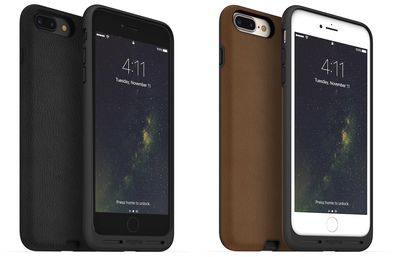
The company said that the new cases for iPhone 7 and iPhone 7 Plus provide protection from everyday wear and tear, and don't add "excess bulk" to the iPhone. There's also easy access to the iPhone's Lightning port so users can charge their iPhone through a wired connection, or use wired headphones and listen to music.
“mophie is committed to developing technologies that keep devices charged all day,” said Chris Ahern, President at mophie. “This case accomplishes that goal, not through additional batteries, but by making charging throughout the day effortless.”
The notably lean design of the case also protects from everyday wear and tear without adding excess bulk to your device. Raised corners provide added protection against scratched and cracked screens. Premium leather, TPU bezel and superior design strengthen the case’s durability.
Mophie also announced the Charge Force Powerstation mini, which offers users a quick and compact solution to charging their iPhone 7 when not near a wireless pad or AC port. The portable pack includes a 3,000 mAh battery that magnetically attaches to the back of the Charge Force iPhone 7 case, and charges up the iPhone when connected.

Both the iPhone 7 and iPhone 7 Plus versions of Mophie's Charge Force leather case cost $59.95, and come in black, tan, brown, blue and (PRODUCT)RED. The Charge Force Powerstation mini costs $49.95 and works with both sizes of iPhone.


Check out Mophie's website for more Charge Force products and accessories.

























![Apple Pulls Keynote, Pages and Numbers From App Store [Update: Back]](https://images.macrumors.com/t/Okb7kitB_gNr6qe5Pex9nQIysD8=/112x112/article-new/2026/01/Apple-Creator-Studio-iWork-suite.jpg)




















Top Rated Comments