

Google appears to be testing a Dark Mode feature for YouTube in the latest version of its Chrome 57 desktop browser.
The built-in mode was discovered on Thursday and shared in a Reddit post, and while the setting doesn't appear by default, a quick command in the developer console is all that's required to enable it.
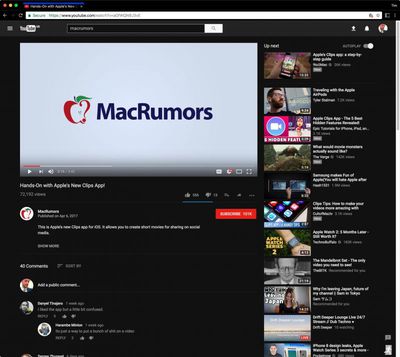
YouTube Dark Mode in Chrome with black theme enabled
Follow these steps to enable the YouTube dark mode in Chrome on Mac. Make sure you're signed in to YouTube before performing the steps.
- Press the keyboard combination shortcut Option + Command + I to open the developer tools sidebar.
- Click the Console tab.
- Paste document.cookie="VISITOR_INFO1_LIVE=fPQ4jCL6EiE" into the console and press enter.
- Close the developer tools sidebar and refresh the YouTube page.
- Click your YouTube profile picture, select Dark Mode from the dropdown, and toggle the switch to enable the mode.
Google Chrome is available to download for free on the Chrome website. [Direct Link]
Tag: Chrome




















Top Rated Comments
Netflix doesn't have ads.
Just look up the code and give it into the java console...
Edit: Tada!
I wish I could be more of more help but I seriously just logged in one day and the interface was different (like when Twitter updates). There's an option there:
But it's per browser. You need to do that with every browser you use.
You need to have Developer menu enabled. Go to Safari -> Preferences -> Advanced tab, and enable Developer menu.
* Go to www.youtube.com ('//www.youtube.com') and from the Developer menu select Show error console (or press: option + command + I)
* In the error console open Storage tab
* In the left panel select "Cookies - www.youtube.com ('//www.youtube.com')"
* Look through the cookies and see if there is one called "VISITOR_INFO1_LIVE". If there is, delete it.
* Then enter the following command to the error console at the bottom where it reads ">"
document.cookie='VISITOR_INFO1_LIVE=fPQ4jCL6EiE;domain=.youtube.com;path=/;max-age='+100000000000+';';
After that refresh the youtube page and press on the profile icon. That profile menu should now look completely different than how it was before. You should find the Dark Mode from there.