Apple Reimbursing Customers Who Recently Purchased Now-Acquired App Workflow - MacRumors
Skip to Content

Apple Reimbursing Customers Who Recently Purchased Now-Acquired App Workflow

by

Apple today began sending out emails to customers who purchased popular automation app Workflow in the last few weeks, letting them know that they'll be receiving a refund for the purchase price of the app.

Apple is handing out refunds because following its recent acquisition of the Workflow app and team, it made the Workflow app free to download and removed some key functionality.
workflowforios
A MacRumors reader shared his refund email with us, and we've also seen several reports of Workflow refunds from Twitter.

Dear iTunes Customer,
Thank you for purchasing Workflow by DeskConnect, Inc. Workflow is now available for free in the App Store. Since you recently purchased this app, we have issued you a full refund in the amount of $3.23. These funds will be applied to your original payment method and may take up to five business days from the issue date to post to your account.

Regards,

iTunes Support Team
http://www.apple.com/support/itunes/ww/

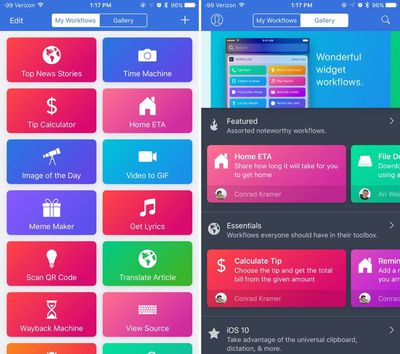
For those unfamiliar with Workflow, which is now owned by Apple, it's an automation tool that allows users to create a variety of workflows to automate tasks like creating GIFs from a series of photos, translating an article, posting photos to multiple social networks at once, calculating a tip, and tons more.

Following Apple's acquisition of Workflow, there was an update to remove certain features, including workflow functionality that involved Google Chrome, Pocket, LINE, Telegram, and Uber, likely for legal reasons.

Apple plans to keep Workflow available in the App Store, and it is now a free download. [Direct Link]


Top Rated Comments

OriginalAppleGuy Avatar
117 months ago
Jailbreak is your friend
No it's not. It may allow you to do more with the device, but it also opens it up to severe security concerns.
Score: 7 Votes (Like | Disagree)
jerry16 Avatar
117 months ago
So much potential with this app. Unfortunately, two of the immediate work flows I thought of in an effort to eliminate taps, can't be done.

* Turn on low power mode
* Close all open apps

I would hope that with the acquisition maybe a deeper integration w/ iOS would occur but I suppose if that were the case then Apple would just build these features right into iOS.

*and before anyone starts harping on me about why open apps don't matter, I don't care, I like them closed
Score: 7 Votes (Like | Disagree)
FloatingBones Avatar
117 months ago
Anyone got some good workflows to share?
Check out the archive at MacStories ('http://macstories.net'). Federico Viticci is one of the best sources anywhere on Workflow. There's more in the Club MacStories premium site, but plenty of free stuff too. And check out their Canvas podcast ('https://www.macstories.net/linked/canvas-episode-29-workflow-magic-variables/').
Score: 5 Votes (Like | Disagree)
117 months ago
Ok very nice on them.
Score: 5 Votes (Like | Disagree)
ErikGrim Avatar
117 months ago
This thread is strangely devoid of hate.
Score: 2 Votes (Like | Disagree)
117 months ago
I'd already read most of this and noted that it does not refer to the recent apps list at all. In fact it says that even a "terminated" app (how this is defined I am not sure) is woken and placed in the background if it needs to receive a location service. It says, "iOS supports the delivery of location events to apps that are suspended or no longer running." Even without being totally certain of the distinction between "terminated" and "no longer running" (if any), it's pretty clear that apps are allowed to process events when as far as the user knows the app is inactive. The user does have the option of disabling background event handling either specifically for an app or globally but I find nothing to suggest that they can do it any other way.
[doublepost=1491431713][/doublepost]

Apple doesn't make this as clear as they could to the user. This leads to a lot of speculation about how much control the user has over OS functions and how much they need to intervene to optimize performance. Apple's clear philosophy is "we took care of that, don't worry about it."
Right, with the user not allowing Background App refresh enabled for a particular app or in general then an app is only able to perform something if it's in foreground or background (suspended or not), but not if it's actually closed/terminated.

All this also only applies to this one particular location service aspect of it, while there are other ones related to VoIP, audio playback, and a few others that can allow apps to perform tasks in the background if they have been used at some point and are simply in background (suspended or otherwise), but not if they are completely closed (either haven't been launched or have been closed/terminated).

Basically that is to say that there are certainly circumstances where removing the app from the recent apps list to actually fully close/terminate it can have an effect of stopping it from doing something in the background which it otherwise might be doing.

"Note: If your app is terminated either by a user or by the system, the system doesn’t automatically restart your app when new location updates arrive. A user must explicitly relaunch your app before the delivery of location updates resumes. The only way to have your app relaunched automatically is to use region monitoring or the significant-change location service.

However, when a user disables the Background App Refresh setting either globally or specifically for your app, the system doesn’t relaunch your app for any location events, including significant-change or region monitoring events. Further, while Background App Refresh is off your app won’t receive significant-change or region monitoring events even when it's in the foreground. When a user reenables Background App Refresh for your app, Core Location restores all background services, including any previously registered regions."
Score: 1 Votes (Like | Disagree)

Popular Stories

Apple Event Logo

Apple to Launch These 15+ New Products Later This Year

Friday March 27, 2026 2:03 pm PDT by
March has been an incredibly busy month for Apple, with the company unveiling more than 10 new products and accessories. We said hello to the MacBook Neo at the start of the month, and we bid farewell to the Mac Pro at the end of it. Nevertheless, there is still a lot more to come this year. Beyond the usual annual updates to iPhones and Apple Watches, Apple's all-new smart home hub is...
iOS 26

iOS 26.4 Adds Two New Features to CarPlay

Tuesday March 24, 2026 1:55 pm PDT by
iOS 26.4 was released today, and it includes a couple of new features for CarPlay: an Ambient Music widget and support for voice-based chatbot apps. To update your iPhone 11 or newer to iOS 26.4, open the Settings app and tap on General → Software Update. CarPlay will automatically offer the new features so long as the iPhone connected to your vehicle is running iOS 26.4 or later....
Mac Pro Feature Teal

Apple Confirms Mac Pro Is Dead, No Future Models Planned

Thursday March 26, 2026 2:04 pm PDT by
Apple has discontinued the Mac Pro and has removed the machine from its website, reports 9to5Mac. Apple said it does not plan to design a new version of the Mac Pro, and no new model will be coming in the future. The Mac Pro was last updated in 2023, which was when Apple added an M2 Ultra Apple silicon chip, but the chassis has not been refreshed since 2019. Apple redesigned the Mac Pro to...