Last October, Twitter began testing out an enhanced version of a new "Explore" tab on its iOS app, giving a small group of users access to trending topics, simplified search tools, and "Moments," the news aggregating feature which previously had its own dedicated tab within the app. Beginning today, the "Explore" tab will be available to all users on the iOS Twitter app, giving them one-stop access to trends, search, Moments, and live video.
According to Twitter, the tests from last year went well, and users told the company "that the new Explore tab helped them easily find news, what’s trending, and what’s popular right now." In the blog post today, Twitter also pointed out that "nothing is going away," simply that various parts of the app are moving into the new Explore section.
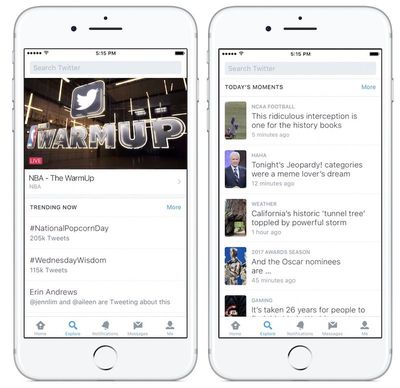
When users tap on Explore, they'll see breaking news via a live video header with trending topics underneath, and further news stories under a "Today's Moments" section.
Over the past year, we’ve been exploring different ways to make it simpler for people to find and use trends, Moments, and search. During our research process, people told us that the new Explore tab helped them easily find news, what’s trending, and what’s popular right now.
Nothing is going away – we’re just making it easier to find what you want. Explore will begin rolling out today on Twitter for iOS, and in the coming weeks on Twitter for Android. Make sure you have the latest version of your app to check it out. And of course, we will continue to listen to your feedback to make Explore even better, based on your thoughts and some ideas we have up our sleeve!
The overhaul to Moments -- which launched in 2015 -- comes after Twitter faced its slowest revenue growth in years. In an attempt to keep old users happy and welcome newcomers, Twitter has recently removed media attachments from the 140 character limit, and is trying to address harassment on the service with new mute filter and reporting features.
Last December, the company began a new test to see if a rebranding of "retweet" to "sharing" would increase traction on the social network for new users confused by the Twitter-specific lingo of the word "retweet." One of the most user-requested features -- Tweet editing -- is still not available on Twitter, but CEO Jack Dorsey admitted recently that it's "definitely needed."
Twitter is available on the iOS App Store for free. [Direct Link] The company noted that the update will be rolling out throughout the day, and "in the coming weeks" it will arrive on Android.