

CES 2017: Withings Debuts HomeKit-Enabled 'Home Plus' Baby Monitor and Security Camera - MacRumors
Skip to Content

CES 2017: Withings Debuts HomeKit-Enabled 'Home Plus' Baby Monitor and Security Camera

by

At this week's Consumer Electronics Show, Withings introduced the next-generation version of its "Home" smart security camera and baby monitor, which adds HomeKit compatibility.

The new "Home Plus" is one of the first security cameras on the market to integrate with HomeKit, allowing it to interface with other HomeKit-enabled products and be accessed through Apple's own Home app.

Like many security cameras on the market, the Home Plus streams HD video to a smartphone or tablet, allowing users to keep an eye on their homes when away, or on their children when in a different room. The Home Plus sends notifications out when there's unusual noise and movement, and it's able to monitor indoor pollution.
withingshomeplus
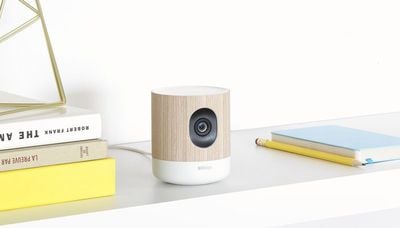
Design wise, the Withings Home Plus looks similar to the original Withings Home, introduced in 2015, with a wood enclosure and white accents that house a wide-angle camera. It has the same HD camera with night vision support and the ability to store video for up to 48 hours with no subscription plan needed.

Withings plans to make the Home Plus available for purchase during the first quarter of 2017. It will be priced at $199.
withingssteelhr
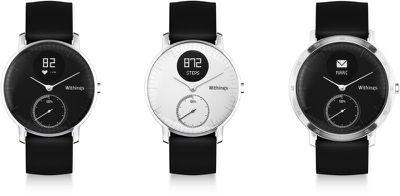
Withings has also begun selling its new Withings Steel HR, an analog fitness tracking watch with a built-in heart rate monitor. First introduced in September, the Withings Steel HR looks like a traditional watch, but features heart rate and activity tracking. The Steel HR is available for $179.95 to $199.95 from the Withings website.

Top Rated Comments

avanpelt Avatar
124 months ago
For the same price, the Nest indoor camera is a better option, I'd say -- especially when you can usually pick the Nest Cam up for less than $199 on Amazon or on sale somewhere.

Nest also requires a subscription to store video in the cloud; but it offers a 10-day option as a minimum, which, to me, is more useful than 48 hours. I know some people don't need or want 10 days worth of video stored in the cloud, though.

We use the Nest Cam in conjunction with a baby monitor app that works over Wi-Fi or Bluetooth. We have the baby monitor app set for audio only and have it running on an old iPad that isn't useful for much more than a baby monitor these days anyway. We do it that way because the Nest app doesn't continue to stream audio when the app is in the background, unfortunately. The setup works very well for us.

I'm still not sold on HomeKit. All it takes is for Apple to decide to change the standard and suddenly, all this HomeKit-compatible stuff could be rendered not HomeKit compatible any more. Sadly, I no longer trust that Apple wouldn't do something like that -- and then call it "courageous", to boot.
Score: 3 Votes (Like | Disagree)
124 months ago

I'm still not sold on HomeKit. All it takes is for Apple to decide to change the standard and suddenly, all this HomeKit-compatible stuff could be rendered not HomeKit compatible any more. Sadly, I no longer trust that Apple wouldn't do something like that -- and then call it "courageous", to boot.
Other vendors could drop support too just as easily. Homekit requirements are very strict, so if something supports Homekit, most likely it supports Alexa, Google, SmartThings, etc.

I refuse to buy non Homekit smart devices because I want to have everything be accessible through the Home app. Homekit is also very secure providing full encryption,.... which is what you'd defintely want for a security cam.
Score: 2 Votes (Like | Disagree)
Mizio Avatar
124 months ago
Any news on the D-link Homekit camera that was announced to be available end of last year? Will it also be presented at CES?

Thanks
Score: 2 Votes (Like | Disagree)
124 months ago
The fact that this is compatible with Home Kit would separate it from the other competitors.
Score: 2 Votes (Like | Disagree)
centauratlas Avatar
124 months ago
...
I'm still not sold on HomeKit. All it takes is for Apple to decide to change the standard and suddenly, all this HomeKit-compatible stuff could be rendered not HomeKit compatible any more. Sadly, I no longer trust that Apple wouldn't do something like that -- and then call it "courageous", to boot. ...
This is my concern as well. It is the main reason when I got my CarPlay equipped car, I made sure it also had Android Auto. ... just in case ...
Score: 1 Votes (Like | Disagree)
124 months ago


We use the Nest Cam in conjunction with a baby monitor app that works over Wi-Fi or Bluetooth. We have the baby monitor app set for audio only. We do it that way because the Nest app doesn't continue to stream audio when the app is in the background, unfortunately. The setup works very well for us.
What app do you use?
Score: 1 Votes (Like | Disagree)

Popular Stories

iphone 16 teal

'Siri AI' Lawsuit Update: Apple to Pay Owners of These iPhone Models

Thursday July 9, 2026 7:08 am PDT by
In May, Apple agreed to pay $250 million to settle a U.S. class action lawsuit over Siri AI's delayed launch, and eligible iPhone users could receive up to a $95 payout. This week, the California court overseeing the case held a hearing regarding preliminary approval of the settlement, but the judge has not yet issued a ruling. It will likely be at least a few more months before eligible...
Apple TV Thumb 3

Everything Coming in the 2026 Apple TV 4K

Wednesday July 8, 2026 4:51 pm PDT by
The Apple TV 4K hasn't been updated since 2022, and it's due for a refresh. An update is planned for 2026, but Apple is likely going to wait to launch it after Siri AI launches in iOS 27. Design Apple TV design updates don't happen often, and that's not changing. The next Apple TV is going to have the same squircle shape as the current model, and it'll continue to be made from a black...
apple wallet drivers license feature iPhone 15 pro

Apple Says iPhone Driver's Licenses Will Expand to These 6 U.S. States

Thursday July 9, 2026 7:29 am PDT by
In select U.S. states, residents can add their driver's license or state ID to the Apple Wallet app on the iPhone and Apple Watch, and then use it to display proof of identity or age at select airports and businesses, and in select apps. To set up the feature, open the Wallet app on the iPhone and tap on the plus sign in the top-right corner. Next, tap on Driver's License and ID Cards,...









































