Plex Media Player for Mac Now a Free Download for All Users - MacRumors
Skip to Content

Plex Media Player for Mac Now a Free Download for All Users

by

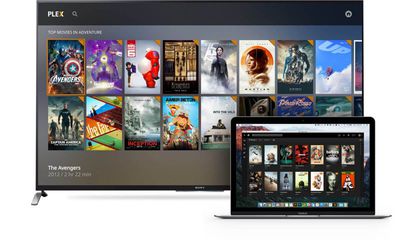
Media management service Plex has announced that its Plex Media Player app is now free to everyone. Previously only available to Pass subscribers, the Plex app for Mac is a home theater-style media browser and player for content stored in personal media libraries.

Plex Media Player (which is distinct from the Plex Media Server client app) now features a fullscreen desktop interface where it integrates online files and metadata to present users' media, including artwork and, optionally, movie subtitles. In the latest update, the Player also allows users to queue up movies and music.
plex-media-player-tv-macbook-1600x958

Maybe you pine for stuff like Plex Media Player’s silky smooth playback, complex subtitle rendering, and lightning fast seeking on your desktop. Maybe you have a lower-powered NAS server that doesn’t like to transcode. Or maybe you’d just like to rock out to some FLAC while you work. Until today, your only option was to find some place to stash a little baby Media Player window and muddle through the TV UI to queue up your background music of choice.

Well, no more: we’ve harnessed our incredibly powerful Web app and wrapped it up inside our lovely Plex Media Player shell to give you a full-fledged “desktop mode” experience right out of the box. With Plex Media Player running in a window, you can now use your mouse and keyboard as nature intended, and switching to the TV UI is as easy as going full-screen.

In addition to making Plex Media Player a free download, Plex also announced the long-awaited Plex for Kodi add-on. Kodi is a fully extensible, community driven software media center with wide support for playing a range of media content. Exclusively for Plex Pass members, the Plex add-on brings users' Plex-processed media libraries to the Kodi interface for the first time.

You can download Plex Media Player on this page by clicking the 'Get an app' button (third option).

Post updated for clarification.

Tag: Plex

Top Rated Comments

dannys1 Avatar
123 months ago
Huh? I have always had the free player (Plex Home Theater)...Confused by this.
PHT was killed off about a year ago to be replaced by PMP (this) which has been in beta since then (for plex pass only). It's totally rewritten from the ground up and future proofed.
Score: 4 Votes (Like | Disagree)
123 months ago
Huh? I have always had the free player (Plex Home Theater)...Confused by this.
Score: 4 Votes (Like | Disagree)
123 months ago
Plex Media Player is still missing a ton of Plex Home Theater's features and settings. Fortunately, there is an open source fork of Plex Home Theater called OpenPHT (https://forums.plex.tv/categories/openpht), which improves upon the now retired Plex Home Theater.

I switched to OpenPHT a few months ago and have been very happy with it since.
Score: 3 Votes (Like | Disagree)
timmyh Avatar
123 months ago
Sorry guys. To clarify, the Plex Media Server has always been free for Mac users. It's a background client for serving media to your other devices, but it also lets you play media from Plex within a browser.

Plex Media Player is a different thing - a standalone media center app, as described above. You can download it from this page, by clicking on 'Download a Plex app': https://www.plex.tv/downloads/

Confusing, I know!
Score: 2 Votes (Like | Disagree)
123 months ago
Hmm.. so now you must login with the Plex-username and password..?
Yep. This happened sometime this past year on my TV set as well. Very disconcerting.
That was one major reason I didn't like Plex. I couldn't see the reason why I needed to log in to some outside computer in order to use my own media on my own devices. Then I found that it gave Plex access to my photo library even though I had specifically turned off the photo library in the original setup. That library was loaded with a lot of production stills that could possibly get me in serious trouble if they get into the wrong hands due to non-disclosure.

The lousy thing never worked right, so I deleted it. I followed the instructions at Plex as well as what was posted here in other Plex threads. A few months later, so many good reports were posted on how well Plex was working I decided to try it again. Surprisingly, it skipped the setup and went right to working as if I'd never deleted it. According to everyone I spoke with in various forums, I didn't miss a single file when I deleted everything. So where did that setup info get hidden?

So, we have a program that can't be completely deleted, that requires you to log in to a cloud service in order to use your own media on your own devices. Who really designed this thing? The NSA?

I deleted it all, again, and spent a lot of time scouring my system, and found a few hidden files which I also deleted. Then I installed Infuse from Firecore and was very pleased with it. It works brilliantly on my aTV4.
Score: 1 Votes (Like | Disagree)
123 months ago
Hopefully this will help clear up some confusion. You have three options now:

Plex Media Player - This is the official replacement for Plex Home Theater that was built from the ground up.
OpenPHT - This is the community supported fork of Plex Home Theater.
Plex add-on for Kodi - For those who want to use Kodi, Plex now has an official add-on that's available for Plex Pass members.
Score: 1 Votes (Like | Disagree)

Popular Stories

General Apps Reddit Feature

Reddit Starts Blocking Mobile Website, Pushing Users to App Instead

Monday May 11, 2026 6:10 am PDT by
Social network Reddit recently began blocking mobile visitors to its website while pushing them to download the official Reddit app, and it's fair to say that the move is not going down well with users. If you visit reddit.com on your iPhone today, you may see a new popup that can't be dismissed, asking you to "get the app to keep using Reddit." A Reddit spokesperson told Ars Technica...
iOS 26

Apple Releases iOS 26.5 and iPadOS 26.5 With End-to-End Encrypted RCS, New Wallpaper, and Maps Updates

Monday May 11, 2026 10:06 am PDT by
Apple today released iOS 26.5 and iPadOS 26.5, the newest updates to the iOS 26 and iPadOS 26 operating systems. The software comes nearly two months after Apple released iOS 26.4 and iPadOS 26.4. The new software can be downloaded on eligible iPhones and iPads over-the-air by going to Settings > General > Software Update. Apple has also released iOS 15.8.8, iOS 16.7.16, iOS 18.7.9, and...
Four iPhone 18 Pro Colors Mock Feature

iPhone 18 Pro Launching in September With These 10 New Features

Saturday May 9, 2026 6:03 am PDT by
While the iPhone 18 Pro and iPhone 18 Pro Max are not launching until September, there are already plenty of rumors about the devices. It was initially reported that the iPhone 18 Pro models would have fully under-screen Face ID, with only a front camera visible in the top-left corner of the screen. However, the latest rumors indicate that only one Face ID component will be moved under the...