Starting today, Apple is making the new macOS Sierra operating system available as an automatic download to customers running OS X El Capitan in order to encourage them to update.
Customers who have auto downloads enabled will see macOS Sierra start to download automatically, but it will not install without express user permission.
Apple shared the news with The Loop and says the update will only be downloaded on computers that meet the specs for macOS Sierra and have an adequate amount of storage space.
Apple is also being smart about the download. If your computer is low on space, macOS Sierra will not download. In addition, if it has downloaded and your computer starts to get low on space, the download will be automatically deleted.
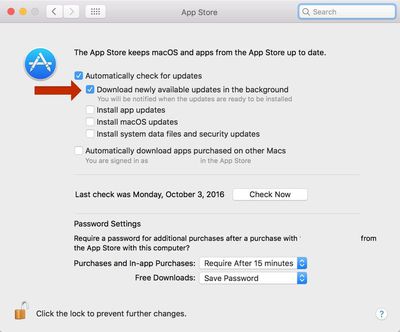
Customers who do not want to upgrade to macOS Sierra can manually delete the update to keep from being prompted to do the install, and the download can be turned off by disabling automatic downloads. Disabling the feature can be done by going to System Preferences -> App Store and unchecking "Download newly available updates in the background."
Automatic downloads of macOS Sierra will be rolling out to customers over the next week.
If you pay for certain iCloud+ storage plans beyond the 5GB that Apple offers for free, you will receive two more perks on iOS 27 at no additional cost.
A summary of the two new iCloud+ perks on iOS 27:Increased daily usage limits for some new Apple Intelligence features, including image generation in the revamped Image Playground app.
HomeKit Secure Video cameras receive generated video...
Apple's first product release of summer 2026 occurred this week, but do not get too excited, as it is merely the Beats Solo Buds in a new color.
Beats Solo Buds are now offered in orange through Best Buy in the U.S., with availability set to expand to 7-Eleven stores in Japan on July 4.
Apple already offered orange Solo Buds in India for free with the purchase of an iPhone 15 or iPhone 15 ...
The lower-end iPhone 18 and iPhone 18e will be equipped with 9GB of RAM, up from 8GB in the iPhone 17 and iPhone 17e, according to supply chain analyst Ming-Chi Kuo.
In a social media post, Kuo said the 1GB increase in RAM will ensure that Apple Intelligence features continue to run smoothly on the pair of devices.
The higher-end iPhone 18 Pro, iPhone 18 Pro Max, and foldable "iPhone Ultra...
I don't get why people are upset about this. How is it any different than iOS? Actually the only difference is that it can be disabled as where iOS does it automatically. I guess I'm not understanding why people are complaining about it unless it's because it's Apple and people here complain more about Apple lately than on Android Central. [doublepost=1475518967][/doublepost]
Apple's first foldable iPhone, with a book-style design featuring a ~5.5-inch outer display and a ~7.8-inch inner display with a minimal crease down the middle.