

Popular writing environment Scrivener made its long-awaited debut on iOS this morning.
For those unfamiliar with the Mac application, Scrivener is a scalable long-form writing platform and author project management system featuring multiple editing and organization tools.
Note cards, character sketches, place descriptions, and research notes are just some of the options available to writers, with import options for media, web pages, PDFs, and more also forming part of the package.
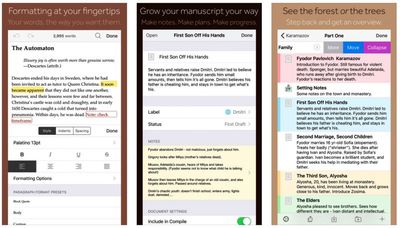
As a standalone writing environment, the new Scrivener iOS app functions in much the same way, offering rich text editing with support for comments, footnotes, keywords, and so on.
Many of the features from the desktop version have also made the port, such as the Binder, Outliner, Corkboard, and Inspector, although certain features that require more screen space — the Corkboard, for instance — are iPad-only.
The app syncs with Scrivener for macOS (Scrivener v2.8) and Scrivener for Windows using Dropbox, or users can copy projects between devices via iTunes. As mentioned however, the iOS app also works as a standalone tool, featuring multiple manuscript compilation and print formats as well as project export options, such as ebook, ePub, and PDF.
Scrivener 2.8 for Mac is a free update for all registered users of Scrivener 2, and along with iOS support, it also includes a number of bug fixes and minor tweaks.
Scrivener for iOS was first announced back in 2011, with an early launch goal originally estimated to be "some time in 2012." When that date slipped, lead developer Keith Blount kept fans updated on the troubled development of the app, with the iOS team running into coding issues and other setbacks over the years.
Scrivener for iOS costs $19.99 and is compatible with any device running iOS 9.0 or later. [Direct Link]




















Top Rated Comments
The more professional alternative to Scrivener is Finaldraft.
One of the biggest advantages I've had with writing with Scrivener for iOS on an iPad mini is the ability to just pull up a version of a novel or another novel fast and check documents notes and reference material, then hop back over to the one I'm working on. Even with the small screen and no keyboard I've been able to get work done, albeit with the a HUGE amount of typos due to iOS's lack of an international dictionary.
Can't wait to try it out on a 12.9" iPad Pro.
I've been waiting YEARS for this.