iPods in Unreleased Colors Spotted in iTunes 12.2
Following the release of iTunes 12.2 with Apple Music support yesterday, one MacRumors user has discovered graphics depicting iPods in colors not currently offered by Apple. The composite image of an iPod touch, nano, and shuffle is shown when setting up or restoring an iPod in iTunes.
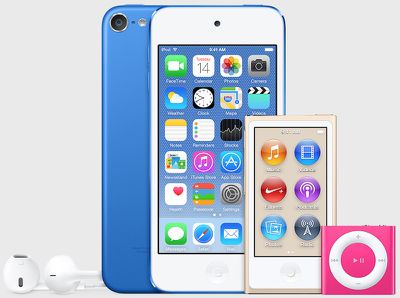
The new colors include a darker blue for the iPod touch, a new gold or beige color for the iPod nano, and a brighter pink color for the iPod shuffle.
Apple has not updated its iPod color lineup in several years, most recently shifting the previous "slate" color to "space gray" back in 2013. Apple has typically updated its iPod lineup during the month of September, although it is unclear whether these new colors are actually in the works and what their release timeframe might be.
Update: Several observers have pointed to the Calendar icon on the iPod touch screenshot showing a date of Tuesday the 14th, leading to speculation the new models could launch on Tuesday, July 14. Readers have also noticed the new image does not depict a wrist strap attachment post as seen in the lower left corner of the current models.
(Thanks, iPhone.Freak!)
Popular Stories
The Apple TV 4K hasn't been updated since 2022, and it's due for a refresh. An update is planned for 2026, but Apple is likely going to wait to launch it after Siri AI launches in iOS 27.
Design
Apple TV design updates don't happen often, and that's not changing. The next Apple TV is going to have the same squircle shape as the current model, and it'll continue to be made from a black...
In May, Apple agreed to pay $250 million to settle a U.S. class action lawsuit over Siri AI's delayed launch, and eligible iPhone users could receive up to a $95 payout.
This week, the California court overseeing the case held a hearing regarding preliminary approval of the settlement, but the judge has not yet issued a ruling. It will likely be at least a few more months before eligible...
In select U.S. states, residents can add their driver's license or state ID to the Apple Wallet app on the iPhone and Apple Watch, and then use it to display proof of identity or age at select airports and businesses, and in select apps.
To set up the feature, open the Wallet app on the iPhone and tap on the plus sign in the top-right corner. Next, tap on Driver's License and ID Cards,...