SVALT today announced the launch of a new cooling dock designed for Apple MacBooks and select PC laptops, which the company promises offers a 12x improvement in cooling, 129 percent improvement in CPU power, and 53 percent improvement in CPU Turbo Boost by eliminating CPU throttling due to heat issues.

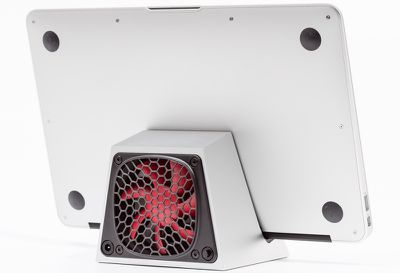
Created from solid aluminum and designed to match up with the style of Apple's MacBooks, the two-pound SVALT D is compact and holds a closed MacBook vertically in a dedicated ledge. A 12-volt fan sends air through the laptop's closed screen to reduce system temperatures while allowing GPU resources to be used for an external display.
svalt

Transform your laptop with a level of performance and functionality previously limited to the highest-end desktop computers. Heat buildup in the laptop negatively impacts performance and long term durability. Anchored by the passive cooling capacity of a highly engineered 2 pounds of aluminum, SVALT D enhances cooling with a 12-volt 80x25mm fan to drive airflow through the laptop's closed screen position air vent. Airflow is directed over the internal electronic components and bottom panel, feeding cool air into one or more of the laptop's fans and driving waste exhaust air out vents, flushing out heat.

The company says that real world results using the SVALT D will depend on the laptop used, the workload, and ambient temperatures, but it detailed testing on a 2012 11-inch MacBook Air:

- Fan: Red 1600-1700RPM
- Environment: 21 Celsius +/-1 and 50dB +/-5 office standards
- Cooling: 13C increase without SVALTTM D verses 1C increase with SVALTTM D
- Power: 0.748W increase with SVALTTM D verses -2.616W reduction without SVALTTM D
- Turbo Boost: 1.000GHz increase and sustained max Turbo Boost with SVALTTM D verses a throttled 0.653GHz increase without SVALTTM D
- Noise observation: slightly louder than background noise at 2ft from front

svalt2The dock ships with a power supply and it can be used with the fan on or off. There are two fan options -- a higher-powered red fan that runs at 1700RPM/15 dBA and a quieter Yellow fan that runs at 1200RPM/12 dBA.

The SVALT D works with current-generation MacBook Air and Retina MacBook Pro computers, including 11, 13, and 15-inch models. The SVALT D is currently in production, and the company plans to begin taking orders in February. The dock will be priced between $130 and $150.


Tag: SVALT

Top Rated Comments

Hedwigg Avatar
143 months ago
I've never have a need for a cooling dock on any of my MacBook pro.

Sweet! Your usage dictates everyone else's usage! I'm so psyched to know I'll never need one since you've never needed one... thanks!
Score: 30 Votes (Like | Disagree)
5t3f4n Avatar
143 months ago
Sweet! Your usage dictates everyone else's usage! I'm so psyched to know I'll never need one since you've never needed one... thanks!

Score: 8 Votes (Like | Disagree)
legally Avatar
143 months ago
Operated in clamshell mode

The MacBook can be used while docked--the MacBook operates in clamshell mode, with external monitor and peripherals. See http://support.apple.com/en-us/HT201834 for instructions regarding use in clamshell mode.

*disclosure, I'm a consultant to SVALT, so not disinterested.
Score: 5 Votes (Like | Disagree)
penter Avatar
143 months ago
This looks awesome, but I wonder if placing the laptop vents *downward* is the best way to go...
Score: 5 Votes (Like | Disagree)
PowerBook-G5 Avatar
143 months ago
I feel like you've mistaken the speaker grill for vents, but I've never had a 15" rMBP.

I don't have a rMBP, but the speaker grills are on the top, with the keyboard nestled between them. The air vents that he speaks of are on the sides on the notebook. Check out this picture...


If I recall correctly, these vents (on either side of the MacBook) draw in Air that cools the machine. The vent by the hinge is for exhaust. Also check out this (http://youtu.be/uzK0Cu5nfUE?t=3m20s). It should help clarify this...
Score: 4 Votes (Like | Disagree)
freeskier93 Avatar
143 months ago
Extra real estate is key (I'm a film editor so I've got my 27" iMac along with 2 external monitors), but you're not really gaining all that much real estate if you're not using the monitor that you paid for in the laptop...all you're doing is pushing the information over to another monitor...

Are you really this dense? Can you put your iMac in your backpack and take it with you? People like the portability of a laptop but at home want a bigger screen and monitors are a lot cheaper than whole computers. Plus the not everyone wants to deal with having two computers.
Score: 3 Votes (Like | Disagree)

Popular Stories

iOS 26

iOS 26.4 and iOS 27 Features Revealed in New Leak

Friday December 12, 2025 10:56 am PST by
Macworld's Filipe Espósito today revealed a handful of features that Apple is allegedly planning for iOS 26.4, iOS 27, and even iOS 28. The report said the features are referenced within the code for a leaked internal build of iOS 26 that is not meant to be seen by the public. However, it appears that Espósito and/or his sources managed to gain access to it, providing us with a sneak peek...
iOS 26

iOS 26.2 Coming Soon With These 8 New Features on Your iPhone

Thursday December 11, 2025 8:49 am PST by
Apple seeded the second iOS 26.2 Release Candidate to developers earlier this week, meaning the update will be released to the general public very soon. Apple confirmed iOS 26.2 would be released in December, but it did not provide a specific date. We expect the update to be released by early next week. iOS 26.2 includes a handful of new features and changes on the iPhone, such as a new...
iOS 26

Apple Releases iOS 26.2 With Alarms for Reminders, Lock Screen Changes, Enhanced Safety Alerts and More

Friday December 12, 2025 10:10 am PST by
Apple today released iOS 26.2, the second major update to the iOS 26 operating system that came out in September, iOS 26.2 comes a little over a month after iOS 26.1 launched. ‌iOS 26‌.2 is compatible with the ‌iPhone‌ 11 series and later, as well as the second-generation ‌iPhone‌ SE. The new software can be downloaded on eligible iPhones over-the-air by going to Settings >...
AirPods Pro Firmware Feature

Apple Releases New Firmware for AirPods Pro 2 and AirPods Pro 3

Thursday December 11, 2025 11:28 am PST by
Apple today released new firmware designed for the AirPods Pro 3 and the prior-generation AirPods Pro 2. The AirPods Pro 3 firmware is 8B30, up from 8B25, while the AirPods Pro 2 firmware is 8B28, up from 8B21. There's no word on what's include in the updated firmware, but the AirPods Pro 2 and AirPods Pro 3 are getting expanded support for Live Translation in the European Union in iOS...
macOS Tahoe 26 Thumb

Apple Releases macOS Tahoe 26.2 With Edge Light

Friday December 12, 2025 10:08 am PST by
Apple today released macOS Tahoe 26.2, the second major update to the macOS Tahoe operating system that came out in September. macOS Tahoe 26.2 comes five weeks after Apple released macOS Tahoe 26.1. Mac users can download the macOS Tahoe update by using the Software Update section of System Settings. macOS Tahoe 26.2 includes Edge Light, a feature that illuminates your face with soft...
AirTag 2 Mock Feature

Apple AirTag 2: Four New Features Found in iOS 26 Code

Thursday December 11, 2025 10:31 am PST by
The AirTag 2 will include a handful of new features that will improve tracking capabilities, according to a new report from Macworld. The site says that it was able to access an internal build of iOS 26, which includes references to multiple unreleased products. Here's what's supposedly coming: An improved pairing process, though no details were provided. AirTag pairing is already...
ipados 26 1 slide over

Apple Releases iPadOS 26.2 With Multitasking Improvements

Friday December 12, 2025 10:09 am PST by
Apple today released iPadOS 26.2, the second major update to the iPadOS 26 operating system released in September. iPadOS 26.2 comes a month after iPadOS 26.1. The new software can be downloaded on eligible iPads over-the-air by going to Settings > General > Software Update. iPadOS 26.2 continues with the multitasking improvements that were added with iPadOS 26.1. You can now drag and...
bug security vulnerability issue fix larry

Update Now: iOS 26.2 Fixes 20+ Security Vulnerabilities

Friday December 12, 2025 11:11 am PST by
Apple today released iOS 26.2, iPadOS 26.2, and macOS 26.2, all of which introduce new features, bug fixes, and security improvements. Apple says that the updates address over 20 vulnerabilities, including two bugs that are known to have been actively exploited. There are a pair of WebKit vulnerabilities that could allow maliciously crafted web content to execute code or cause memory...