Apple Begins Asking Developers to Turn On Family Sharing for iOS 8 and OS X Yosemite Apps

Just a couple days after announcing Family Sharing, a feature that allows families to share iTunes and App Store purchases, Apple has begun emailing developers to ask them to turn on the feature in their iTunes Connect developer portal.

While Family Sharing is a significant addition to the App Store, the opt-in requirement for developers could see some declining to allow their apps to be shared amongst as many as six accounts with no extra charge.
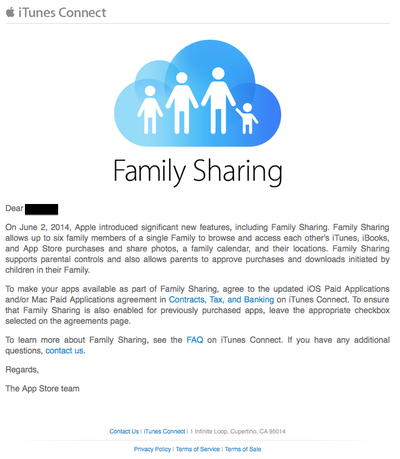
familysharing

To make your apps available as part of Family Sharing, agree to the updated iOS Paid Applications and/or Mac Paid Applications agreement in Contracts, Tax and Banking on iTunes Connect. To ensure that Family Sharing is also enabled for previously purchased apps, leave the appropriate checkbox selected on the agreements page.

Family Sharing also allows families to share calendars, reminders, photos and locations. It also allows parents to monitor and approve downloads and purchases made by their children remotely. The feature is likely to get turned on and tested in the iOS 8 betas before going live when iOS 8 is available for the public later this year.

Popular Stories

iPhone Top Left Hole Punch Face ID Feature Purple

iPhone 18 Pro Launching Later This Year With These 12 New Features

Thursday January 15, 2026 10:56 am PST by
While the iPhone 18 Pro and iPhone 18 Pro Max are not expected to launch for another eight months, there are already plenty of rumors about the devices. Below, we have recapped 12 features rumored for the iPhone 18 Pro models, as of January 2026: The same overall design is expected, with 6.3-inch and 6.9-inch display sizes, and a "plateau" housing three rear cameras Under-screen Face ID...
Apple MacBook Pro M4 hero

These 5 Apple Products Will Reportedly Be Upgraded With OLED Displays

Friday January 16, 2026 7:07 pm PST by
Apple plans to upgrade the iPad mini, MacBook Pro, iPad Air, iMac, and MacBook Air with OLED displays between 2026 and 2028, according to DigiTimes. Bloomberg's Mark Gurman previously reported that the iPad mini and MacBook Pro will receive an OLED display as early as this year, but he does not expect the MacBook Air to adopt the technology until 2028 at the earliest. A new iPad Air is...
2024 iPhone Boxes Feature

Apple Adjusts Trade-In Values for iPhones, Macs, and More

Thursday January 15, 2026 11:19 am PST by
Apple today updated its trade-in values for select iPhone, iPad, Mac, and Apple Watch models. Trade-ins can be completed on Apple's website, or at an Apple Store. The charts below provide an overview of Apple's current and previous trade-in values in the United States, according to the company's website. Most of the values declined slightly, but some of the Mac values increased. iPhone ...
Apple Wallet ID Illinois

Apple Plans to Expand iPhone Driver's Licenses to These 7 U.S. States

Friday January 16, 2026 12:12 pm PST by
In select U.S. states, residents can add their driver's license or state ID to the Apple Wallet app on the iPhone and Apple Watch, and then use it to display proof of identity or age at select airports and businesses, and in select apps. The feature is currently available in 13 U.S. states and Puerto Rico, and it is expected to launch in at least seven more in the future. To set up the...
iPhone Top Left Hole Punch Face ID Feature Purple

New Leak Reveals iPhone 18 Pro Display Sizes, Under-Screen Face ID, and More

Wednesday January 14, 2026 7:09 am PST by
While the iPhone 18 Pro models are still around eight months away, a leaker has shared some alleged details about the devices. In a post on Chinese social media platform Weibo this week, the account Digital Chat Station said the iPhone 18 Pro and iPhone 18 Pro Max will have the same 6.3-inch and 6.9-inch display sizes as the iPhone 17 Pro and iPhone 17 Pro Max. Consistent with previous...

Top Rated Comments

newagemac Avatar
152 months ago
Here's a nugget that most people don't know about. You could always share purchased iPhone/iPad apps among your family using Apple's Home Sharing feature in iTunes which has been available for many years now. This new Family Sharing thing is just more visible, adds more features, and is more automated.

Also MacRumors should clarify that from now on, it appears Family Sharing is required when selling in the App Store. There is nothing to turn on or off for developers. The only thing the checkbox applies to is for previously purchased apps.
Score: 19 Votes (Like | Disagree)
stiligFox Avatar
152 months ago
This is one of those things that a developer would need a really good reason not to allow this. Otherwise it may come across as a dev just being greedy. It's going to be a fine balance!

That said, I'm really looking forward to this for iTunes music/movies purchases.
Score: 11 Votes (Like | Disagree)
surfingarbo Avatar
152 months ago
When I was a kid, I would never share games with my sister.

Reflecting back on many years ago, it is a good thing to share.
Score: 9 Votes (Like | Disagree)
grjj Avatar
152 months ago
No reason not to

First... Family Sharing doesn't enable anything new. Between Home Sharing and just plain syncing apps to a device, it was possible to do much of this before. This just makes it simple, ubiquitous and adds explicit protection against "my kid send $2,000 in gumdrops in his game".

From the bit of text in the article and what I've experienced at Apple, this won't be opt-in in the sense you think; I read this as allow sharing or don't agree to the new terms and you're not a developer any longer.
Score: 7 Votes (Like | Disagree)
John.B Avatar
152 months ago
Did anyone else read the first few lines of this image in the 1984 commercial voice?
:confused:

WTF?
Score: 5 Votes (Like | Disagree)
M-O Avatar
152 months ago
Here's a nugget that most people don't know about. You could always share purchased iPhone/iPad apps among your family using Apple's Home Sharing feature in iTunes which has been available for many years now. This new Family Sharing thing is just more visible, adds more features, and is more automated.
Home sharing lets you share content across different devices using the same apple id. Family sharing lets you share content across 6 different apple id's. it's quite different.
Score: 3 Votes (Like | Disagree)


















