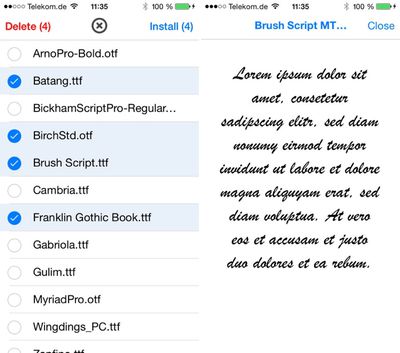
AnyFont, a recently released app from developer Florian Schimanke (via TUAW) allows iOS users to install custom TrueType and OpenType fonts to an iOS device for use in a multiple applications, such as Pages, Numbers, and Keynote.

According to the developer, the fonts are installed to an iOS device via a configuration profile after being added to an app's storage in iTunes, which is a new feature introduced with iOS 7.
anyfont

[AnyFont] takes the fonts that are added to the app's storage by the user via iTunes file sharing or the 'Open in...' dialog and creates a configuration profile from it so it can be installed on the device. AnyFont hands over the newly created profile to Safari which then takes the user to the installation process. When finished, the user is then taken back to AnyFont.

To use the app, .ttf or .otf font files must be installed to the AnyFont app using iTunes. Alternatively, fonts can be installed via Dropbox or Mail, by opening a file in those respective apps and choosing the "Open in..." option for AnyFont.

Once a font is added to the AnyFont app, a single tap will install it to a configuration profile on the device, which then allows the font to be used within other apps in the font selection menus.

While this is handy for creating documents on iOS devices with fonts that are typically unavailable on iOS devices, it is also useful for viewing documents or presentations created on a Mac or PC, as fonts can be preserved. The developer has created a tutorial that explains the entire font installation process, which is fairly easy using Dropbox:


AnyFont can be downloaded from the App Store for $1.99. [Direct Link]

Top Rated Comments

rorschach Avatar
153 months ago
You can do this for free already with the Configurator app; I guess this just makes it easier.
Score: 2 Votes (Like | Disagree)
xdxdaustin Avatar
153 months ago
Why do I feel like Apple won't let this stay too long in the App Store....
Score: 2 Votes (Like | Disagree)
dannys1 Avatar
153 months ago
Oh my. Something other than freakin helvetica on the iPad?

Apple's not going to stand for this, no sir.

Ive got

Helvetica
Helvetica Neue
Helvetica World
Helvetica Light
Helvetica Condensed
Helvetica Bold
Helvetica Ultra Light

Where can I find this "Freakin Helvetica" you talk about?
Score: 1 Votes (Like | Disagree)
japanime Avatar
153 months ago
You can do this for free already with the Configurator app; I guess this just makes it easier.

Exactly. Also, Configurator is pretty easy to use itself, can do a whole lot more than just install fonts, and is made by Apple.
Score: 1 Votes (Like | Disagree)
csixty4 Avatar
153 months ago
The programmer behind this is a user here & first mentioned it a month ago. There's been at least one upgrade approved since then. I can't see Apple cracking down on it since it's using a feature they built for things like this. I just wish more apps used the OS font APIs so they could use the installed fonts.
Score: 1 Votes (Like | Disagree)

Popular Stories

iOS 26

iOS 26.4 and iOS 27 Features Revealed in New Leak

Friday December 12, 2025 10:56 am PST by
Macworld's Filipe Espósito today revealed a handful of features that Apple is allegedly planning for iOS 26.4, iOS 27, and even iOS 28. The report said the features are referenced within the code for a leaked internal build of iOS 26 that is not meant to be seen by the public. However, it appears that Espósito and/or his sources managed to gain access to it, providing us with a sneak peek...
iOS 26

iOS 26.2 Coming Soon With These 8 New Features on Your iPhone

Thursday December 11, 2025 8:49 am PST by
Apple seeded the second iOS 26.2 Release Candidate to developers earlier this week, meaning the update will be released to the general public very soon. Apple confirmed iOS 26.2 would be released in December, but it did not provide a specific date. We expect the update to be released by early next week. iOS 26.2 includes a handful of new features and changes on the iPhone, such as a new...
iOS 26

Apple Releases iOS 26.2 With Alarms for Reminders, Lock Screen Changes, Enhanced Safety Alerts and More

Friday December 12, 2025 10:10 am PST by
Apple today released iOS 26.2, the second major update to the iOS 26 operating system that came out in September, iOS 26.2 comes a little over a month after iOS 26.1 launched. ‌iOS 26‌.2 is compatible with the ‌iPhone‌ 11 series and later, as well as the second-generation ‌iPhone‌ SE. The new software can be downloaded on eligible iPhones over-the-air by going to Settings >...
AirPods Pro Firmware Feature

Apple Releases New Firmware for AirPods Pro 2 and AirPods Pro 3

Thursday December 11, 2025 11:28 am PST by
Apple today released new firmware designed for the AirPods Pro 3 and the prior-generation AirPods Pro 2. The AirPods Pro 3 firmware is 8B30, up from 8B25, while the AirPods Pro 2 firmware is 8B28, up from 8B21. There's no word on what's include in the updated firmware, but the AirPods Pro 2 and AirPods Pro 3 are getting expanded support for Live Translation in the European Union in iOS...
macOS Tahoe 26 Thumb

Apple Releases macOS Tahoe 26.2 With Edge Light

Friday December 12, 2025 10:08 am PST by
Apple today released macOS Tahoe 26.2, the second major update to the macOS Tahoe operating system that came out in September. macOS Tahoe 26.2 comes five weeks after Apple released macOS Tahoe 26.1. Mac users can download the macOS Tahoe update by using the Software Update section of System Settings. macOS Tahoe 26.2 includes Edge Light, a feature that illuminates your face with soft...
AirTag 2 Mock Feature

Apple AirTag 2: Four New Features Found in iOS 26 Code

Thursday December 11, 2025 10:31 am PST by
The AirTag 2 will include a handful of new features that will improve tracking capabilities, according to a new report from Macworld. The site says that it was able to access an internal build of iOS 26, which includes references to multiple unreleased products. Here's what's supposedly coming: An improved pairing process, though no details were provided. AirTag pairing is already...
ipados 26 1 slide over

Apple Releases iPadOS 26.2 With Multitasking Improvements

Friday December 12, 2025 10:09 am PST by
Apple today released iPadOS 26.2, the second major update to the iPadOS 26 operating system released in September. iPadOS 26.2 comes a month after iPadOS 26.1. The new software can be downloaded on eligible iPads over-the-air by going to Settings > General > Software Update. iPadOS 26.2 continues with the multitasking improvements that were added with iPadOS 26.1. You can now drag and...
bug security vulnerability issue fix larry

Update Now: iOS 26.2 Fixes 20+ Security Vulnerabilities

Friday December 12, 2025 11:11 am PST by
Apple today released iOS 26.2, iPadOS 26.2, and macOS 26.2, all of which introduce new features, bug fixes, and security improvements. Apple says that the updates address over 20 vulnerabilities, including two bugs that are known to have been actively exploited. There are a pair of WebKit vulnerabilities that could allow maliciously crafted web content to execute code or cause memory...