iOS 5 Beta 3 Brings Enhanced Location Controls and Other Tweaks

It's All Tech posts an extensive list of changes discovered so far in the third beta version of iOS 5, which was seeded to developers just a short time ago. Among the interesting new features and tweaks are:
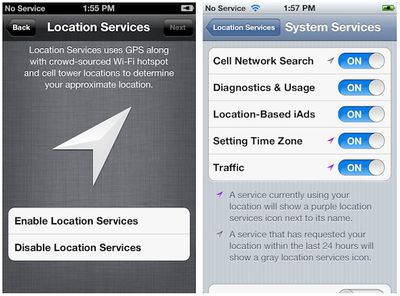
ios 5 beta 3 location
- Enhanced location services controls: Aside from a prominent new screen in the iOS 5 setup process outlining how location services work, the new beta also includes finer granularity of controls, allowing users to specify whether such functions as cell network searching, diagnostics, iAds, time zone setting, and traffic information may make use of the device's location information. This is of course in addition to the per-app location controls that are already available.

- Speed enhancements: User reports indicate that performance is significantly improved under the new beta, with a considerable reduction in lag.

- Voice roaming: In addition to the existing ability to turn off data roaming in order to avoid hefty data charges, the new beta adds a "voice roaming" toggle that will allow users to prevent their phone from connecting while on roaming networks not included in their carrier's service package and thus subject to extra fees.

- Prompt for moved video content: With iOS 5, Apple has rebranded the "iPod" app on the iPhone and iPad as "Music", in line with what is found on the iPod touch. The new beta now issues an initial prompt informing users that video content such as movies, TV shows, and music videos have been moved to the "Videos" app.

- Safari preferences: The ability to clear cookies and data has been restored in the new beta, and a new "Advanced" page has been added with additional tools for removing data and debugging.

- Other assorted tweaks: A new icon for the "Reminders" app that is being added in iOS 5, an iTunes Store button in the "Music" app, the Wi-Fi Sync setting renamed to "iTunes Wi-Fi Sync", and mailbox creation from within Mail.


Popular Stories

iOS 26

iOS 26.2 Coming Soon With These 8 New Features on Your iPhone

Thursday December 11, 2025 8:49 am PST by
Apple seeded the second iOS 26.2 Release Candidate to developers earlier this week, meaning the update will be released to the general public very soon. Apple confirmed iOS 26.2 would be released in December, but it did not provide a specific date. We expect the update to be released by early next week. iOS 26.2 includes a handful of new features and changes on the iPhone, such as a new...
iOS 26

iOS 26.4 and iOS 27 Features Revealed in New Leak

Friday December 12, 2025 10:56 am PST by
Macworld's Filipe Espósito today revealed a handful of features that Apple is allegedly planning for iOS 26.4, iOS 27, and even iOS 28. The report said the features are referenced within the code for a leaked internal build of iOS 26 that is not meant to be seen by the public. However, it appears that Espósito and/or his sources managed to gain access to it, providing us with a sneak peek...
AirPods Pro Firmware Feature

Apple Releases New Firmware for AirPods Pro 2 and AirPods Pro 3

Thursday December 11, 2025 11:28 am PST by
Apple today released new firmware designed for the AirPods Pro 3 and the prior-generation AirPods Pro 2. The AirPods Pro 3 firmware is 8B30, up from 8B25, while the AirPods Pro 2 firmware is 8B28, up from 8B21. There's no word on what's include in the updated firmware, but the AirPods Pro 2 and AirPods Pro 3 are getting expanded support for Live Translation in the European Union in iOS...
iOS 26

Apple Releases iOS 26.2 With Alarms for Reminders, Lock Screen Changes, Enhanced Safety Alerts and More

Friday December 12, 2025 10:10 am PST by
Apple today released iOS 26.2, the second major update to the iOS 26 operating system that came out in September, iOS 26.2 comes a little over a month after iOS 26.1 launched. ‌iOS 26‌.2 is compatible with the ‌iPhone‌ 11 series and later, as well as the second-generation ‌iPhone‌ SE. The new software can be downloaded on eligible iPhones over-the-air by going to Settings >...
Google maps feaure

Google Maps Quietly Added This Long-Overdue Feature for Drivers

Wednesday December 10, 2025 2:52 am PST by
Google Maps on iOS quietly gained a new feature recently that automatically recognizes where you've parked your vehicle and saves the location for you. Announced on LinkedIn by Rio Akasaka, Google Maps' senior product manager, the new feature auto-detects your parked location even if you don't use the parking pin function, saves it for up to 48 hours, and then automatically removes it once...
AirTag 2 Mock Feature

Apple AirTag 2: Four New Features Found in iOS 26 Code

Thursday December 11, 2025 10:31 am PST by
The AirTag 2 will include a handful of new features that will improve tracking capabilities, according to a new report from Macworld. The site says that it was able to access an internal build of iOS 26, which includes references to multiple unreleased products. Here's what's supposedly coming: An improved pairing process, though no details were provided. AirTag pairing is already...
macOS Tahoe 26 Thumb

Apple Releases macOS Tahoe 26.2 With Edge Light

Friday December 12, 2025 10:08 am PST by
Apple today released macOS Tahoe 26.2, the second major update to the macOS Tahoe operating system that came out in September. macOS Tahoe 26.2 comes five weeks after Apple released macOS Tahoe 26.1. Mac users can download the macOS Tahoe update by using the Software Update section of System Settings. macOS Tahoe 26.2 includes Edge Light, a feature that illuminates your face with soft...
iOS 26

15 New Things Your iPhone Can Do in iOS 26.2

Friday December 5, 2025 9:40 am PST by
Apple is about to release iOS 26.2, the second major point update for iPhones since iOS 26 was rolled out in September, and there are at least 15 notable changes and improvements worth checking out. We've rounded them up below. Apple is expected to roll out iOS 26.2 to compatible devices sometime between December 8 and December 16. When the update drops, you can check Apple's servers for the ...

Top Rated Comments

slrandall Avatar
188 months ago
did u really just say "in steve jobs we trust"? im sorry but steve jobs isnt even considered human to some of us.....more like the devil
Yes, damn him and his company that gives us high-quality electronics and software. The devil indeed.
Score: 17 Votes (Like | Disagree)
Voidness Avatar
188 months ago
They fixed one major annoyance with Notification Centre. Previously, in a full-screen game like Cut the Rope where the status bar is hidden, swiping from the top of the screen would pull down Notification Centre immediately. This was really annoying and interrupted the flow of the game. Now, swiping from the top in an application without a status bar will pull down the Notification Centre "handle" without interrupting the game. To pull down the Notification Centre completely, you pull down the handle. Here's a screenshot:
Score: 9 Votes (Like | Disagree)
pgyanke Avatar
188 months ago
Mail in iOS5

STEVE!!! CAN YOU HEAR ME?!

I have been asking for this since before iOS4... Please can we have separate signatures for the separate email boxes? It is a royal pain to either have to type out my professional signature block on professional emails or erase it for emails from my personal box.

I have sent this suggestion numerous times through Apple's website and it seems so silly to even be an issue!
Score: 9 Votes (Like | Disagree)
leog Avatar
188 months ago
Sweet, now they just need to separate gps functionality from "Airplane Mode" since GPS is passive technology.
Score: 9 Votes (Like | Disagree)
Gemütlichkeit Avatar
188 months ago
I like everything except the extra "Music" and "Video" apps. Video's were fine being a tab in iPod.

At least take away the Youtube app and add it to "video"
Score: 8 Votes (Like | Disagree)
joxzaren Avatar
188 months ago
I hope that the battery life has improved.
Score: 8 Votes (Like | Disagree)