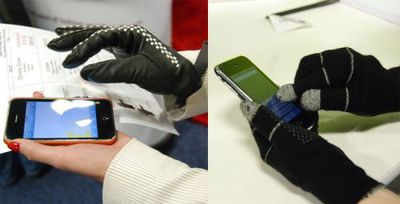
At Macworld, iTouch Gloves (left) and Telefingers (right) both offered solutions for using the iPhone's capacitive touch screen while wearing gloves. iTouch Gloves offer high end leather glove styles that start at $99.95.. They offer a variety of styles in both women's and men's styles.
Telefingers' solution is quite a bit less stylish but also much cheaper. For only $15 a pair, you can get a thinner (non-leather) pair gloves with specialized tips that allow you to control your iPhone screen. Either way, it's better than using sausages.
Xserve Racking Solution
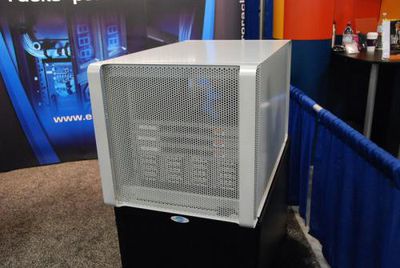
Electrorack offers a wide variety of server racking solutions, but this one caught our eye. It's a rack enclosure for Xserves and RAID configurations that happens to styled like an oversized Mac Pro.
SurfaceSound in Your Helmet
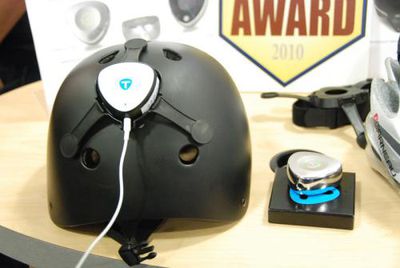
TuneBug has been offering its SurfaceSound solution Vibe for some time already. Vibe is a small device that takes an audio source and turns any surface into a speaker. TuneBug has taken this same concept and applied it to both Bike and Snow/Skateboard helmets.
Shake connects via Bluetooth to your iPhone and then transmits sound waves throughout your helmet, letting you listen to your favorite tunes without headphones. Shake is expected to ship in April for $119.95.
U-Socket - USB Power in Your Wall
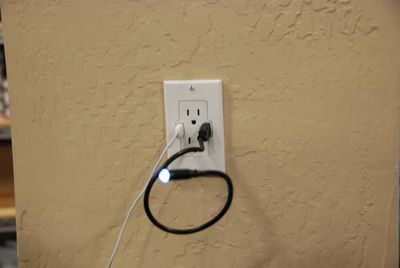
Fastmac claims this is the first of it kind due to some regulatory issues they had to clear. The U-Socket allows you to have a wall plate with both USB and regular power outlets. No more hunting for your USB->Power dongle, just plug your USB cable straight into the wall. U-Socket can be installed on any existing wall socket. The price is $19.95 now, but normally $29.95.

Saturday February 7, 2026 9:26 am PST by Joe Rossignol
Apple today shared an ad that shows how the upgraded Center Stage front camera on the latest iPhones improves the process of taking a group selfie.
"Watch how the new front facing camera on iPhone 17 Pro takes group selfies that automatically expand and rotate as more people come into frame," says Apple. While the ad is focused on the iPhone 17 Pro and iPhone 17 Pro Max, the regular iPhone...
Monday February 9, 2026 6:24 am PST by Joe Rossignol
In select U.S. states, residents can add their driver's license or state ID to the Apple Wallet app on the iPhone and Apple Watch, and then use it to display proof of identity or age at select airports and businesses, and in select apps.
The feature is currently available in 13 U.S. states and Puerto Rico, and it is expected to launch in at least seven more in the future.
To set up the...
Tuesday February 10, 2026 6:33 am PST by Joe Rossignol
It has been a slow start to 2026 for Apple product launches, with only a new AirTag and a special Apple Watch band released so far. We are still waiting for MacBook Pro models with M5 Pro and M5 Max chips, the iPhone 17e, a lower-cost MacBook with an iPhone chip, long-rumored updates to the Apple TV and HomePod mini, and much more.
Apple is expected to release/update the following products...
Tuesday February 10, 2026 4:27 pm PST by Juli Clover
Apple is planning to launch new MacBook Pro models as soon as early March, but if you can, this is one generation you should skip because there's something much better in the works.
We're waiting on 14-inch and 16-inch MacBook Pro models with M5 Pro and M5 Max chips, with few changes other than the processor upgrade. There won't be any tweaks to the design or the display, but later this...
New MacBook Pro models with the M5 Pro and M5 Max chips could arrive as soon as Monday, March 2, according to Bloomberg's Mark Gurman.
In today's "Power On" newsletter, Gurman said that the release of new MacBook Pro models is tied to the release of macOS Tahoe 26.3. The launch is said to be slated for as early as the week of March 2. He added that the M4 Pro and M4 Max models on sale today...
And Instructables has had DIY versions of two of these products forever.
iPhone Gloves (http://www.instructables.com/id/Making-A-Glove-Work-With-A-Touch-Screen/)
USB wall sockets (http://www.instructables.com/id/Outlets-of-the-Future-aka-in-wall-USB-Charger/)
The USB do it yourself draws power constantly unless you hook up the outlet to a switch. With all the work it takes and the cost of the supplies it is not that much more expensive to buy the premade ones that do not constantly suck power.