

There are hundreds of external battery packs available for the iPhone, but only a small subset of those are given the Apple seal of approval and offered in Apple retail stores and the Apple online store. MiPow's 3,000 mAh Smart Power Tube is one of the newest portable batteries Apple offers, with a lot of perks like built-in charging cables and an accompanying app.
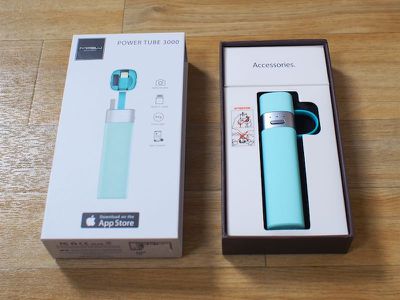
Design and Features
MiPow's Smart Power Tube is, as the name suggests, tube shaped. While it's small enough to fit comfortably in a bag or a purse at just over four inches long and an inch thick, it's an odd shape for a pocket and it isn't as convenient to use while charging an iPhone like the flatter Mophie-style battery packs. It comes with a little matching carrying pouch so it can be dropped in a bag without worrying about scratches and scuffs.

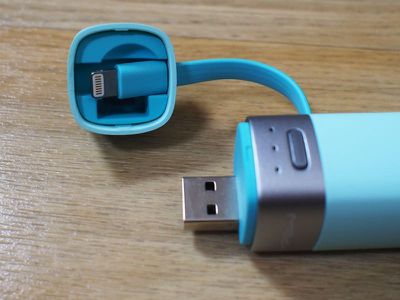
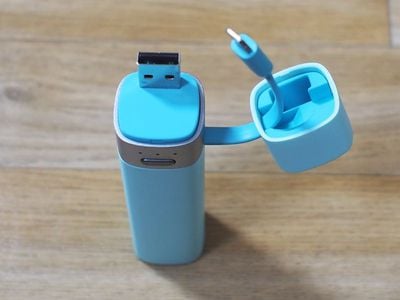
The Smart Power Tube is available in black, white, gray, and a handful of bright candy colors: turquoise, green, and pink. A smooth, soft-touch material covers the outside of the Smart Power Tube and a metal band separates the body from the cap of the device. On the metal band there are three LEDs that display the power level and a button that activates the Tube when it's plugged into an iPhone.
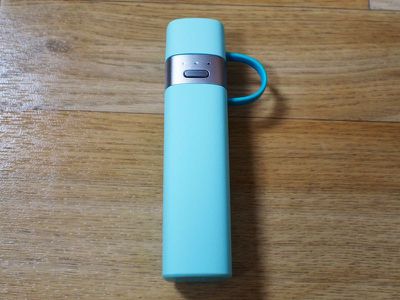
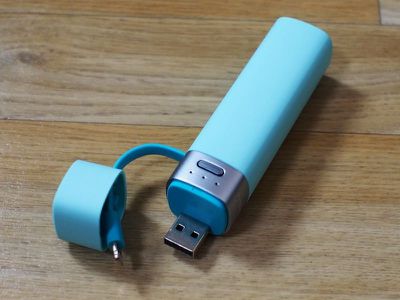
Underneath the cap, there's a USB connector for charging the internal battery and a cleverly placed Lightning cable that connects the Power Tube to an iPhone and also holds the cap of the device in place. On the whole, the Smart Power Tube feels like a premium product with coordinated colors, clean lines, and quality materials.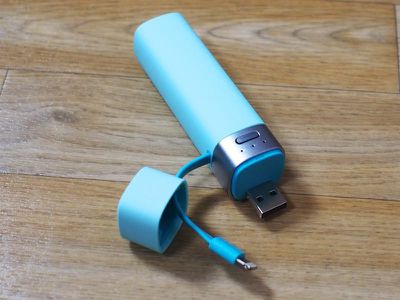
While I like that the Smart Power Tube has built-in cables, the USB connector that's included is limiting. I normally charge my external battery packs using a dedicated micro-USB cable on my desk, but with the MiPow Smart Power Tube, I need to plug it directly into my computer to charge or stick it in a USB power adapter. This may not matter to most users who will appreciate being able to plug the Power Tube right into a computer to charge.
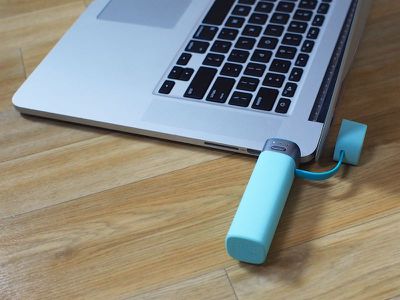
Given the size of the Smart Power Tube and the short Lightning cable, it was awkward using my iPhone while it was charging with the battery pack. With the Mophie battery pack I regularly use, it can be positioned out of the way behind the phone, but that was difficult with the Smart Power Tube because of the cap connected to the cable.
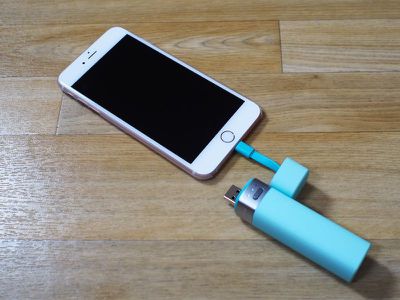
With the cap in place, the Lightning cable built into the Smart Power Tube serves as a little handle for carrying it, which is a nice touch. It's the perfect size to fit around a finger. Speaking of the cap, I should mention that it needs to be removed in a specific way. According to MiPow, it should be removed using an upward swipe with a thumb rather than pulled with the hand to prevent damage to the Lightning cable.
A thumb swipe where the Lightning cable is located pops the cap right off, whereas pulling from the top takes a lot more force, so I can see how the Lightning cable could accidentally be damaged from being opened the wrong way. I am concerned about the long term viability of the Power Tube given the potential for damage to the cable, but I gave it a good stress test (I yanked on it really hard several times) and the cable remained securely in place.
I tested the Power Tube with my iPhone 6s Plus. I drained the battery completely to the point where the iPhone turned off, and then plugged in a fully charged Smart Tube. I plugged my iPhone in at 6:30 p.m., and by 10:00 p.m., I had exhausted the Smart Tube's battery. For an iPhone 6s Plus with a 2,750 mAh battery, the Smart Tube charged it to 77 percent. Repeated charging sessions offered similar results.
The Smart Power Tube is not going to charge an iPhone 6s Plus to full, but it is going to provide enough power for a full charge for the smaller capacity iPhone 6s, which has a 1,715 mAh battery. It'll also provide enough power for earlier iPhones like the iPhone 5, 5c, and 5s.
As for charging, I plugged it into my Retina MacBook Pro in at 9:30 a.m. and it reached a full charge at approximately 12:30 p.m., which is in line with the estimated four hour charging time that MiPow lists for the device. It does not offer passthrough charging, so it's not possible to charge the MiPow and the iPhone at the same time through its Lightning cable.
App
The Smart Power Tube is able to connect to an iPhone via Bluetooth to allow iPhone users to monitor its power level via an accompanying MiPow JuiceSync2 app. While this seems like a cool idea on the surface, it felt like a gimmick to me.
The app displays the power levels of the iPhone and the Power Tube, along with details on how much standby, talk time, and Internet usage that power equates to. The design of the app is outdated and it can be difficult to interpret the information at a glance. iPhone battery level is at left, and Power Tube battery is at the right. At the top, there's a number that is the combined battery level between the two.
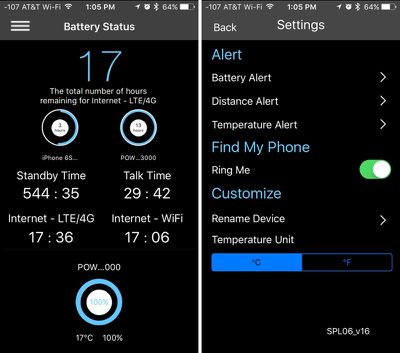
MiPow's app will send alerts when the Power Tube battery is low, when the iPhone gets too far away from the Power Tube, and when the Power Tube temperature gets too high. None of these features were useful to me during my time testing the device, nor was a dedicated feature that's meant to allow users to find a lost Power Tube.
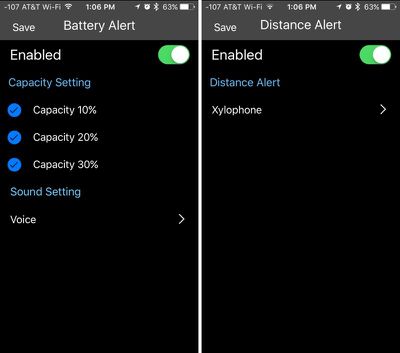
"Find Me" turns on the LED lights of the device, but since there's no sound, if it's hidden away in a drawer or in a bright room, there's no way to see the light. It has a radar that seems like it's meant to determine distance, but it didn't work for me, fluctuating between full bars and two bars even when right next to the Power Tube.
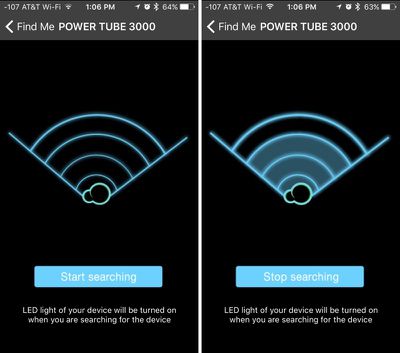
There were a few other app functions I wasn't able to get working or that didn't work well. A tracking feature is supposed to record the point at which an iPhone and the Power Tube lose connection, but I couldn't get it to record my location, despite having location services and all alerts turned on. A "Ring Me" feature is supposed to cause the iPhone to ring, but it didn't. Interestingly enough, the button on the Power Tube did control the volume on my iPhone when connected via Bluetooth, allowing it to be used as a remote to snap photos.
Getting an alert when the iPhone is moved out of range from the Power Tube is the only semi-useful feature because it can remind users not to forget the Power Tube (or the iPhone, if the Power Tube is in a bag and the phone itself is left behind), but that feature alone didn't seem worth the battery drain I experienced from the iPhone's Bluetooth connection to the Smart Tube. It also didn't seem to trigger reliably in my testing, waiting until I was far out of Bluetooth range before sending a notification.
For reference, the battery monitoring app that accompanies the Power Tube was responsible for approximately 12 percent of the overall battery drain of my phone over the last several days, and on par with background usage of social media apps like Twitter. I used the app with its full capabilities enabled for testing purposes, but disabling its ability to use location services may cut back on that battery usage.
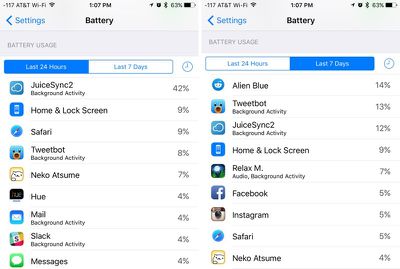
The Smart Power Tube can be used entirely without the app, which would be my preferred use case. The three LEDs on the side display enough information about its battery level, and since it always takes the same time to charge and discharge its battery into an iPhone, there's little need to get details on its power level in the app. I didn't feel like connection features were worth the loss of battery life, but people who want a closer look at battery life or reminders not to forget their Power Tube might have a different opinion on the app.
Bottom Line
Since this is a 3,000 mAh battery, it's best for iPhone 6s users and those with earlier iPhone models. It's not going to charge an iPhone 6s Plus to full, and it doesn't offer enough capacity to be suitable for an iPad. For an iPhone 6s Plus or iPad user, I'd recommend a significantly more powerful external battery pack.
At $49.95, the Smart Power Tube is priced on the higher side, but it comes in a cute, compact package and it has a built-in Lightning cable and USB connector for charging. It's something a lot of people might pick up on a whim when visiting the Apple Store.
The included features aren't going to be worth the extra money for most users when simple battery packs can be purchased for half the cost on Amazon, but some may appreciate the convenience, the design, and the accompanying app that gives a clear picture of the charge level.
Buyers should be aware of potential downsides to the Power Tube, including its odd shape that prevents the iPhone from being used comfortably while charging, the need to be careful with the Lightning cable, and the battery drain the Bluetooth connection and app cause.
Pros:
- Cute design with fun colors
- Portable
- Integrated Lightning cable
- Integrated USB connector
- Button on Power Tube serves as iPhone camera shutter (via Bluetooth)
Cons:
- 3,000mAh battery is only suitable for smaller devices
- Shape is somewhat awkward
- Integrated USB connector limits recharging methods
- App isn't very useful
- App drains battery
How to Buy
The MiPow Smart Power Tube can be purchased from the online Apple Store for $49.95.
Note: MacRumors received no compensation for this review.







































Top Rated Comments
Anker's 3350 mAh is $9.99
http://www.amazon.com/gp/product/B005X1Y7I2
Not only are Anker units a fraction of the price, you can buy Xiaomi Mi 16000mAh for just $25. While it's a lot bigger, I can charge both my iPhone and iPad at the same time....twice on one charge.