2017 was a big year for apps. The App Store got a major overhaul in iOS 11 to separate apps and games to give both better visibility, and Apple introduced ARKit, an SDK that lets developers build unique augmented reality capabilities into their apps.
Below, we've rounded up some of the most notable apps that came out in 2017, based both on what we use and recommendations from MacRumors readers sourced from Twitter. Our list, which is in no particular order, features AR apps, several photo editing apps, to-do and weather apps, and a few other apps. In our opinion, all of these are worth checking out if you're looking for something to spend your Christmas iTunes cash on.
Affinity Photo ($14.99)
Affinity Photo for iPad is one of the most robust photo editing tools available for Apple's tablet lineup. Designed with the same backend as Affinity Photo for Mac, Affinity Photo for iPad is a must have for artists and photographers who like to work on an iPad. It's speedy, intuitive to use, and it offers an ideal touch-based interface.
Every tool you'd expect in a pro photo editing app is available, including unlimited layers, support for RAW images, panorama stitching, advanced lens corrections, histogram information, and more, plus there are tools for quick selections and retouches. There's also an advanced brush engine that supports custom brush creation and a wide range of painting, drawing, and texture tools.
Halide ($2.99)
Halide is a camera app that was designed specifically with Apple's latest devices in mind - the iPhone X, iPhone 8, and iPhone 8 Plus. Halide is a powerful photography app that's also simple to use, as intuitive touch gestures can be used to tweak exposure and focus.
If you want access to full manual controls for shutter speed, ISO, and white balance along with manual focusing options and tools that include an adaptive level grid, a detailed live histogram, and focus peaking, Halide is worth checking out. If you're not looking for manual control, Halide is still great because it has an intelligent automatic mode that churns out some nice looking photos. On supported iPhones, Halide also captures depth information so you can apply Portrait effects after capturing an image.
HQ (Free)
Trivia app HQ is technically in the games category of the App Store, but we're including it here because it's more entertainment app than traditional game. HQ made our list because of its explosion in popularity over the course of the last month or two.

When it was released in September, HQ had just a few thousand users, but now hundreds of thousands of people tune in to the live trivia gameshow every day at 3:00 and 9:00 p.m. Eastern Time. HQ is played live, and players answer a series of 12 questions. If you make it through all 12, you split a cash prize with other winners. Questions run the gamut from super simple to incredibly difficult, so making it to the end can be a serious challenge.
IKEA Place (Free)
IKEA Place is an augmented reality app that lets you see how IKEA furniture will look in your house before you buy it. It's not an app that you're going to use everyday, but it's on our list because it's one of the apps that best shows off what ARKit is capable of when it comes to improving the shopping experience.
IKEA Place isn't perfect and there are some kinks IKEA has yet to work out, but it's a neat way to see if a particular piece of IKEA furniture works in your living space, and it's a good way to experience a practical ARKit application.
Apollo for Reddit (Free)
When we asked MacRumors readers about their favorite 2017 apps on Twitter, Apollo is an app that came up time and time again. This Reddit client was introduced in October and it's already become a favorite among Redditors.
Apollo has a simple, clean interface with customizable gestures, a full-screen media viewer, a markdown editor for formatting posts, a Jump Bar for navigating between subreddits, a Dark Mode, and more. The developer behind Apollo is active on Reddit and regularly solicits feedback from Reddit users.
Weather Atlas (Free)
Weather Atlas was designed from the ground up for Apple's newest devices, so it takes advantage of iOS 11-style design elements and the full length of the iPhone X display. Weather Atlas offers a wealth of information in a single glance, with both hourly weather and 10-day forecasts overlaid on a map with standard rader and cloud layers.
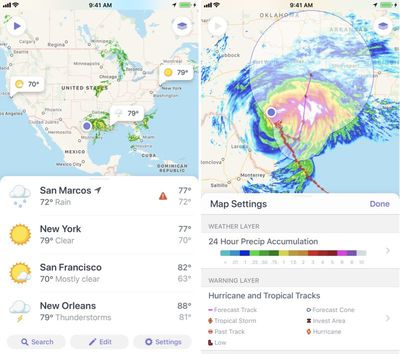
Multiple locations are supported, there are built-in weather warnings, and there's an option to see weather patterns on the map over time. Weather Atlas is free to download, but to get rid of the ads and to get features like themes and widgets, you'll need a pro account. Pro accounts are priced at $0.49 per month or $4.99 per year.
Things 3 ($9.99)
Things 3, the newest version of the popular Things to-do/task management app, was another popular choice among MacRumors readers. Things 3 features an overhauled design with all of the same tools Things users have come to know and love, along with all new tools.
The Things 3 interface is more intuitive with reimagined Today and Upcoming screens that merge calendar events and to-dos into a single daily view, there's a new Quick Find feature for searching content across the entire app, and there's a Magic Plus Button for quickly creating new tasks. For anyone who needs a robust task management app that's richly featured but still easy to use, Things 3 is the app to get.
Focos (Free)
Focos is a fun little photo editing app that works with dual-camera iPhones like the iPhone X and the iPhone 8 Plus. It lets you take Portrait Mode photos that can then be edited with customizable bokeh effects, aka that artful background blur that you get with high-end DSLRs.
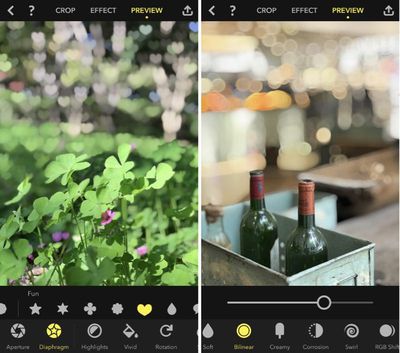
You can either snap a picture right in the app or edit a Portrait Mode photo you've already captured. An adjustable aperture tool lets you change the amount of blur in a Portrait Mode photo, and an adjustable diaphragm results in different blur effects. Focos is free to download, but many pro features are behind a paywall. It'll cost $0.99 per month or $5.99 per year to unlock them, but there's also a $9.99 lifetime access purchase option.
Yoink ($2.99)
Yoink, which is also available on the Mac, is an app that's designed to store items that you drag, copy, or share, giving you a central place to collect things like photos, screenshots, text snippets, URLs, and more, so they're easier to access later.
On iPad, Yoink supports Slide Over and Split View multitasking so you can drag content from any app to Yoink. On iPhone, there's a Share extension for getting content to Yoink, and you can also use copy/paste. It's basically a little storage space where you can hold media you want to be able to use for something else later.
Astro Mail (Free)
Astro Mail is another app suggested by MacRumors readers. It has a priority inbox powered by artificial intelligence, which is designed to separate important emails from junk mail, and it has tools to snooze, star, archive, delete, and move emails with simple gestures.
There are options to track when an email is opened and send an email at a scheduled date, and the built-in Astrobot assistant can do things like archive old emails, unsubscribe from lists, and more. For Slack users, Astro Mail offers Slack integration so you can manage your email inbox from Slack and search across both Slack and email when looking for something.
Our list only includes apps that were released in 2017, which is why you won't see older but still very popular apps on the list. Many of you told us that your favorite apps were older apps, though, so here's our list of some of the best apps that didn't come out in 2017 but were still widely used or received major updates throughout the year:
- T-Mobile Tuesdays - Free stuff for T-Mobile subscribers every Tuesday.
- Spark - Readdle's email app that supports a smart inbox to filter out the junk, intuitive touch gestures, and more.
- Fantastical 2 - A full-featured calendar replacement with everything you need from a calendar app, plus natural language support.
- Dark Sky - A popular weather app known for its accuracy at delivering hyperlocal weather data.
- Pennies - A super simple budgeting app that lets you know how much you can spend each day after you input a monthly target.
- Day One - A popular subscription-based personal journaling app that has a rich selection of features.
- Bear - A subscription-based cross-platform writing and note taking app.
- Shazam - Shazam, which Apple is in the process of buying, identifies songs that are playing aloud. A visual feature can also identify magazines, books, posters, and more.
- Waze - A community based navigation app that offers up live traffic and road condition reports, along with the best routes to save time.
Along with our list of top apps of 2017, make sure to check out our top games of 2017, a list sourced from our sister site TouchArcade. Have a favorite 2017 app we didn't mention, or a favorite overall app? Share it with us in the comments.