

Developers at U.S. digital consultancy Rain have created a little-known app called Reverb that allows users to access Amazon's Alexa virtual assistant from their Mac desktop or iOS device.
Launching the free Mac app prompts users to sign in to their Amazon account, after which a window opens showing the familiar blue Alexa ring on the desktop. Click and hold on the ring with the mouse cursor, and provided an internet connection is active, the virtual assistant listens and responds to the sort of spoken questions and commands usually directed at Amazon's Echo range of smart speakers.
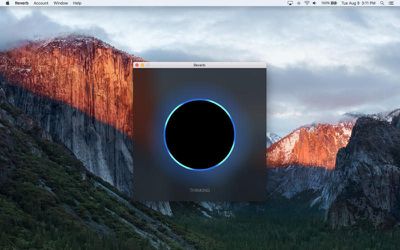
The iOS app works similarly, and the latest version of Reverb uses Alexa v2, which adds support for news flashes, timers, alarms, long form audio, audiobooks, and more. It can also interact with smart devices that are compatible with Alexa, such as lights, switches, and thermostats compatible with Samsung SmartThings, WeMo, Philips Hue, and others. The only Alexa service Reverb does not support is playing music, due to restrictions Amazon has placed on using Amazon Music in apps.
In addition to the above, users can enable third-party skills through the app with a simple voice command – "Enable Bird Songs", for example. In testing, the Mac app also responded to new skills enabled through Amazon's Alexa iOS app, which officially supports and integrates with the Reverb app for iOS.
The apps provide a convenient solution for Echo owners wishing to make Alexa available in, say, their office room or study, without having to buy an additional supporting device. It also offers prospective Echo buyers an opportunity to test the service prior to making a purchase, and at the very least gives curious Mac users a chance to compare Alexa's and Siri's smarts side by side on their desktop.
Reverb for Amazon Alexa is a free download available for Mac from the Mac App Store [Direct Link] and for iPhone and iPad on the iOS App Store [Direct Link].



















Top Rated Comments
Reverb doesn't get any credentials for anything.
You actually can't. The credentials were a one time thing directly to Amazon. They're not in the data to and from Reverb after that. Reverb and Alexa use HTTPS v2 and if you try to get in between the connection to watch data, that disrupts the security and data will no longer be sent properly until you stop monitoring it. It's a safety feature to keep the data safe built into iOS and macOS.