What's New in iOS 10.2 Beta 1: Unicode 9 Emoji, Preserve Settings for Camera, Videos Widget, Wallpapers and More - MacRumors
Skip to Content

What's New in iOS 10.2 Beta 1: Unicode 9 Emoji, Preserve Settings for Camera, Videos Widget, Wallpapers and More

Apple seeded the first beta of iOS 10.2 to developers this afternoon, marking the second major update to the iOS 10 operating system. While iOS 10.2 doesn't include a single main feature like the Portrait mode that was introduced in iOS 10.1, it does include several smaller features.

There are a bunch of new emoji that were first introduced in Unicode 9, plus there's a new video widget and handy new settings for preserving your camera preferences when taking a photo. For a full overview of the new features, make sure to check out our video.


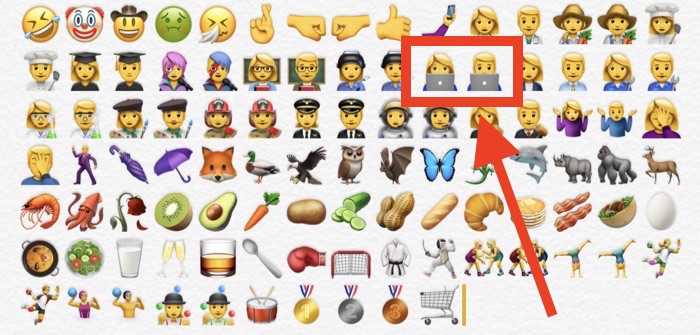
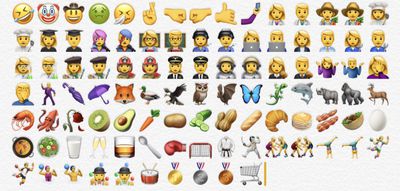
Emoji - Unicode 9 emoji are included in iOS 10.2. Some of the new emoji include clown face, drooling face, selfie, fox face, owl, shark, butterfly, avocado, pancakes, croissant, and more. There are more than a hundred new emoji, including several profession emoji available in both male and female genders, such as firefighter, mechanic, lawyer, doctor, scientist, and more. Many existing emoji have also seen significant redesigns.
ios102emoji
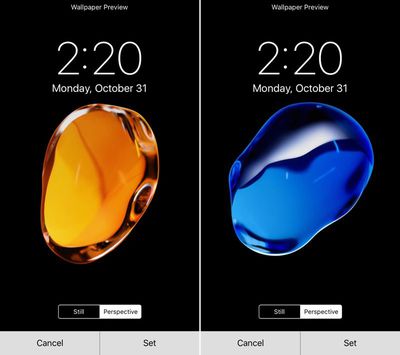
Wallpapers - There are new wallpapers in iOS 10.2, which use the same graphics that were shown off in iPhone 7 marketing materials.
ios102wallpaper
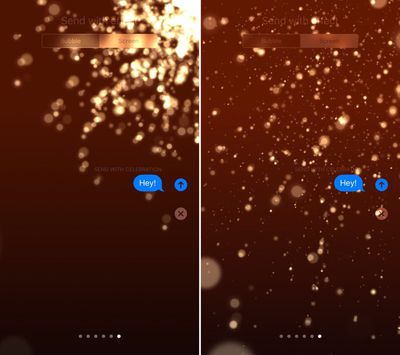
Screen Effects - There's a new "Celebrate" Screen Effect available, accessible when adding an effect to a message.
celebratescreeneffect
Camera settings - There's a new option for saving your last known camera settings. This will let you preserve the last Camera Mode, Photo Filter, or Live Photo setting. "Preserve Settings" is available in the Settings App under "Photos & Camera."
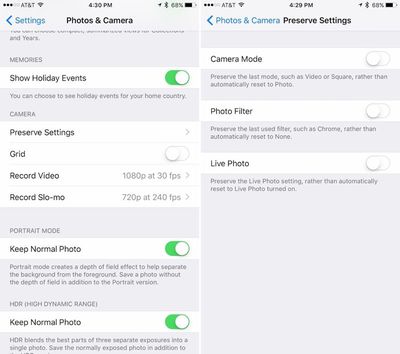
preservesettings
Videos widget - There's a new widget available for the Videos app, accessible on the widgets panel by swiping to the right on the Home screen of an iPhone or iPad. The Videos widget displays movies and TV shows in the Videos app, and a tap will cause content to play automatically.
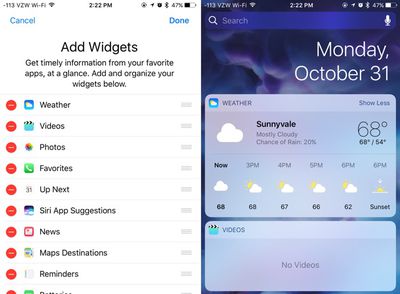
videowidgetsios102
Emergency contacts - There's a new feature that will automatically notify your emergency contacts when you use the Emergency SOS feature on iPhone or Apple Watch. A popup notification shows up when you open the Health app after installing iOS 10.2.

Apple Music - There's a new option to sort playlists in Apple Music by type, title, and recently added. There are also new options for sorting songs and albums by title or artist.

iOS 10.2 is currently only available for registered developers, but Apple will likely make a beta available for public beta testers in the near future.


Related Forum: iOS 10

Popular Stories

iphone 17 pro dark blue 1

Apple Preparing 'Most Significant Overhaul in the iPhone's History'

Sunday March 29, 2026 8:18 am PDT by
Bloomberg's Mark Gurman has high expectations for Apple's first foldable iPhone. In his Power On newsletter today, he said the foldable iPhone will be "the most significant overhaul in the iPhone's history." "iPhone 4, iPhone 6 and iPhone X were clearly a big deal, but this is a whole new design," he said. Like Samsung's Galaxy Z Fold 7, the foldable iPhone will reportedly open up like ...
Apple Event Logo

Apple to Launch These 15+ New Products Later This Year

Friday March 27, 2026 2:03 pm PDT by
March has been an incredibly busy month for Apple, with the company unveiling more than 10 new products and accessories. We said hello to the MacBook Neo at the start of the month, and we bid farewell to the Mac Pro at the end of it. Nevertheless, there is still a lot more to come this year. Beyond the usual annual updates to iPhones and Apple Watches, Apple's all-new smart home hub is...
Apple Apps Grid

Apple Releasing Two New iPhone Apps This Year

Saturday March 28, 2026 8:00 am PDT by
Apple is expected to release two new iPhone apps this year, including an Apple Business app and a Siri app with chatbot-like functionality. With the Apple Business app, employees at businesses using the new Apple Business platform will be able to install apps for work, view contact information for colleagues, and request support. Apple Business is launching on April 14, and it replaces Apple ...

Top Rated Comments

ck2875 Avatar
123 months ago
I guess these two emoji didn't want to update to the 2016 MBP since they still have the glowing Apple logo.

Score: 43 Votes (Like | Disagree)
123 months ago
Not enough emoji. Please discontinue all work on desktop systems and give us more emoji. Thanks. /s
Score: 23 Votes (Like | Disagree)
123 months ago
Apple under Timmy and Jony:

1) Emojis and Messages effects to chase mainstream public*
2) "Pro" products with mediocre enhancements, but PRO pricing
3) The pursuit of margins, margins, and more margins

*I'm not saying emojis and messages effects are bad things; I use them all the time. Or that it's bad to chase mainstream public. But it's sad to see all this be a priority over other things that imo can push innovation and the boundaries. (Flashback of Craig talking about how cool it is to have emojis in the Touch Bar on a freaking PRO computer)
Score: 13 Votes (Like | Disagree)
Hustler1337 Avatar
123 months ago
More Emojis?

At this rate, my phone and Mac are drowning with emojis.
Score: 12 Votes (Like | Disagree)
123 months ago
How else are millennials going to communicate???
soon.... very soon...

PS Anyone else noticing how quickly MacRumors is burying this frontpage article? lol


Attachment Image
Score: 9 Votes (Like | Disagree)
SoSickSadNslOw Avatar
123 months ago
What's the holdup with the dark mode? Enough with the emojis man.
Score: 8 Votes (Like | Disagree)