macOS Sierra Addresses Dropbox Security Concerns by Explicitly Asking for Accessibility User Permission - MacRumors
Skip to Content

macOS Sierra Addresses Dropbox Security Concerns by Explicitly Asking for Accessibility User Permission

by

Following Dropbox-related security concerns that surfaced earlier this month, developer Phil Stokes has confirmed that macOS Sierra now explicitly requires apps to ask for user permission to access Accessibility (via Daring Fireball). Users can give access to an app, or click "not now" to deny the request.
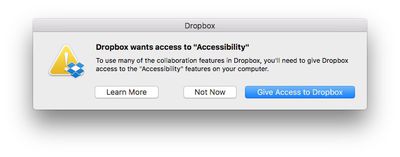
dropbox-accessibility-permission
Concerns were raised after it was demonstrated that Dropbox appears in System Preferences > Security & Privacy under Accessibility, despite the fact that users were never prompted to grant access to the features. More details can be found in our previous coverage and in a Dropbox support document.

Let’s assume for the sake of argument that Dropbox never does any evil on your computer. It remains the fact that the Dropbox process has that ability. And that means, if Dropbox itself has a bug in it, it’s possible an attacker could take control of your computer by hijacking flaws in Dropbox’s code. Of course, that’s entirely theoretical, but all security risks are until someone exploits them. The essence of good computer security and indeed the very reason why OSX has these kinds of safeguards in place to begin with is that apps should not have permissions greater than those that they need to do their job.

At the time, Dropbox said it was working with Apple to reduce its dependence on elevated access in macOS Sierra, and would respect when people disable the app's Accessibility permissions, but now a much-needed safeguard exists regardless.

In a new blog post, Dropbox still recommends that Mac users running macOS Sierra update their Accessibility permissions, if needed, to ensure smooth syncing and access to certain features of the cloud storage service.

Advanced Dropbox collaboration features, such as the badge, require Accessibility permissions. You’ll be prompted to grant these permissions when you install the Dropbox desktop app on macOS Sierra. To do so, follow the instructions on screen. The same will apply for older versions of OS X in the coming weeks. For more information on Dropbox Mac permissions, visit our help center.

macOS Sierra was publicly released today as a free update on the Mac App Store.

Related Forum: macOS Sierra

Top Rated Comments

dragje Avatar
132 months ago
Drop-who?

However in all seriousness, I abandoned Dropbox ages ago and migrated to Google Drive and have never looked back.

Dropbox are "ok" no doubt but lack so many features and compared to Google are seriously slow. My file transfers since switching to Google Drive have more than tripled!
I'll never move my documents to Google Drive which enables the company to look inside within each document for commercial exploitation usage. For the same very reason I rarely using Google as a search engine, simply because I truly hate the so called targeting adds, as if I'm considdered to be a f*beep*ing monkey that would be interested in camera's for weeks just because I was searching for one at one given day. Google makes sure that all the adds on websites, in one way or the other, has something to do with camera's.

I'll regret the day that I might not care about this any longer, that I'm willingly stop using my brains and surrender myself entirely to commercial exploitation and accept that I've become a slave for a company by providing them personal information about myself and by agreeing that "to think yourself" is something one should not do. For the same reason I don't make use of facebook, delete apps that requires a facebook and/or a Google account and doesn't enable me to login besides these options.

I grew up in the world where the internet became big. And I'm really became fascinated with the phenomenon called the internet. And I should because it delivers also so much good. But I've never been able to understand why people willingly give away all of their private information, especially knowing that there is no such thing as: 'I've nothing to hide'
Score: 7 Votes (Like | Disagree)
simonmet Avatar
132 months ago
I came here to say the same thing. No matter which box you click: "Not Now", "Learn More", or obviously the third one, it puts itself in Accessibility.

My response was to remove Dropbox from my computer.
This is an OS X behaviour and unrelated to Dropbox. OS X is putting it there and this I believe is nothing new. The problem before was that Dropbox seemingly exploited loopholes or weakness in OS X to enable those privileges without asking.

It also replicates behaviour in iOS. If you deny an app permission to send you notifications or have access to your location the app still appears in the relevent settings so you can subsequently enable the permissions later if you so choose without having to delete and reinstall the app.

So it's entirely appropriate and normal that OS X puts it there.
Score: 5 Votes (Like | Disagree)
132 months ago
I chose "Not Now" and Dropbox still jumped into Accessibility—though unchecked. My question is, how does it get in there?
I came here to say the same thing. No matter which box you click: "Not Now", "Learn More", or obviously the third one, it puts itself in Accessibility.

My response was to remove Dropbox from my computer.
Score: 2 Votes (Like | Disagree)
Pakaku Avatar
132 months ago
I chose "Not Now" and Dropbox still jumped into Accessibility—though unchecked. My question is, how does it get in there?
Sounds like the OS itself just keeps a history of whatever has attempted to ask for permission, and anything the user denied permission for is just left there unticked.
Score: 2 Votes (Like | Disagree)
132 months ago
Well done Apple.
Score: 2 Votes (Like | Disagree)
smacrumon Avatar
132 months ago
Drop-who?

However in all seriousness, I abandoned Dropbox ages ago and migrated to Google Drive and have never looked back.

Dropbox are "ok" no doubt but lack so many features and compared to Google are seriously slow. My file transfers since switching to Google Drive have more than tripled!
And I guess you're happy for Google to peruse your files on a daily basis.
[doublepost=1474429813][/doublepost]This is really interesting. Who would have thought MacOS could be circumvented like this? I certainly didn't. Yep post those permission warnings just like iOS vigilantly does.
Score: 1 Votes (Like | Disagree)

Popular Stories

iphone duo screen crack

Apple Responds to iPhone Duo Display Cracking Reports

Monday October 26, 2026 10:20 am PDT by
Shortly after the iPhone Duo launched, a few users reported hinge issues that were causing cracks in the inner display. Apple has now responded to the reports in a statement to MacRumors, saying a small number of units are affected. The response to iPhone Duo from early users has been incredibly positive, and we are seeing exciting things from developers who are rapidly updating their apps...
iphone duo screen crack in store

Crackgate? iPhone Duo Owners Report Screens Breaking Along the Hinge

Friday October 23, 2026 11:05 am PDT by
Some iPhone Duos are already experiencing hinge issues that cause display cracks, based on photos shared on Reddit and the MacRumors forums. Almost all of the display faults are right along the hinge, and most result in a line of bright pixels across one side of the screen. An iPhone Duo owner in Australia said his device cracked after being opened fewer than 20 times, and there was no...
iPad mini OLED feature 1

Apple Announces New iPad Mini With 8.5-Inch OLED Display, A20 Pro Chip, and More

Monday October 26, 2026 6:05 am PDT by
Apple today announced a new iPad mini with a larger 8.5-inch OLED display, a nano-texture display option, a thinner and lighter design, an A20 Pro chip, a new Acoustic Display audio system that eliminates speaker holes, IP67-rated water and dust resistance, a landscape front camera, Apple's N1 chip with Wi-Fi 7 and Bluetooth 6 support, and more. Altogether, Apple says this amounts to the iPad...


Latest Stories
ChatGPT Can Now Access Your iCloud Mail and Calendar
1 minute ago
Best Buy Details Black Friday Plans With Early Deals Available on Halloween
2 hours ago
Apple Reportedly Plans to Release MacBook Neo 2 in First Half of 2027
3 hours ago
M5 vs. M6 MacBook Pro Buyer's Guide: All Differences Compared
4 hours ago
New iMac Available With 2.5 Gigabit Ethernet Port on Power Adapter
4 hours ago
M4 vs. M6 iMac Buyer's Guide: Should You Upgrade?
4 hours ago
Apple Expected to Announce MacBook Pro With Touchscreen Tomorrow
5 hours ago
Banktivity Offers 30% Off First Year Subscriptions for MacRumors Readers
5 hours ago
M6 MacBook Pro's 170GB/s Memory Bandwidth Skips Base 16GB Model
6 hours ago
M6 iMac Pre-Orders and Release Date Announced
6 hours ago
Apple Updates Creator Studio With New Tools and AI Features
6 hours ago
M6 14-Inch MacBook Pro: Pre-Orders and Release Date Announced
7 hours ago
Apple Announces New 14-Inch MacBook Pro With M6 Chip
7 hours ago
Apple Announces New iMac With M6 Chip and More
7 hours ago
Apple Fixes Possibly Exploited CoreGraphics Flaw on Older iPhones
8 hours ago
Apple's MacBook Pro Touch Bar Was Announced 10 Years Ago Today
9 hours ago
iPhone 18e Could Get Two Key Upgrades While Keeping 60Hz Display
9 hours ago
New iMac and 14-Inch MacBook Pro With M6 Chip Expected Tomorrow
17 hours ago
JAŸ-Z to Headline 2027 Apple Music Super Bowl LXI Halftime Show
18 hours ago
macOS 27.2 Stops Upgrades From Removing Rosetta
18 hours ago
Older Siri Remotes Now Show Up in Find My With iOS 27.2
20 hours ago
iPhone Duo Features Independent Rotation Lock Controls
20 hours ago
iOS 27.2 Features: Everything New in iOS 27.2
21 hours ago
Why Can't iPhone Duo Users Make Eye Contact on FaceTime?
21 hours ago
iOS 27.2 Fixes Over 160 Security Vulnerabilities
22 hours ago
iPhone AI Images and Edits Now Have a Hidden Watermark
23 hours ago
iOS 27.2 Lets You Watch Four Live Sports Streams on iPhone
1 day ago
iOS 27.2 Expands Dual Capture to Group FaceTime
1 day ago
Here's Why Apple's Next Pre-Orders Begin on Wednesday at 10:10 AM
1 day ago
Apple Says Siri AI Will Support Even More Languages Later This Year
1 day ago