FaceTime's Eye Contact setting is missing on the iPhone Duo, MacRumors can confirm. The setting was first flagged as absent by MacRumors forum member TwoBytes, who noticed their eyes looking "a little off" during a call.

Introduced in iOS 14, Eye Contact uses machine learning to subtly adjust your eyes during a video call to make it seem like you're looking into the camera lens, even though you're actually looking at the image of the other person on your screen.
While it may seem the obvious cause, the iPhone Duo's lack of Face ID and TrueDepth camera is unlikely to be the reason for Eye Contact's absence, since iPhone SE models with Touch ID also include the option in Settings. One possibility is the position of the inner display's under-display camera, which sits toward the right-hand side of the screen, away from the center where the other caller's face usually appears.
Correcting for that larger, sideways offset is going to be different than for the small vertical gap on a regular iPhone.
The Duo's design also means the camera's position relative to your gaze changes depending on which display you're using and what the device's folded state is. Apple already restricts Eye Tracking – a gaze-based accessibility feature – to when the Duo is fully open.
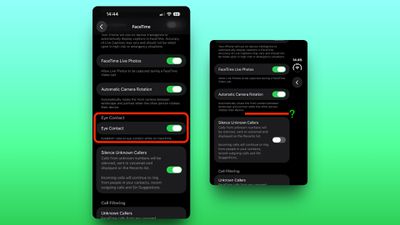
We've reached out to Apple for a technical explanation about the lack of Eye Contact on the iPhone Duo.