

Swiss startup Wrio has launched a new keyboard app for iOS which claims to speed up typing by between 20 and 70 percent compared to standard Qwerty layouts.
The developers of Wrio say they achieved this typing feat by throwing out the rulebook that says keys should be square, and instead adopting a honeycomb-like layout of hexagonal keys. This allows individual keys to be a little larger than usual, which reduces the incidence of mistyped characters.
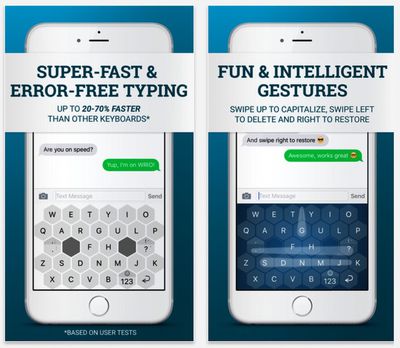
Users will notice there's no typical spacebar in the Wrio keyboard either. This functionality is divided into two single space keys at the centre of the layout. The delete key has been removed, and users swipe from right to left to delete a character, holding the swipe at the end to continue deleting characters.
A swipe right restores deleted characters, and holding the swipe restores multiple characters. And instead of relying on shift keys which have also been removed, swiping up on a character types a capital version of it.
Eight of the most commonly used punctuation symbols can be found in two primary keyboard keys, which serve up a secondary symbol with a hold, a third with a hold and swipe up, and a fourth with a hold-swipe to the right.
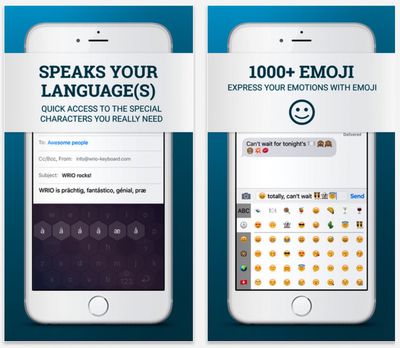
Elsewhere, holding down on a key invokes any accented variations available for the character, while a new double-function key takes users to the secondary keyboard and swiping up on the same key takes them to the emoji deck.
Wrio also supports 30 languages, and boasts a custom user dictionary that learns what languages are regularly typed and makes predictions based on usage patterns.
The developers claim that after one or two weeks, users should be familiar enough with the Wrio keyboard to start making significant gains in typing speed over traditional layouts.
Wrio currently costs $2.99 on the App Store as part of a limited "40 percent off" introductory offer, and is available for iPhone and iPad. [Direct link]





















Top Rated Comments
I'm the co-founder of WRIO Keyboard.
@Freakyslidey: You're right that autocorrection is not implemented yet in Android. We're currently working on it an will submit it within to weeks. But since autocorrection has to learn how you type first, it needs 1-2 weeks anyway until it work. This learning mode is already implemented.
3D Touch would be very nice but unfortunately there are still a lot of devices around which don't support it. That's why we couldn't use it for basic features yet. You can still suggest it on our community platform ('http://community.wrio-keyboard.com/') so people can vote for it. Would be great! For us it's important to know which features are the most needed ones so we can focus on these things first.
@tom.humphrey: I think a lot of the features are new. Not only the hexagon keys which are rounder (easier to hit) but also the gestures to capitalize (swipe up), delete (swipe left) and restore (swipe right). You can also adjust deletion (and restore) speed by swiping shorter or longer.
By the way it's not untested at all: We had over 800 beta testers from our Kickstarter campaign who tested the app for several months. Of course there's still room for improvement, no doubt. But it's still version 1.0.
Best
Janis
People getting up in arms because an app or keyboard is $3 annoys my especially when stopping for a $3 snack isn't even a second thought. The snack lasts 5 minutes people, the app/keyboard lasts "forever". Priorities you know.