Apple Releases New iTunes 12 Beta for OS X Yosemite - MacRumors
Skip to Content

Apple Releases New iTunes 12 Beta for OS X Yosemite

by

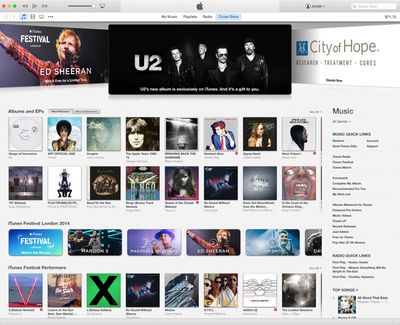
Apple today released a new version of the iTunes 12 beta for both developers and OS X Yosemite beta testers, following Monday's release of the Yosemite Golden Master Candidate and a fourth public beta.
yosemiteitunes12
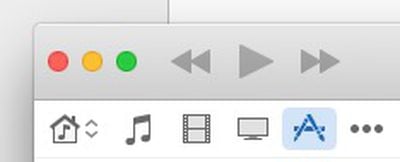
First introduced in July, iTunes 12 includes an "elegant new design" that also includes support for several iOS 8/Yosemite features, including Family Sharing. Apple has released three iTunes beta updates thus far, fixing small bugs and other issues. This newest beta includes new top bar icons in preferences with an iOS-style design and stoplight buttons that have been moved back to the center.

icons

stoplight
iTunes 12 also includes improved playlists, a redesigned Info Window, and a new icon. Both iTunes 12 and OS X Yosemite remain in a beta testing phase, though a public release for the software is expected in October.


Top Rated Comments

timshundo Avatar
150 months ago
UI changes are getting sparse. Vertically-centered window controls for the win!

Score: 29 Votes (Like | Disagree)
150 months ago
iTunes is nice and all, but my god is it bloated. I must use like 10% of its features.
Score: 19 Votes (Like | Disagree)
casperes1996 Avatar
150 months ago
Strange

Already played with it. I hate it.

I might not hate it if it actually worked. Like, ever.

Once you look at a CD (in my case) you can't look at your playlists, music, or anything else again without quitting and re-opening.

That's strange. I don't have that issue.

----------

iTunes is nice and all, but my god is it bloated. I must use like 10% of its features.

Everyone says that. I must just be a massive media consumer, cause I feel like I use pretty much all of iTunes.
Score: 12 Votes (Like | Disagree)
TechGod Avatar
150 months ago
This is really exciting.

Ok, I'm being ironic.

I think "sarcastic" is the word you are looking for.
Score: 8 Votes (Like | Disagree)
150 months ago
Am I the only one that finds the new UI without sidebar really inconvenient to actually use?
Score: 8 Votes (Like | Disagree)
eXan Avatar
150 months ago
Apple keeps changing the UI, icons and adding some gimmicks, keeps bloating the application up, while ignoring the glaring inconveniences, long-standing bugs and lack of organizing-related features.

Can't remember the last version that was actually better than its predecessor.

And don't get me started on the icon itself. Still using this one.
Score: 7 Votes (Like | Disagree)

Popular Stories

imac video apple feature

Apple Released Yet Another New Product Today

Friday March 20, 2026 2:39 pm PDT by
Apple has unveiled a whopping nine new products so far this March, including an iPhone 17e, iPad Air models with the M4 chip, MacBook Air models with the M5 chip, MacBook Pro models with M5 Pro and M5 Max chips, the all-new MacBook Neo, an updated Studio Display, a higher-end Studio Display XDR, AirPods Max 2, and now the Nike Powerbeats Pro 2. iPhone 17e features the same overall design as...
HomePod mini and Apple TV Sage

New Apple TV and HomePod Mini Remain 'Ready' to Launch

Sunday March 22, 2026 6:33 am PDT by
Apple has unveiled nine new products this month, but the wait continues for the next-generation Apple TV 4K and HomePod mini models. In his Power On newsletter today, Bloomberg's Mark Gurman said new versions of the Apple TV and HomePod mini have been "ready" since last year, but he reiterated that Apple has held off on releasing them until the more personalized version of Siri and other...
ios 26 4 pastel

iOS 26.4: Top 10 New Features Coming to Your iPhone

Friday March 20, 2026 2:44 pm PDT by
iOS 26.4 isn't the major update with new Siri features that we hoped for, but there are some useful quality of life improvements, and a little bit of fun with an AI playlist generator and new emoji characters. Playlist Playground - Apple Music has a Playlist Playground option that lets you generate playlists from text-based descriptions. You can include moods, feelings, activities, or...