iOS 7 Disables Screenshot Interruptions, Allows Users to Secretly Take Snapchat Screenshots - MacRumors
Skip to Content

iOS 7 Disables Screenshot Interruptions, Allows Users to Secretly Take Snapchat Screenshots

While we detailed a number of new features of iOS 7 beta 2 earlier today, a MacRumors reader sent us a tip on a small change that has gone unnoticed since the first beta was released on June 10.

In iOS 7, screenshot behavior has been altered, and as the release notes state, "Active touches are no longer canceled when the user takes a screenshot." This minor change has a number of implications for several apps that rely on screenshots to notify users of unwanted behavior, such as Snapchat and Facebook Poke.

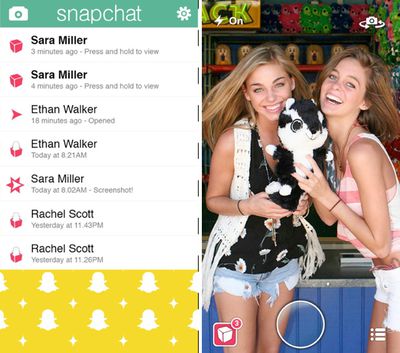
When a user opens a Snapchat photo in the app, a finger is required on the screen to hold the photo open while viewing the picture. The act of taking a screenshot interrupts the picture viewing and closes the photo, which is the method that Snapchat uses to detect an "illegal" screenshot, thereby notifying the sender of the photo that a snapshot has been saved.
snapchat
In iOS 7, taking a screenshot no longer closes the photo viewing window in Snapchat, which means no notification is sent when a screenshot is captured. As screenshots no longer interrupt on-screen touches, the photo stays open and the app is unable to recognize the screenshot action. iOS 7 users will be notified if an iOS 6 user takes a screenshot of a sent photo, but the reverse is not true.

Snapchat's screenshot detection, which is designed to be a safety measure to keep photos private, has had issues in the past. Earlier this year, several screenshot workarounds surfaced, allowing users to save photos without sending notifications, and with iOS 7, a workaround isn't required as the app's core functionality is disabled.

While the change has immediate implications for Snapchat users interacting with other users running iOS 7, it will ultimately require Snapchat and similar apps to come up with a new method for detecting screenshots or to abandon the feature entirely when the final version of iOS 7 is released.

(Thanks, Matt!)

Related Forum: iOS 7

Popular Stories

8 CarPlay Features in iOS 27 Feature

Which iOS 27 CarPlay Features Actually Work in Your Car?

Thursday September 17, 2026 4:17 am PDT by
In iOS 27, available now, CarPlay gets its biggest update in years, but some features depend on what type of car you have rather than your iPhone model. Some of the biggest additions won't do anything in the vast majority of vehicles on the road today. Here's how the new features pan out. Works in Any CarPlay Vehicle Custom widgets: In iOS 27, CarPlay is no longer limited to Apple's handful ...
Apple Watch New Charging Puck

Here's Why a New Apple Watch Charging Puck Was Just Released

Wednesday September 16, 2026 8:53 am PDT by
The new Apple Watch Series 12 and Apple Watch Ultra 4 have hardware changes that allow for faster charging, but you will need to use the new version of the Apple Watch Magnetic Fast Charger included in the box in order to achieve this boost. If you need extra ones for your own charging stands or travel or so forth, Apple released the new version of the charger on its online store last week, with...
ios272anniversary

iOS 27.2 Could Save Your Marriage

Wednesday September 16, 2026 1:32 pm PDT by
The iOS 27.2 beta that Apple released today adds a feature that reminds you it's your anniversary when you call someone, as long as you've added the date in the Contacts app. On the date of your anniversary, when you go to call the person, you'll see a reminder that it's an important day so you don't forget to say something. The anniversary alert uses Call Context, a feature Apple added in...

Top Rated Comments

Gemütlichkeit Avatar
173 months ago
I read this twice and still don't know what they're talking about....
Score: 54 Votes (Like | Disagree)
173 months ago
As always, don't put stuff on the Internet you don't want in the public domain...
Score: 30 Votes (Like | Disagree)
173 months ago
great, now I can't send nude photos with my face anymore. #firstworldproblems
Score: 30 Votes (Like | Disagree)
173 months ago
Please, Snapchat, give us a break! You can never prevent people from snapping a photo of the screen. The ultimate workaround has always been -- and will always be -- the same. Take a photo of your screen with another iPhone, an iPod, an iPad, or any normal digital camera!!
Score: 18 Votes (Like | Disagree)
pnoyblazed Avatar
173 months ago
good looking girls in that pic.. looks a little too perfect
Score: 15 Votes (Like | Disagree)
173 months ago
I agree. WTF does this even mean? It sounds like snapchat was taking advantage of an iOS bug and calling it a feature.
Touches on screen = Snapchat shows photo
No touches = Snapchat hides photo

Taking a screenshot in iOS 6 interrupts all touches on screen = no touches detected on screen even if your finger is still on the screen = Snapchat hides photo before screenshot can save the photo

Taking a screenshot in iOS 7 does not interrupt touches on screen = screen still has touches = Snapchat still shows the photo = screenshot saves the photo == rendering Snapchat a useless messenger.
Score: 14 Votes (Like | Disagree)