

Dropbox has updated its iOS app with a new photo browsing experience, a "shiny new design", and a streamlined way to upload files directly to a particular folder.
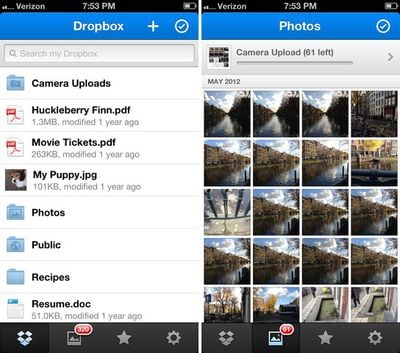
The new photos experience is the biggest change, however:
Now all of your photos are right at your fingertips with the brand new Photos tab. With just a tap, you’ll be able to scroll through a timeline of all the photos you’ve automatically uploaded (including the pocket-dialed ones too). And since Dropbox is a one stop shop for all your memories, you can also check out the photos you’ve uploaded from everywhere else!
Also, when you select a photo, you’ll be able to view it in full-screen glory with nary a button in sight. This means you can get maximum real estate when you’re flipping through puppy photos, or those pics of your bare feet. And to make things even better, our new speedy scroller will help you navigate all the way back to time immemorial (or your earliest photos) in seconds. Even if you have “Billions and Billions” of them.
Dropbox for iOS is a free download from the App Store. [Direct Link]




















Top Rated Comments
Sure, with 10 clicks and some other apps you do get that functionality on iOS.
Also the gallery viewer is terribly. It is only for the photos you've uploaded; whereas the previous version had a thumbnail button, that once tapped would display a thumbnail view of pictures in any folder.