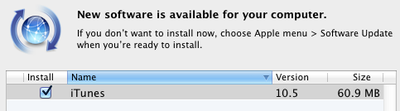
Apple today released iTunes 10.5, bringing support for iOS 5 and iCloud as well as new Wi-Fi syncing capabilities. iOS 5 and iCloud are set to launch tomorrow, and today's launch of iTunes 10.5 sets the stage for those releases.
What's new in iTunes 10.5
- iTunes in the Cloud. iTunes now stores your music and TV purchases in iCloud and makes them available on your devices anywhere, any time, at no additional cost.
* Automatic Downloads. Purchase music from any device or computer and automatically download a copy to your Mac and iOS devices.
* Download Previous Purchases. Download your past music, TV, app, and book purchases again, at no additional cost. Previous purchases may be unavailable if they are no longer on the iTunes Store.- Sync with your iPhone, iPad, or iPod touch with iOS 5.
- Wi-Fi Syncing. Automatically sync your iPhone, iPad, or iPod touch with iTunes any time they're both on the same Wi-Fi network.
iTunes 10.5 brings compatibility with iOS 5 and iCloud, as well as the paid iTunes Match portion of iCloud. iTunes Match is a $24.99/year service that allows users to have their music libraries matched to Apple's database of over 20 million tracks, making those songs available for use on any iCloud-enabled device associated with the user's accounts. Songs not available in the iTunes Store can be uploaded to Apple's servers and also made available across devices.
Apple announced at its media event last week that iTunes Match will launch in the United States by the end of October.
Update: iTunes Match appears to have been pulled completely from the public release of iTunes 10.5. Developer beta users had previously had the ability to turn iTunes Match on and off from the iTunes menu bar, but that option is missing in the public release. Consequently, Apple may need to release an updated version of iTunes to reenable the feature when the service launches later this month.
Update 2: Apple has posted a support document to assist users with troubleshooting the new Wi-Fi syncing feature in iTunes 10.5.