Apple Updates Anti-Malware Definitions to Address Fake Flash Player Trojan - MacRumors
Skip to Content

Apple Updates Anti-Malware Definitions to Address Fake Flash Player Trojan

flash player trojan
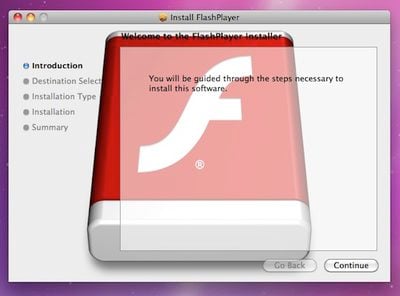
Fake Flash Player trojan installer

While things have been relatively quiet on the malware front for OS X since a raid on Russian payment processing firm ChronoPay appeared to have taken down MacDefender nearly two months ago, one new trojan horse did pop up earlier this month. As detailed by F-Secure, the trojan known as "OSX.QHost.WB.A" masquerades as a Flash Player installer but actually adds entries to a computer's hosts file to redirect users attempting to visit certain Google sites.

Once installed, the trojan adds entries to the hosts file to hijack users visiting various Google sites (e.g., Google.com.tw, Google.com.tl, et cetera) to the IP address 91.224.160.26, which is located in Netherlands.

The server at the IP address displays a fake webpage designed to appear similar to the legitimate Google site.

Search results on the fake Google pages actually lead to pop-up windows that load external content which was broken at the time of discovery but presumably consisted of advertisements of some sort. While the threat as implemented at the time of discovery was relatively mild, inexperienced users falling for the trojan could find themselves unaware of what had happened to their systems and how to fix the hijacked routing added by the malware.
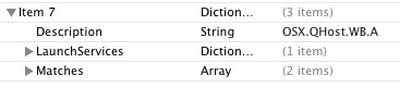
osx qhost wb a
Consequently, Apple earlier this week made its first significant addition to its "XProtect.plist" file since the spate of MacDefender variants surfaced in June. The XProtect.plist file contains malware definitions to enable users' systems to recognize and warn users of malicious downloads, a feature that debuted with Mac OS X Snow Leopard back in 2009.

The original anti-malware system required manual updates to account for new threats, and as such was updated only rarely by Apple as part of larger software updates. But with an Apple software update issued in response to the MacDefender threat earlier this year, Mac OS X systems are now able to make daily checks for updates to that file to ensure up-to-date protection against malware.


Popular Stories

8 CarPlay Features in iOS 27 Feature

Which iOS 27 CarPlay Features Actually Work in Your Car?

Thursday September 17, 2026 4:17 am PDT by
In iOS 27, available now, CarPlay gets its biggest update in years, but some features depend on what type of car you have rather than your iPhone model. Some of the biggest additions won't do anything in the vast majority of vehicles on the road today. Here's how the new features pan out. Works in Any CarPlay Vehicle Custom widgets: In iOS 27, CarPlay is no longer limited to Apple's handful ...
Apple Watch New Charging Puck

Here's Why a New Apple Watch Charging Puck Was Just Released

Wednesday September 16, 2026 8:53 am PDT by
The new Apple Watch Series 12 and Apple Watch Ultra 4 have hardware changes that allow for faster charging, but you will need to use the new version of the Apple Watch Magnetic Fast Charger included in the box in order to achieve this boost. If you need extra ones for your own charging stands or travel or so forth, Apple released the new version of the charger on its online store last week, with...
ios272anniversary

iOS 27.2 Could Save Your Marriage

Wednesday September 16, 2026 1:32 pm PDT by
The iOS 27.2 beta that Apple released today adds a feature that reminds you it's your anniversary when you call someone, as long as you've added the date in the Contacts app. On the date of your anniversary, when you go to call the person, you'll see a reminder that it's an important day so you don't forget to say something. The anniversary alert uses Call Context, a feature Apple added in...

Top Rated Comments

KnightWRX Avatar
197 months ago
Let's get this out of the way right now : This is not an OS X virus.
Score: 36 Votes (Like | Disagree)
Stridder44 Avatar
197 months ago
Awesome, I was not aware that it updated daily.

And yes, this is not a virus. This is malware.

Score: 11 Votes (Like | Disagree)
longofest Avatar
197 months ago
No, it's not a "virus". It's a trojan. You think it's good, but its bad. (heh... depending on if you think "flash" is "good").

A question I have though, is under what conditions should ANY software modify the hosts file? Should Apple even allow programs that have been granted administrative rights to alter the hosts file? There is only a very limited benvolent use case for such an action, and that very related to what they did here: some anti-ad or anti-spyware utilities modify a host file to redirect known ad-producing domains to a "safe" domain. I personally think any modification of the host file should be given a warning like this:

The program _____ is trying to update a core Mac OS X system file that is used to provide network connectivity. While online advertisement blocking programs may require legitimate use of this file, most others applications may represent an attempt to install malicious software onto your computer. Are you sure you want to allow program _____ to modify this file?
Score: 9 Votes (Like | Disagree)
BC2009 Avatar
197 months ago
Funny.... I updated Flash yesterday on my kids' Mac mini and I thought that writing a Trojan that masquerades as an update to Flash would be brilliant since Flash is updated so often and getting prompted that you need to update Flash to view a website is very common..... And then today, here it is.
Score: 8 Votes (Like | Disagree)
197 months ago
That's why you need to disable flash. :p

This has nothing to do with Flash.
Score: 8 Votes (Like | Disagree)
197 months ago
Been out of the loop for 10 weeks and MacRumors is getting my up to speed fast. I love this site.

Score: 8 Votes (Like | Disagree)