Apple Releases iTunes 10.3.1, Potentially Fixing iOS Device Syncing Bug [Updated] - MacRumors
Skip to Content

Apple Releases iTunes 10.3.1, Potentially Fixing iOS Device Syncing Bug [Updated]
itunes 10 3 1
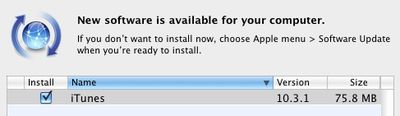
Just a day after releasing iTunes 10.3 to support some early iCloud features such as automatic downloads and access to previously purchased content, Apple has already pushed out iTunes 10.3.1 via Software Update and the company's software downloads page.

The documentation accompanying the release merely offers the same information as found with the original iTunes 10.3 release, providing no word on exactly what is addressed in what is presumably a minor bug fix update.

A number of users in Apple's support forums and elsewhere have reported issues with syncing iOS devices under iTunes 10.3, with iTunes reporting an "unknown error (-50)" when attempting to sync. Consequently, it seems reasonable to speculate that the iTunes 10.3.1 update addresses this issue, although we have yet to receive confirmation from users.

Update: In a new support document, Apple confirms that iTunes 10.3.1 addresses the "unknown error (-50)" syncing issue experienced by some users under iTunes 10.3.

Related Forum: Mac Apps

Popular Stories

Apple Event Logo

Apple to Launch These 15+ New Products Later This Year

Friday March 27, 2026 2:03 pm PDT by
March has been an incredibly busy month for Apple, with the company unveiling more than 10 new products and accessories. We said hello to the MacBook Neo at the start of the month, and we bid farewell to the Mac Pro at the end of it. Nevertheless, there is still a lot more to come this year. Beyond the usual annual updates to iPhones and Apple Watches, Apple's all-new smart home hub is...
iOS 26

iOS 26.4 Adds Two New Features to CarPlay

Tuesday March 24, 2026 1:55 pm PDT by
iOS 26.4 was released today, and it includes a couple of new features for CarPlay: an Ambient Music widget and support for voice-based chatbot apps. To update your iPhone 11 or newer to iOS 26.4, open the Settings app and tap on General → Software Update. CarPlay will automatically offer the new features so long as the iPhone connected to your vehicle is running iOS 26.4 or later....
Mac Pro Feature Teal

Apple Confirms Mac Pro Is Dead, No Future Models Planned

Thursday March 26, 2026 2:04 pm PDT by
Apple has discontinued the Mac Pro and has removed the machine from its website, reports 9to5Mac. Apple said it does not plan to design a new version of the Mac Pro, and no new model will be coming in the future. The Mac Pro was last updated in 2023, which was when Apple added an M2 Ultra Apple silicon chip, but the chassis has not been refreshed since 2019. Apple redesigned the Mac Pro to...


Top Rated Comments

Hallivand Avatar
193 months ago
Looks like it's a very fat universal binary. it not only has Intel/PPC, but also Intel part is 32/64 bit. 32 bit for Leopard and Snow Leopard and 64 bit for Lion. That's at least what i think is going on here.

Is it just me, or does anyone else find it incredible that Apple is still supporting the last vestiges of PowerPC Macs running Leopard.

Now just hoping that Apple is still releasing 10.5 or whatever version have you as a Universal Binary that would support WiFi syncing with my original iPad :D.

Heres to another few years with the Power Mac G5 :p
Score: 3 Votes (Like | Disagree)
193 months ago
No update here, yet.
Score: 2 Votes (Like | Disagree)
193 months ago
I wish Apple would properly streamline iTunes on PC so that it was smaller and ran faster. It would certainly shut a lot of of the moaners up.
Score: 2 Votes (Like | Disagree)
193 months ago
I wish Apple would give more information.
Score: 2 Votes (Like | Disagree)
Amazing Iceman Avatar
193 months ago
no no, it's iTunes and only with some calendars some duplicated and some tripled:

Image (http://homepage.mac.com/xsimon/diversos/calendars.png)

if I uncheck one both appear unchecked after syncing and vice versa

I see the problem... If your iOS device already logs into MobileMe, there's no need to sync anything related to MobileMe via iTunes. your iOS device will synchronized directly with MobileMe over the internet.

Otherwise, you'll get duplicated entries from:
- MobileMe Calendars (directly accessed)
- MobileMe Calendars (synchronized via iTunes)

You should disable calendar sync via iTunes, and most likely do the same for Contacts and email
Score: 1 Votes (Like | Disagree)
193 months ago
At last! A use for that philosophy degree!

I prefer to watch a new version come out, let other people find any potential problems, then upgrade after everything seems stable across a wide swath of users.

Kant's categorical imperative teaches us that what you're doing is bad.
Score: 1 Votes (Like | Disagree)