iPad App Highlights: Air Display, CoPilot Live HD, and BeejiveIM
The iPad has been available in the U.S. for nearly two months now and is officially rolling out to nine more countries this Friday. At its U.S. debut, about 2,000 iPad-specific apps were available in the App Store and this number has since swelled to over 7,000 with more arriving every day. Here are a few notable ones that have been released over the past couple of weeks.
Air Display
Avatron Software, the makers of the Air Sharing HD document sharing app, recently released a new app, Air Display, that turns an iPad into an extra external display. In order to work, the app requires a desktop companion application - which is available for Macs running OS 10.6 only for now though a Windows version is coming and for the Mac and the iPad to be on the same Wi-Fi network.
Set-up is pretty easy and we found that the app works as advertised, though video lags a little behind the accompanying audio and it's probably best suited for more static items such as Inspector windows, iChat buddy lists and the like. Youre also not restricted to using your computers mouse to navigate the display on the iPad you can use its multi-touch display to click links and buttons. To enter text, youll need to use your computers keyboard since the iPads virtual keyboard wont pop up when you get to a text field.
For $9.99, turning your iPad into a extra display is pretty cheap compared to buying a dedicated display and this app could be invaluable for laptop users who need a little more screen real estate while on the go.
CoPilot Live HD
ALK Technologies, the developer of GPS applications for a wide variety of mobile devices, was the first to put out a turn-by-turn navigation app specifically for the iPad. CoPilot Live HD North America debuted in the App Store earlier this month and it's priced aggressively relative to other GPS apps at $29.99. We've been trying it out and it is a joy to have navigation guidance on such a large screen, though we wish there was a setting to let the map take over the majority of the screen and force the next turn guidance section to be smaller.
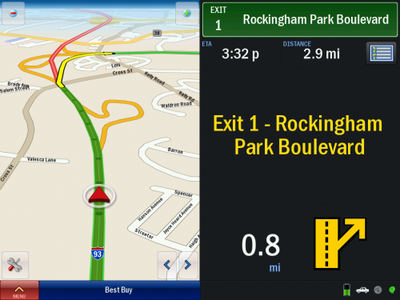
CoPilot Live HD will work only on iPads with 3G connectivity since these models possess a GPS receiver while the Wi-Fi only models do not. Additionally, this version of the app works only on the iPad and not the iPhone, though ALK Technologies does offer CoPilot Live North America specifically for the iPhone, priced at $19.99.
BeejiveIM
BeejiveIM has been one of our favorite IM apps for the iPhone and the company put out an iPad-speciic version of the app just a few days ago. BeejiveIM for iPad lets you set up multiple IM accounts under the most popular instant messaging protocols used today and offers push notifications to let you know about incoming messages even when the app is closed. It also lets you send images and voice notes as attachments to your instant messages.
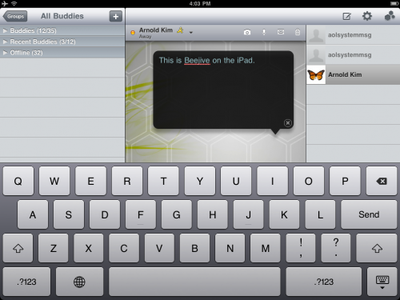
BeejiveIM for iPad is available at an introductory sale price of $5.99 right now for a limited time only.

Air Display
Avatron Software, the makers of the Air Sharing HD document sharing app, recently released a new app, Air Display, that turns an iPad into an extra external display. In order to work, the app requires a desktop companion application - which is available for Macs running OS 10.6 only for now though a Windows version is coming and for the Mac and the iPad to be on the same Wi-Fi network.
Set-up is pretty easy and we found that the app works as advertised, though video lags a little behind the accompanying audio and it's probably best suited for more static items such as Inspector windows, iChat buddy lists and the like. Youre also not restricted to using your computers mouse to navigate the display on the iPad you can use its multi-touch display to click links and buttons. To enter text, youll need to use your computers keyboard since the iPads virtual keyboard wont pop up when you get to a text field.
For $9.99, turning your iPad into a extra display is pretty cheap compared to buying a dedicated display and this app could be invaluable for laptop users who need a little more screen real estate while on the go.
CoPilot Live HD
ALK Technologies, the developer of GPS applications for a wide variety of mobile devices, was the first to put out a turn-by-turn navigation app specifically for the iPad. CoPilot Live HD North America debuted in the App Store earlier this month and it's priced aggressively relative to other GPS apps at $29.99. We've been trying it out and it is a joy to have navigation guidance on such a large screen, though we wish there was a setting to let the map take over the majority of the screen and force the next turn guidance section to be smaller.

CoPilot Live HD will work only on iPads with 3G connectivity since these models possess a GPS receiver while the Wi-Fi only models do not. Additionally, this version of the app works only on the iPad and not the iPhone, though ALK Technologies does offer CoPilot Live North America specifically for the iPhone, priced at $19.99.
BeejiveIM
BeejiveIM has been one of our favorite IM apps for the iPhone and the company put out an iPad-speciic version of the app just a few days ago. BeejiveIM for iPad lets you set up multiple IM accounts under the most popular instant messaging protocols used today and offers push notifications to let you know about incoming messages even when the app is closed. It also lets you send images and voice notes as attachments to your instant messages.

BeejiveIM for iPad is available at an introductory sale price of $5.99 right now for a limited time only.

Top Rated Comments
(View all)26 months ago
I guess BeejiveIM will be even more useful with iPhone OS 4.0 multitasking, huh?
26 months ago
It's going to be a while before wireless networks will have the proper bandwidth to run streaming video. This has nothing to do with the quality of the app or the iPad; it's a limitation of the networking technology.
26 months ago
Shouldn't this be in the Ipad forum rather than the "News" forum?
It doesn't seem to be relevant for people looking for Mac news.
26 months ago
Man, I wish I had an iPad. I would buy Air Display in a heartbeat.
Anyone know if touchscreen can be used on the iPad to control the computer?
26 months ago
I bought Air Display as soon as it was released the other day and must say that it's great. Maybe even the best $10 I've spent on my iPad since launch day. However, I'm hoping that Avatron will make a few updates:
Two finger scrolling
Right click
Popup keyboard
Ability to activate screen from the iPad instead
Performance setting tweaks
Overall it runs great most of the time. Highly recommend, as the iPad display is gorgeous, especially compared to any model Macbook Pro.
Yes it does. Please refer to the article as it clearly states this.
Two finger scrolling
Right click
Popup keyboard
Ability to activate screen from the iPad instead
Performance setting tweaks
Overall it runs great most of the time. Highly recommend, as the iPad display is gorgeous, especially compared to any model Macbook Pro.
Man, I wish I had an iPad. I would buy Air Display in a heartbeat.
Anyone know if touchscreen can be used on the iPad to control the computer?
Yes it does. Please refer to the article as it clearly states this.
26 months ago
I've been debating about Beejive and maybe the 6 bucks is worth it.
Beejive is worth it. It's the best IM client on the iPhone.
One thing I don't get is why an IM client has to take the whole screen? I know iPad can't multitask yet but it just seems so much screen estate is wasted.
26 months ago
Air Display would be cool.
Wonder if you can use it as a primary display for your Mini. Take the iPad on the go and use it as a display for your Mini at home - truly a minimal/mobile system like the Duo system back in the day... ;)
26 months ago
So for Air Display what is the experience like quitting the app? For example, you might quit the app for a minute, do something on your iPad, then open it again… How exactly does the app handle that?
[ Read All Comments ]

Our sister-site TouchArcade notes that Chillingo's excellent physics puzzler Feed Me Oil is free today for both the iPhone and iPad. It's normally $0.99 for iPhone and $1.99 for iPad....
Several years ago, Comcast began instituting bandwidth caps of 250GB per month on its residential customers. In 2008, this was plenty for most customers, but with the advent of streaming video...
Reuters reports that China Mobile Chairman Xi Guohua has once again publicly stated that the world's largest mobile phone carrier is engaged in talks with Apple about offering the iPhone to its...
Apple has filed a motion to dismiss in a case filed by customers over alleged misleading advertising depicting the Siri technology in the iPhone 4S. The lawsuit, filed in March, alleges that...
The American Customer Satisfaction Index (ASCI) today released its latest rankings of customer satisfaction in the United States for mobile phones and a number of products and services, with the new...