AirPort Extreme and Time Capsule Update Details: Dual-Band, Guest Networks, Remote File Access
As we noted earlier today, Apple has updated their AirPort Extreme Base Station and Time Capsule offerings. A few of the new features are worth highlighting:
Simultaneous dual-band support - Operates simultaneously on both 5 GHz (802.11n) and 2.4 GHz (802.11b/g) frequencies to allow all wireless products to connect on the best available band. On previous models, users wishing to permit 802.11b/g devices such as many older Macs or the iPhone or iPod touch to connect to their access point were required to run in "mixed mode" at 2.4 GHz, negating some of the peformance benefits of 802.11n-enabled devices running on 5 GHz networks.
Guest networking - Creates a secondary network to allow family and visitors to connect to the Internet, while keeping the primary network with attached printers, drives, and other devices secured. The secondary network can be configured with a different password from the primary network or can have no password at all.
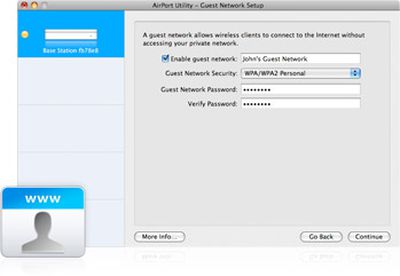
Guest Network Setup
Access files on a networked drive from anywhere - Allows MobileMe subscribers to register their AirPort Extreme Base Station or Time Capsule with their MobileMe account, providing them access to their files from anywhere via the Internet. Drives will appear in the Finder sidebar like any other attached drive, acting just like a personal file server with remote access.
Simultaneous dual-band support - Operates simultaneously on both 5 GHz (802.11n) and 2.4 GHz (802.11b/g) frequencies to allow all wireless products to connect on the best available band. On previous models, users wishing to permit 802.11b/g devices such as many older Macs or the iPhone or iPod touch to connect to their access point were required to run in "mixed mode" at 2.4 GHz, negating some of the peformance benefits of 802.11n-enabled devices running on 5 GHz networks.
Guest networking - Creates a secondary network to allow family and visitors to connect to the Internet, while keeping the primary network with attached printers, drives, and other devices secured. The secondary network can be configured with a different password from the primary network or can have no password at all.
Guest Network Setup
Access files on a networked drive from anywhere - Allows MobileMe subscribers to register their AirPort Extreme Base Station or Time Capsule with their MobileMe account, providing them access to their files from anywhere via the Internet. Drives will appear in the Finder sidebar like any other attached drive, acting just like a personal file server with remote access.
Top Rated Comments
(View all)39 months ago
Anyone have any idea on whether this will be offered as a firmware/software update on existing TCs?
39 months ago
That's actually pretty awesome. I'm loving the guest account, and having the equivalent of a file server from anywhere you can access MobileMe is pretty sweet!
39 months ago
Man would i like for some of these features to be added to my current AEBS via Firmware (if no new internal hardware is needed, of course).
Any chance? :rolleyes:
39 months ago
Anyone have any idea on whether this will be offered as a firmware/software update on existing TCs?
They probably could not do dual-mode 5Ghz and 2.4Ghz, but the MobileMe option and guest sharing is plausible. But, then there would be no need to spend more money and upgrade! :D
39 months ago
So remote Time Machine backups then, eh?
lol have fun with that!
They probably could not do dual-mode 5Ghz and 2.4Ghz, but the MobileMe option and guest sharing is plausible. But, then there would be no need to spend more money and upgrade! :D
Yes, I believe dual-band functionality is hardware-based. Now if the original AirPort Extreme did 5Ghz (don't know), then it may be possible as a FW update.
39 months ago
so theoretically, you could point your iphone/itouch to your time capsule remotely and stream your video library. think this would require an iphone app? shouldn't be too hard.
39 months ago
Guest sounds very cool indeed.
Remote File Access - this was meant to work in the original Airport Extreme right? I've never got it working/don't think it had an option in Airport Utility.
[ Read All Comments ]

Analytics firm Chitika today released a report showing that by its metrics iOS has now surpassed OS X in overall web traffic share in the United States. Chitika's methodology involves an analysis...
One of the most frequent reasons for an iPhone to go on a trip to the Apple Store's Genius Bar is because of water damage. Typically, a water damaged iPhone can be replaced for a flat $199...
TheVerge's Joshua Topolsky summarizes the iPad 3 casing findings reported earlier today, but also adds his own sources regarding some details of the iPad 3.
Image from RepairLabs
As...
Last July, Apple discontinued the white MacBook from its consumer lineup, pushing consumers toward the company's popular MacBook Air line or the 13-inch MacBook Pro. The company didn't kill...
Popular iPhone Twitter client Tweetbot has finally arrived on the iPad, with a user interface instantly familiar to any current Tweetbot user. Designed for the Twitter power-user, Tweetbot packs a...