Add a Volume Slider to Your iPhone Lock Screen - MacRumors
Skip to Content

Add a Volume Slider to Your iPhone Lock Screen

by

Your iPhone's Lock Screen has built-in media playback controls that appear whenever music, a podcast, or other audio is playing. What you might not realize is that those controls can also include a volume slider that lets you adjust the volume without you having to unlock your iPhone or fumble for the physical buttons.
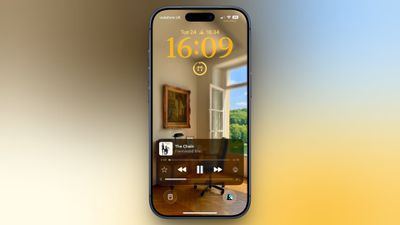
ios 26 volume slider lock screen
Originally, Apple included a volume slider in the Lock Screen media player by default, but it quietly removed the function in iOS 16. It eventually returned as an option in iOS 18.2, but Apple decided to bury it in Accessibility settings, where it's easy to overlook. The setting is still available in iOS 26, and it's super-simple to enable.

Here's how to turn it on:

  1. Open Settings on your iPhone.
  2. Tap Accessibility.
  3. Under "Hearing," tap Audio & Visual.
  4. Toggle on the switch next to Always Show Volume Control.
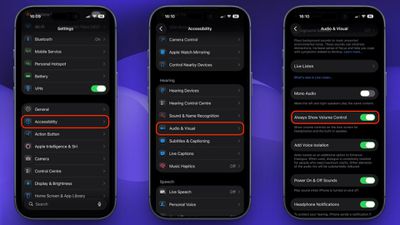
settings

The next time you play audio, a volume slider will appear in the Lock Screen's media player underneath the existing playback controls. It's especially useful when your iPhone is propped up on a desk or sitting on a nightstand, since you don't need to pick it up just to change the volume.

To turn it off again, just head back to Settings ➝ Accessibility ➝ Audio & Visual and toggle off Always Show Volume Control.

Top Rated Comments

6 weeks ago
Accessibility is always just loaded with cool and useful stuff like this. It flies under the radar, but IMO it’s where some of Apple’s best design work is hidden.
Score: 12 Votes (Like | Disagree)
6 weeks ago
Another slider that can be touched accidentally. 👍
Score: 7 Votes (Like | Disagree)
6 weeks ago

Yes. I suspect the reason the slider was removed by default, is because it was too easy to accidentally swipe, and make the volume all of a sudden blast in your ears.
THIS! lol. I have enough heartburn from that time I was singing along with Mariah, and my phone decided to skip to the next song just as I was about to nail that high note, leaving me hanging!

Score: 5 Votes (Like | Disagree)
FlyingToasterStrudel Avatar
6 weeks ago
Yes. I suspect the reason the slider was removed by default, is because it was too easy to accidentally swipe, and make the volume all of a sudden blast in your ears.

Score: 4 Votes (Like | Disagree)
6 weeks ago
You would not believe the amount of times i've blasted my ears on accident when the volume slider was in the lock screen.
Score: 3 Votes (Like | Disagree)
Radeon85 Avatar
6 weeks ago
Things like this should be on by default.
Score: 3 Votes (Like | Disagree)

Popular Stories

Apple Event Logo

Apple Just Released a New Accessory

Monday May 4, 2026 8:13 am PDT by
Apple today released a new Pride Edition Sport Loop for the Apple Watch. The band features a rainbow design with 11 colors of woven nylon yarns. The new Pride Edition Sport Loop is available to order now on Apple.com and in the Apple Store app in 40mm, 42mm, and 46mm sizes, and it will be available at Apple Store locations starting later this week. In the U.S., the band costs $49. There...
iOS 27 on iPhone 17 1

iOS 27 Will Add These New Features to Your iPhone

Saturday May 2, 2026 8:43 am PDT by
Apple is expected to unveil iOS 27 during its WWDC 2026 keynote on June 8, and there are already many rumored features and changes for iPhones. The first developer beta of iOS 27 will likely be available immediately following the keynote, and a public beta typically follows in July. Following beta testing, the software update should be released to all users with a compatible iPhone in...
Apple Announces 2026 Pride Band Watch Face and iPhone Wallpaper Article 2

iOS 26.5 Coming Soon With These New Features

Monday May 4, 2026 8:40 am PDT by
iOS 26.5 is expected to be released next week, following more than a month of beta testing. The update is relatively minor, but there are a couple of new features and changes across the operating system that we have recapped below. iOS 26.5 lays the groundwork for end-to-end encryption for RCS in the Messages app and ads in the Apple Maps app, and it will include a new Pride wallpaper and a...