Despite the Christmas holiday, the U.S. Patent Office continues to be churning away and has revealed this interesting new patent application from Apple called Swipe Gestures for Touch Screen Keyboards. The patent application is authored by Wayne Westerman. While we always enjoy reading research from the former Fingerworks founder, his multi-touch patent applications always seem to be more ambitious than practical. This latest document, however, details some very useful (and practical) additions to the iPhone's on screen keyboard.
Apple suggests the use of swipe gestures to be used on top of the iPhone's on screen keyboard in order to provide the user with quick access to common keys.
For example, erasing and basic punctuation insertion, directional swipes (also referred to herein as "swipe gestures") over the alphabetic keys can be used as an alternative to striking certain keys. Because the Space and Backspace keys are quite frequently used, they are logical candidates for the rightward and leftward swipes, respectively. Leftward and rightward swipes intuitively match the cursor travel caused by these symbols. Following this cursor movement analogy, the Enter/Return may be invoked by a downward swipe, and a Shift/Caps may be invoked by an upward swipe. Alternatively, as the Enter and Shift functions may be less frequently invoked, these may be substituted for other functions as well. One alternative mapping for the upward swipe, for example, could be to activate an alternative numeric and punctuation keypad or a particular punctuation symbol like an apostrophe or period.
A few sample gestures are depicted in the document:
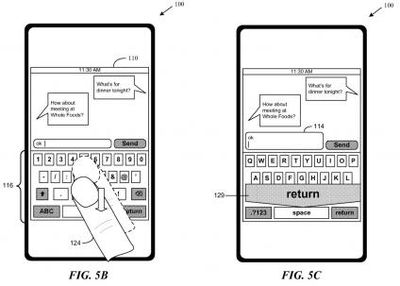
Swipe down = return
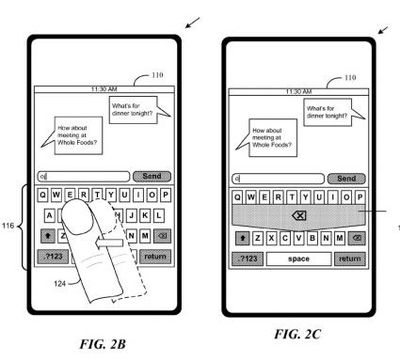
Swipe left = delete
Aside from these single swipe gestures, multi-touch swipes (two fingers) could invoke other special functions. While a single finger left-swipe might delete a letter, a two finger left-swipe could delete a whole word, and a three finger left-swipe could delete a line. Similarly, a single finger right-swipe could add a space, while a two finger right-swipe could add a period. Up swipes and down swipes could also invoke different functions based on the number of fingers used.
Like with Apple's multi-touch notebook trackpads, these optional functions could provide advanced users with many useful shortcuts while not steepening the learning curve for novice users.