Got a tip for us? Share it...

Star Wars Hologram Effect for iChat and PhotoBooth

Forum user, elbows, took some time to try to recreate the missing iChat Star Wars hologram effect that didn't make the final cut of Leopard.

OK here it is. Like I said its not quite right yet, probably need some effects to make the image look grainy etc. And the preview is messed up and it doesnt seem to work in PhotoBooth, just iChat, but give it a try anyway.
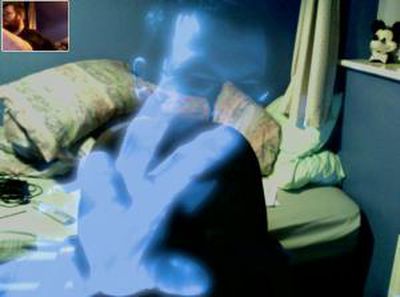


You simply copy the .qtz file into your {HardDriveName}/Library/Compositions/ directory. The new effect will appear in iChat and can be seen by anyone (they don't have to install the effect). An early version of the effect is available in this thread.

Update: Ice-Cube posts how to get this effect into PhotoBooth:

1. Extract HoloGit.qtz from the zip file.
2. Place it on your desktop for easy access.
3. Go to photobooth in your applications folder and right click to *Show package contents*
4. Navigate to content>resources
5. Drag the HoloGit.qtz file from the desktop to this folder.
6. Locate the file *EffectsOrdering.plist* in this folder
7. Open the file with textedit
8. You should see a number of effects listed in that file. You should see user backdrop 1, user backdrop 2, and so forth in the last paragraph.
9. Replace the words *user backdrop 1* to *HoloGit*
It should look like this: /HoloGit
10. Save the file. Close all folders.
11. Open up photobooth and enjoy your newfound effect.

Note: the .qtz must also be placed in the {HardDriveName}/Library/Compositions/ directory as described above for iChat


Top Rated Comments

(View all)

56 months ago
Spent my day trying to recreate the missing effect, using Quartz Composer. I havent seen the original Apple version but I think this is probably close.

I wouldnt say its perfect yet but its working so I am going to share it here shortly. It should work on any Leopard machine but will probably run quite badly on slower machines.

Any ideas for a name? That all thats stopping me releasing it this minute, so come up with a good name and its yours :) Names that avoid infringing Star Wars trademarks would probably be a good idea ;) If nobody comes up with anything its going toend up getting called HoloGeek or HoloGit :D
Rating: 0 Positives / 0 Negatives
56 months ago
The Phantom Menace or anything else equally as trademarked. :)
Rating: 0 Positives / 0 Negatives
56 months ago
Call it whatever the bloody hell you want to, I want to see it! :D
Rating: 0 Positives / 0 Negatives
56 months ago
NOTE: Other people have now created some very interesting effects which can be found on later pages of this thread, for example see page 4 and 5 for an invisible effect and attempts to make effects that look more like a hologram. These may be more to your tastes than my attempts.

It also seems that PPC users are out of luck, these effects are for Leopard Intel Macs only, unless you get them to work with 3rd party iChat effects software that exist for Tiger.

Unzip the attached file and put the .qtz files in /Library/Compositions/ (note that the Compositions folder will have a different name if your Leopard install is not English). HoloGit.qtz.zip is the original effect I posted on Saturday, it is superceded by the contents of HolloGPack1.zip.

Then launch iChat and it should be there somewhere in the grid of effects. Unfortunately preview images are not working at the moment but the actual effect works.

Instructions for getting these working in PhotoBooth can be found later in the thread.

Most of these use your existing background but a test one uses custom backgrounds that you drag onto the effect.

Not sure if I got the blue or the glow right. The mixing Ive used to make you transparent isnt quite perfect yet either.

Feedback needed.

Edited Sunday to add new HoloGPack1 file which has versions of the effect in various different colours, plus a couple of other experimental effects. The Test1.qtz should work with user backdrops but its not really right yet, an early work in progress. HoloGeek versions suffer from some clipping issues.

Edited Tuesday to clear up some details and point out that other effects are lurking much later in this thread.
Rating: 0 Positives / 0 Negatives
56 months ago
Can I see a screen shot? Please and Thank you.
Rating: 0 Positives / 0 Negatives
56 months ago
This is a no go on a 24" Aluminum 2.4/4gb...it doesn't make form of an effect at all. Not sure what's wrong?
Rating: 0 Positives / 0 Negatives
56 months ago
Any successes yet? I should be upgrading to 10.5 in the next few days, and this would be awesome :)

If you can do it in a few days, how come Apple scrapped it?
Rating: 0 Positives / 0 Negatives
56 months ago

OK here it is. Like I said its not quite right yet, probably need some effects to make the image look grainy etc. And the preview is messed up and it doesnt seem to work in PhotoBooth, just iChat, but give it a try anyway.

Unzip the attached file and put HoloGit.qtz in /Library/Compositions/

Then launch iChat and it should be there somewhere in the grid of effects.

This version uses your existing background but will see about doing one with custom backgrounds.

Not sure if I got the blue or the glow right. The mixing Ive used to make you transparent isnt quite perfect yet either.

Feedback needed.


I have to say... thats just friggin fantastic. I love that effect... maybe you could modify it to make a ghostly one for halloween too
Rating: 0 Positives / 0 Negatives
56 months ago

I have to say... thats just friggin fantastic. I love that effect... maybe you could modify it to make a ghostly one for halloween too


can u post screenshots and or videos?
Rating: 0 Positives / 0 Negatives
56 months ago

can u post screenshots and or videos?


Here you go... i was using one Mac to Talk to the other so you can see my real pic in the top left.

Very cool effect...

Please excuse the mess!
Rating: 0 Positives / 0 Negatives

[ Read All Comments ]