How to View Shazam Music Recognition History on iPhone and iPad - MacRumors
Skip to Content

How to View Shazam Music Recognition History on iPhone and iPad

by

In iOS 14.2 and later, Apple includes a Shazam Music Recognition feature for the Control Center, giving iPhone and iPad users a quick and easy way to identify what music is playing without them having to download the Shazam app.
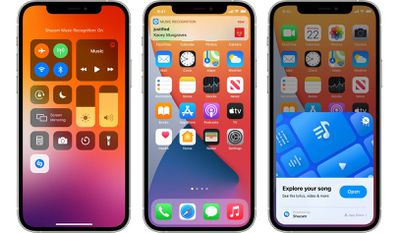
Shazam Music Recognition Control Center
Music Recognition can be added to Control Center in the Settings app under the Control Center menu. From there, scroll down and tap the + button next to the Music Recognition option, which is shown with a Shazam logo.

If you've identified a few songs using the Music Recognition feature and you want to see a list of previously identified songs, simply launch the Control Center and long press the Music Recognition button. If you also have the Shazam app installed on your device, tapping individual songs in the list will open the app with the song information selected.
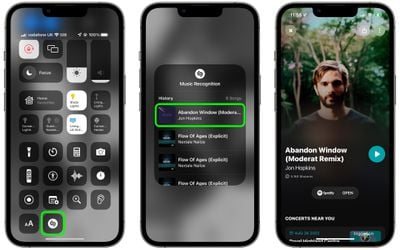
shazam
Note that the Music Recognition feature now syncs with the Shazam app, and Shazam song history is also synced across devices, meaning it will show all songs identified from any device signed into the same Apple ID, regardless of whether it was done via the app or Control Center.

Apple acquired Shazam in 2018 for a reported $400 million and has been steadily improving the service since by removing ads from the app and more. In September 2021, Apple announced that the Music Recognition feature in Control Center had surpassed one billion cumulative recognitions across the iPhone and ‌iPad‌ since launching.

Tag: Shazam

Popular Stories

iOS 26

iOS 26.4 Adds Two New Features to CarPlay

Tuesday March 24, 2026 1:55 pm PDT by
iOS 26.4 was released today, and it includes a couple of new features for CarPlay: an Ambient Music widget and support for voice-based chatbot apps. To update your iPhone 11 or newer to iOS 26.4, open the Settings app and tap on General → Software Update. CarPlay will automatically offer the new features so long as the iPhone connected to your vehicle is running iOS 26.4 or later....
AirPods Pro Firmware Feature

Apple Releases New Firmware for AirPods Pro 3, AirPods Pro 2 and AirPods 4

Tuesday March 24, 2026 12:31 pm PDT by
Apple today released new firmware for the AirPods Pro 2, AirPods Pro 3, and the AirPods 4. The firmware has a version number of 8B39, up from 8B34 on the AirPods Pro 3, 8B28 on the AirPods Pro 2, and 8B21 on the AirPods 4. There is no word on what's included in the firmware, but Apple has a support document with limited notes. Most updates are limited to bug fixes and performance...
apple tv 4k new orange

tvOS 26.4 Adds These New Features to Your Apple TV

Wednesday March 25, 2026 3:33 pm PDT by
Apple this week released tvOS 26.4, and the software update includes a handful of new features and changes for the Apple TV. tvOS 26.4 is compatible with all Apple TV 4K and Apple TV HD models released since 2015. To update your Apple TV, open the Settings app on the device, navigate to System → Software Updates, and select Update Software. Below, we have recapped what is new in tvOS...