Starting with tvOS 26.2, Apple TVs began displaying a user profile selection screen every time you wake the device from sleep. The feature helps households with multiple users maintain separate viewing histories and recommendations, but it can feel like an unnecessary step if you're the sole user.
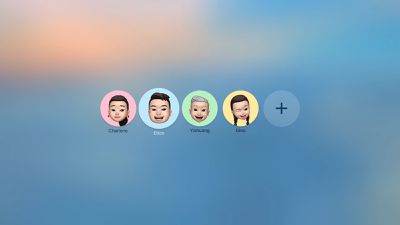
tvOS 26 Profiles
Fortunately, Apple lets you disable this prompt entirely. Here's how to turn off the user profiles screen and go straight to your Home screen.

Disable the User Profile Selection Screen

  1. Open Settings on your Apple TV.
  2. Select Profiles and Accounts.
  3. Toggle off Choose Profile on Wake.

With this setting disabled, your Apple TV will skip the profile selection screen and take you directly to the Home Screen when you wake it.

What Happens When You Disable Profile Switching

Turning off the profile switcher doesn't delete your user profiles or their associated watch history and recommendations. It simply removes the prompt that appears each time you turn on your TV or Apple TV.

If you share your Apple TV with others and want to switch profiles manually, you can still access profile options by going to Settings ➝ Users and Accounts and selecting a different user profile from there.

To learn more about how user profiles can be genuinely useful, check out our dedicated hands-on article.


Top Rated Comments

Mr Todhunter Avatar
9 weeks ago
I needed that. Thank you.
Score: 9 Votes (Like | Disagree)
9 weeks ago

This is the most redundant article ever. What kind of self loathing, split-personality narcissist would create multiple AppleID/iCloud accounts, then manually add and configure all those accounts on their AppleTV, even though they are the "sole user" of that AppleTV.
Am I a self loathing, split-personality narcissist because my family has four user accounts, but the Apple TV in my office is only used by me?

The one in the living room is used by the whole family, so the account selector is there, but not every room has multiple users.
Score: 7 Votes (Like | Disagree)
9 weeks ago
Also a useful tip for families that don’t bother with an ATV profile because all of the apps have their own profile selections (except ATV itself, of course)
Score: 6 Votes (Like | Disagree)
aespana Avatar
9 weeks ago
The first thing I did when the Apple TV auto updated it self was disabling this. My mother asked why there was a new screen of choosing profiles or faces and because that, she couldn't go to YouTube and use the app.
Score: 6 Votes (Like | Disagree)
9 weeks ago
Of all my Apple devices the Apple TV is by far the least user-friendly. The remote control is still an issue after all these years.

And the user profiles are so annoying because they don’t sync with the third party streaming apps.
Score: 6 Votes (Like | Disagree)
9 weeks ago
If this somehow integrated with all the apps so you wouldn't have to log into each other those then great. but its pointless to only have it on the apple tv home screen.. turned this off right away.
Score: 4 Votes (Like | Disagree)

Popular Stories

Apple Announces Special Event in New York Feature

Apple Announces Special Event in New York, London, and Shanghai on March 4

Monday February 16, 2026 6:05 am PST by
Apple today announced a "special Apple Experience" in New York, London, and Shanghai, taking place on March 4, 2026 at 9:00am ET. Apple invited select members of the media to the event in three major cities around the world. It is simply described as a "special Apple Experience," and there is no further information about what it may entail. The invitation features a 3D Apple logo design...
iphone 16 apple intelligence

Apple Aiming to Release 'Breakthrough' New iPhone Accessory

Wednesday February 18, 2026 12:43 pm PST by
Apple is looking for a "breakthrough" with its push into wearable AI devices, including an "AirTag-sized pendant," according to Bloomberg's Mark Gurman. In a report this week, he said the pendant is reminiscent of the failed Humane AI Pin, but it would be an iPhone accessory rather than a standalone product. The pendant would feature an "always-on" camera and a microphone for Siri voice...
CarPlay Liquid Glass Dark

iOS 26.4's New CarPlay Video Feature Shown in Action

Wednesday February 18, 2026 9:29 am PST by
Back at WWDC 2025, Apple revealed that it was planning to allow CarPlay users to watch video via AirPlay in their vehicles while they are not driving, and the first beta of iOS 26.4 suggests the feature may be nearing availability. There are several new references to CarPlay video streaming functionality within the iOS 26.4 beta's source code. The feature is not yet visible to users, but...
iphone 17 pro green

iPhone 17 Pro Max Curiously Becomes Most Traded-In Smartphone

Wednesday February 18, 2026 9:13 am PST by
New trade-in data indicates that Apple's iPhone 17 Pro Max has rapidly become the single most traded-in smartphone. According to a new report from SellCell, Apple's latest flagship iPhone has quickly risen to the top of the independent trade-in market, accounting for 11.5% of all devices appearing in the top-20 trade-in rankings just months after release. The analysis is based on SellCell...
Apple Announces Special Event in New York Feature 1

Apple Event on March 4: Here's What to Expect

Tuesday February 17, 2026 8:08 am PST by
Apple on Monday invited selected journalists and content creators to a "special Apple Experience" on Wednesday, March 4 in New York, London, and Shanghai. At an Apple Experience, attendees are typically given the opportunity to try out Apple's latest hardware or software. Following the launch of Apple Creator Studio last month, for example, some content creators attended an Apple Experience...