

How to Take a Slow-mo Selfie or 'Slofie' on iPhone 11, iPhone 11 Pro, and iPhone 11 Pro Max - MacRumors
Skip to Content

How to Take a Slow-mo Selfie or 'Slofie' on iPhone 11, iPhone 11 Pro, and iPhone 11 Pro Max

by

Apple's iPhone 11, iPhone 11 Pro, and iPhone 11 Pro Max all feature an updated 12-megapixel front-facing camera, along with a couple of notable additional shooting options that selfie fans should love.

appleslofies
The first addition is that you can now turn your iPhone to landscape mode to capture a wider shot, which is great for group selfies. The second is a new option that lets you take slow motion videos at 120 frames per second.

To market the latter feature exclusive to its 2019 iPhones, Apple invented a new word for it, combining slo-mo (the name long used for the 120fps function on the rear-facing camera) and selfie to form the word "Slofie."

Don't worry, though – "Slofie" isn't used to describe the feature in the iPhone 11's redesigned Camera app, where it's still referred to using the more sober term "Slo-mo." Follow the steps below to create your first Slofie.

  1. Launch the Camera app on your iPhone.
  2. Tap the perspective flip button below the viewfinder to activate the front-facing camera.
    camera app

  3. Swipe rightwards along the shooting mode options directly below the viewfinder until Slo-mo is highlighted in yellow.
  4. Take your slo-mo recording by tapping the red shutter button, then tap again to end it.
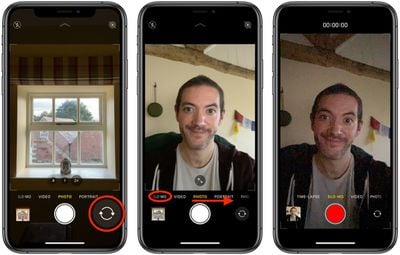
To view your Slofie, simply select it in the Photos app and it will play automatically. If you want, you can share it straight away using the Share button (the square with an arrow pointing out) and selecting one of several options from the Share Sheet.


Related Forum: iPhone

Popular Stories

iOS 26

iOS 26.4 Adds Two New Features to CarPlay

Tuesday March 24, 2026 1:55 pm PDT by
iOS 26.4 was released today, and it includes a couple of new features for CarPlay: an Ambient Music widget and support for voice-based chatbot apps. To update your iPhone 11 or newer to iOS 26.4, open the Settings app and tap on General → Software Update. CarPlay will automatically offer the new features so long as the iPhone connected to your vehicle is running iOS 26.4 or later....
Apple Business hero

Apple Unveils 'Apple Business' All-in-One Platform

Tuesday March 24, 2026 8:53 am PDT by
Apple today announced Apple Business, a new all-in-one platform that unifies device management, productivity tools, and customer outreach features. The service is designed to be a consolidated replacement for several of Apple's existing business-focused offerings, including Apple Business Essentials, Apple Business Manager, and Apple Business Connect. It provides organizations with a single...
AirPods Pro Firmware Feature

Apple Releases New Firmware for AirPods Pro 3, AirPods Pro 2 and AirPods 4

Tuesday March 24, 2026 12:31 pm PDT by
Apple today released new firmware for the AirPods Pro 2, AirPods Pro 3, and the AirPods 4. The firmware has a version number of 8B39, up from 8B34 on the AirPods Pro 3, 8B28 on the AirPods Pro 2, and 8B21 on the AirPods 4. There is no word on what's included in the firmware, but Apple has a support document with limited notes. Most updates are limited to bug fixes and performance...















