

How to Share Passwords With Friends and Family on iPhone and iPad - MacRumors
Skip to Content

How to Share Passwords With Friends and Family on iPhone and iPad

by

In iOS 17 and iPadOS 17, Apple has added the ability to securely share passwords and passkeys with friends and family members using a new shared password function. Here's how to use it.

iOS 17 Privacy and Security Improvements Feature
Family Passwords allows you to create a group of trusted contacts that you can share passwords and passkeys with across devices. (Passkeys let users sign in to apps and sites the same way they unlock their devices: With a fingerprint, a face scan or a screen lock PIN.)

Using the new feature, passwords and passkeys for shared media accounts, utilities, bills, and more can be provided to multiple people, and each person in the group can access, add to, and change passwords that are shared.

Here's how to create your first Family Passwords group in iOS 17 and iPadOS 17.

  1. Open the Settings app on your iPhone or iPad.
  2. Scroll down and tap Passwords.
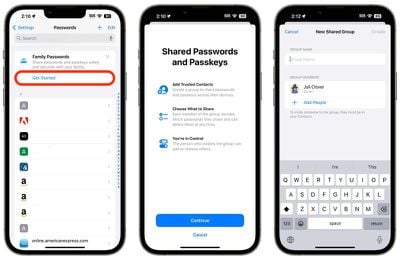
  3. Under the "Family Passwords" card, tap Get Started.
  4. Tap Continue.
  5. Add a Group Name for your shared group, then tap the Add People option to select trusted people from your contacts.
  6. When you're done, tap Create.
  7. Choose the passwords and passkeys you would like to move to the newly created group, then tap Move.
settings

Once you've moved passwords to the group, you can access them any time on your device by going to Settings -> Passwords -> Family Passwords. Here you can also manage the shared passwords, add or remove people from the group, and delete the group if it's no longer needed.

Note that the contacts you add to the group will need to have their devices updated to iOS 17 or iPadOS 17 and later before they can access Shared Password Groups.


Popular Stories

iphone 17 pro dark blue 1

Apple Preparing 'Most Significant Overhaul in the iPhone's History'

Sunday March 29, 2026 8:18 am PDT by
Bloomberg's Mark Gurman has high expectations for Apple's first foldable iPhone. In his Power On newsletter today, he said the foldable iPhone will be "the most significant overhaul in the iPhone's history." "iPhone 4, iPhone 6 and iPhone X were clearly a big deal, but this is a whole new design," he said. Like Samsung's Galaxy Z Fold 7, the foldable iPhone will reportedly open up like ...
Apple Event Logo

Apple to Launch These 15+ New Products Later This Year

Friday March 27, 2026 2:03 pm PDT by
March has been an incredibly busy month for Apple, with the company unveiling more than 10 new products and accessories. We said hello to the MacBook Neo at the start of the month, and we bid farewell to the Mac Pro at the end of it. Nevertheless, there is still a lot more to come this year. Beyond the usual annual updates to iPhones and Apple Watches, Apple's all-new smart home hub is...
Apple Apps Grid

Apple Releasing Two New iPhone Apps This Year

Saturday March 28, 2026 8:00 am PDT by
Apple is expected to release two new iPhone apps this year, including an Apple Business app and a Siri app with chatbot-like functionality. With the Apple Business app, employees at businesses using the new Apple Business platform will be able to install apps for work, view contact information for colleagues, and request support. Apple Business is launching on April 14, and it replaces Apple ...















