Skip to Content

How to Set Reading Goals in iOS 13

by

Apple Books iconIn iOS 13, Apple has added a new feature to its Books app that lets you keep track of how many minutes a day you spend reading and how many books you've read so far this year.

If you could benefit from some motivation to help you start a book and keep going until the end, then using Reading Goals could be the answer. When you hit your goal, you'll get a pop-up notification with the option to share it.

Setting up custom Reading Goals on your iPhone and iPad is easy. Here's how to go about it.

  1. Launch the Books app on your iOS device.
  2. Select the Reading Now tab if it's not already showing.
    how to set reading goals books app

  3. Scroll down to the bottom and tap the minutes shown under the Reading Goals header.
  4. Tap Adjust Goal.
  5. Using the onscreen roller, select the number of minutes you want to read per day, then tap Done.
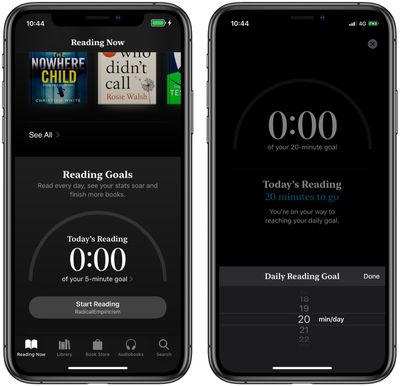
You can adjust the number of books you want to read this year in the same way, by tapping the books shown under the Books Read This Year section.

If you don't receive a notification when you hit your reading goal, notifications are probably switched off. To enable them, tap your account profile picture at the top of the Reading Now tab, tap Notifications, then toggle the switch next to Reading Goals to the green ON position.


Related Forum: iOS 13

Popular Stories

Apple Event Logo

Apple Released Seven New Products Today

Wednesday March 11, 2026 7:05 am PDT by
Starting today, the seven new Apple products that were announced last week are available at Apple Stores and beginning to arrive to customers. The colorful MacBook Neo and all of the other new products are on display at most Apple Store locations around the world starting today. Apple Stores have inventory of the new products for both walk-in customers and Apple Store pickup, but...
iOS 27 Mock Quick

10+ New Features Coming in iOS 27

Friday March 13, 2026 2:13 pm PDT by
We're only three months away from Apple's WWDC 2026 event, which will see the company unveil iOS 27. With the fully revamped version of Siri possibly delayed until September, iOS 27 is shaping up to be the update we wanted iOS 26 to be. There will be new Apple Intelligence features, updates for the iPhone Fold, and more, with the latest rumors summarized below. Foldable iPhone Features...
iOS 27 Mock Quick

iOS 27 Will Reportedly Be Like Mac OS X Snow Leopard

Sunday March 15, 2026 9:42 am PDT by
In his Power On newsletter today, Bloomberg's Mark Gurman reiterated that iOS 27 will be similar to 2009's Mac OS X Snow Leopard, in the sense that one of Apple's biggest priorities is bug fixes for improved performance and stability. During WWDC 2008's State of the Union, Apple showed a slide that said Mac OS X Snow Leopard had "0 new features," as it opted to focus on performance and...