Skip to Content

iOS 16: How to Set a Dynamic Weather Lock Screen Wallpaper

by

In iOS 16, Apple has introduced some major changes to its mobile operating system, including a complete overhaul of the Lock Screen experience.
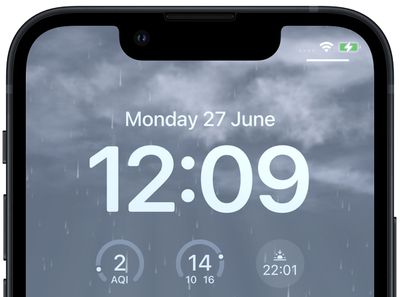
weather lock screen
One of Apple's aims in iOS 16 is to make personalization of your iPhone's Lock Screen a fun and rewarding experience that goes beyond just adding a wallpaper to it. To that end, Apple has made it possible for you to apply unique fonts, colors, filters, and, for the first time, add widgets to the Lock Screen.

Apple has also included a handful of dynamic Lock Screen wallpapers that adapt to specific real-world variables, including an astronomy wallpaper that shows the movement of the stars and a weather wallpaper that reflects current conditions.

The following steps show you how to set up a dynamic weather wallpaper on an ‌iPhone‌ running iOS 16.

  1. Unlock your ‌‌‌iPhone‌‌‌ with Face ID or Touch ID, then press and hold the Lock Screen.
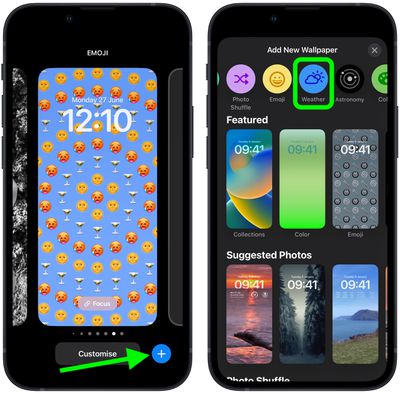
  2. Tap the blue + button, or swipe leftwards all the way to the end and then tap Add New.
  3. Tap the Weather button in the top row of options, or select the first wallpaper in the row under "Weather & Astronomy."
    Lock Screen

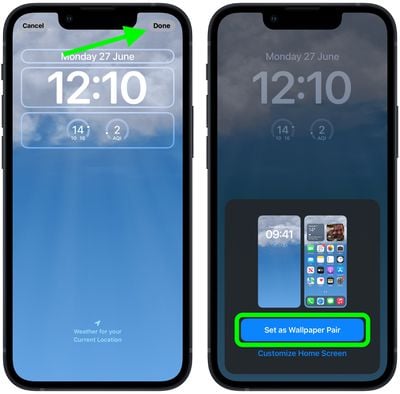
  4. When you're happy with the look and have added any widgets, tap Done in the top-right corner of the screen.
  5. To make the dynamic Weather wallpaper appear on both your Lock Screen and Home Screen, tap Set as Wallpaper Pair in the pop-up. Otherwise, tap Customize Home Screen to do so separately.
  6. Tap the Lock Screen you just created in the wallpaper gallery to activate it.
    Lock Screen

You can customize the current Lock Screen at any time by invoking the gallery view from the Lock Screen with a long press, or by going into Settings -> Wallpapers.


Popular Stories

MacBook Neo Feature Pastel 1

First MacBook Neo Benchmarks Are In: Here's How It Compares to the M1 MacBook Air

Thursday March 5, 2026 4:07 pm PST by
Benchmarks for the new MacBook Neo surfaced today, and unsurprisingly, CPU performance is almost identical to the iPhone 16 Pro. The MacBook Neo uses the same 6-core A18 Pro chip that was first introduced in the iPhone 16 Pro, but it has one fewer GPU core. The MacBook Neo earned a single-core score of 3461 and a multi-core score of 8668, along with a Metal score of 31286. Here's how the...
MacBook Neo Feature Pastel 1

Apple Announces $599 'MacBook Neo' With A18 Pro Chip

Wednesday March 4, 2026 6:15 am PST by
Apple today announced the "MacBook Neo," an all-new kind of low-cost Mac featuring the A18 Pro chip for $599. The MacBook Neo is the first Mac to be powered by an iPhone chip; the A18 Pro debuted in 2024's iPhone 16 Pro models. Apple says it is up to 50% faster for everyday tasks than the bestselling PC with the latest shipping Intel Core Ultra 5, up to 3x faster for on-device AI workloads,...
Multicolored Low Cost A18 Pro MacBook Feature

Apple Accidentally Leaks 'MacBook Neo'

Tuesday March 3, 2026 7:00 am PST by
Apple appears to have prematurely revealed the name of its rumored lower-cost MacBook model, which is expected to be announced this Wednesday. A regulatory document for a "MacBook Neo" (Model A3404) has appeared on Apple's website. Unfortunately, there are no further details or images available yet. While the PDF file does not contain the "MacBook Neo" name, it briefly appeared in a link...