How to Send High Resolution Photos and Videos in WhatsApp - MacRumors
Skip to Content

How to Send High Resolution Photos and Videos in WhatsApp

by

WhatsApp has rolled out a new option that lets users send photos and video over the messaging platform in high resolution. Keep reading to learn how it's done.

Whatsapp Feature
WhatsApp has released an update allowing iPhone and Android users to send photos and videos in high resolution, finally addressing the service's low quality media sharing limitation.

Called "HD quality," the option means users can send photos and videos that are clearer with minimal compression. Images captured on iPhone, for example, can now be sent in 3024 x 4032 resolution, rather than the previous maximum 920 x 1280 resolution, while video can be sent in 1280 × 718 resolution, rather than 848 × 476.

Recipients of HD photos/videos will see a HD label in the corner of the image, indicating that they have received a higher quality version, and all high resolution media is protected under WhatsApp's end-to-end encryption.

To get access to the feature, first update WhatsApp to the latest version, then follow these steps. (Note: If you don't see the HD option described below, the feature rollout has not yet gone live in your region.)

  1. In a chat thread, tap the Camera button.
  2. Select an image or video from your media library to send.
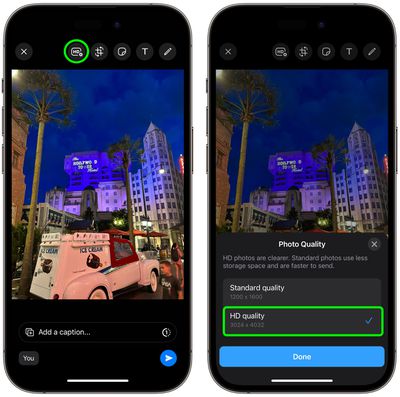
  3. Tap the HD button located at the top of the screen, left of the other image/video editing tools.
  4. Choose HD quality in the popup that appears, then tap Done.
  5. Tap the Send button.

whatsapp hd photos 1

According to Meta, if a user's internet connection is low bandwidth, they will receive photos and videos in Standard Quality, and will be able to choose to keep the standard version or upgrade it to HD where available.


Popular Stories

imac video apple feature

Apple Released Yet Another New Product Today

Friday March 20, 2026 2:39 pm PDT by
Apple has unveiled a whopping nine new products so far this March, including an iPhone 17e, iPad Air models with the M4 chip, MacBook Air models with the M5 chip, MacBook Pro models with M5 Pro and M5 Max chips, the all-new MacBook Neo, an updated Studio Display, a higher-end Studio Display XDR, AirPods Max 2, and now the Nike Powerbeats Pro 2. iPhone 17e features the same overall design as...
HomePod mini and Apple TV Sage

New Apple TV and HomePod Mini Remain 'Ready' to Launch

Sunday March 22, 2026 6:33 am PDT by
Apple has unveiled nine new products this month, but the wait continues for the next-generation Apple TV 4K and HomePod mini models. In his Power On newsletter today, Bloomberg's Mark Gurman said new versions of the Apple TV and HomePod mini have been "ready" since last year, but he reiterated that Apple has held off on releasing them until the more personalized version of Siri and other...
iOS 26

iOS 26.4 Adds Two New Features to CarPlay

Tuesday March 24, 2026 1:55 pm PDT by
iOS 26.4 was released today, and it includes a couple of new features for CarPlay: an Ambient Music widget and support for voice-based chatbot apps. To update your iPhone 11 or newer to iOS 26.4, open the Settings app and tap on General → Software Update. CarPlay will automatically offer the new features so long as the iPhone connected to your vehicle is running iOS 26.4 or later....