Once you've successfully paired your Powerbeats Pro earbuds to an iPhone or iPad, they'll be given the default name "[Your Name]'s ‌Powerbeats Pro‌." If you want, you can change this name by following the simple steps below.

powerbeatsproallcolors

How to Change the Name of Powerbeats Pro on iOS

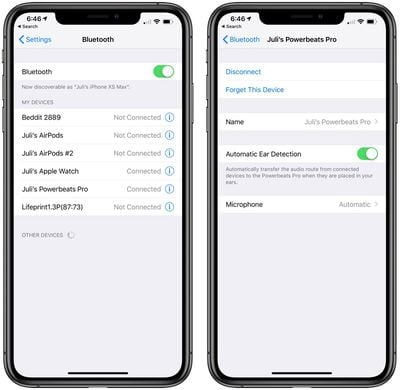
  1. On your iOS device, launch the Settings app.
  2. Tap Bluetooth.

  3. Tap the "i" icon next to your ‌Powerbeats Pro‌ in the My Devices list. renamepowerbeatspro
  4. At the next screen, tap Name and then input a new name for your earbuds using the onscreen virtual keyboard.
How to Change the Name of Powerbeats Pro on Mac

You can also rename your ‌Powerbeats Pro‌ earbuds on your Mac. Simply follow these steps to do so.

  1. On your Mac, launch System Preferences.
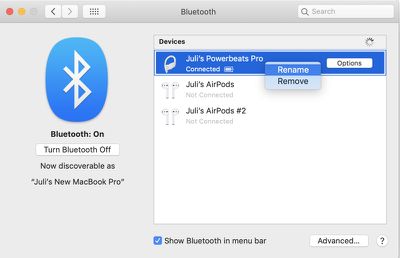
  2. Click the Bluetooth pane.
  3. With your ‌Powerbeats Pro‌ connected to your Mac, right-click them in the Devices list and then select Rename in the pop-up menu. renamepowerbeatspromac
  4. Type in a new name for your ‌Powerbeats Pro‌.
  5. Click the Rename button to confirm.

Note that the custom name you assign to your ‌Powerbeats Pro‌ earbuds will stay with them, so you'll be able to recognize them as such on any other devices you connect them to in future.

Popular Stories

imac video apple feature

Apple Unveils First New Products of 2026

Monday January 26, 2026 1:55 pm PST by
Apple today introduced its first two physical products of 2026: a second-generation AirTag and the Black Unity Connection Braided Solo Loop for the Apple Watch. Read our coverage of each announcement to learn more:Apple Unveils New AirTag With Longer Range, Louder Speaker, and More Apple Introduces New Black Unity Apple Watch BandBoth the new AirTag and the Black Unity Connection Braided...
iPhone 5s

iPhone 5s Gets New Software Update 13 Years After Launch

Monday January 26, 2026 3:56 pm PST by
Alongside iOS 26.2.1, Apple today released an updated version of iOS 12 for devices that are still running that operating system update, eight years after the software was first released. iOS 12.5.8 is available for the iPhone 5s and the iPhone 6, meaning Apple is continuing to support these devices for 13 and 12 years after launch, respectively. The iPhone 5s came out in September 2013,...
Second Generation AirTag Feature

Apple Unveils New AirTag With Longer Range, Louder Speaker, and More

Monday January 26, 2026 6:07 am PST by
Apple today introduced the second-generation AirTag, with key features including longer range for tracking items and a louder speaker. For those who are not familiar, the AirTag is a small accessory that you can attach to your backpack, keys, or other items. Then, you can track the location of those items in the Find My app on the iPhone, iPad, Mac, Apple Watch, and iCloud.com. The new...
Apple Creator Studio

Apple's Next Launch is Today

Tuesday January 27, 2026 2:39 pm PST by
Update: Apple Creator Studio is now available. Apple Creator Studio launches this Wednesday, January 28. The all-in-one subscription provides access to the Final Cut Pro, Logic Pro, Pixelmator Pro, Motion, Compressor, and MainStage apps, with U.S. pricing set at $12.99 per month or $129 per year. A subscription to Apple Creator Studio also unlocks "intelligent features" and "premium...
Apple Logo Spotlight

Apple to Launch These 20+ Products This Year

Sunday January 25, 2026 6:02 pm PST by
2026 promises to be yet another busy year for Apple, with the company rumored to be planning more than 20 product announcements over the coming months. Beyond the usual updates to iPhones, iPads, Macs, and Apple Watches, Apple is expected to release its all-new smart home hub, which was reportedly delayed until the more personalized version of Siri is ready. Other unique products rumored for ...