In iOS, Apple lets you disable individual Home Screen pages on your iPhone. It's also possible to rearrange the order of your ‌‌Home Screen‌‌ pages, and delete pages outright rather than merely disable them. Here's how it works.
ios 15 home screen icons yellow

How to Rearrange Home Screen Pages

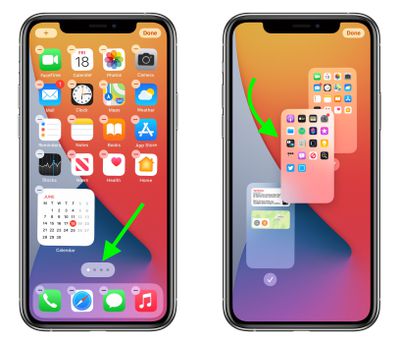
  1. Touch and hold a space on the ‌Home Screen‌ to enter jiggle mode.
  2. Tap the row of dots representing your ‌Home Screen‌ pages.
  3. In the ‌Home Screen‌ grid that appears, touch and drag a page to rearrange it in relation to your other pages. The others will move to make way in response to your drag action.
  4. Tap Done in the top-right corner of the screen when you're happy with the new arrangement, then tap Done again to exit jiggle mode.
Home Screen

How to Disable or Delete Home Screen Pages

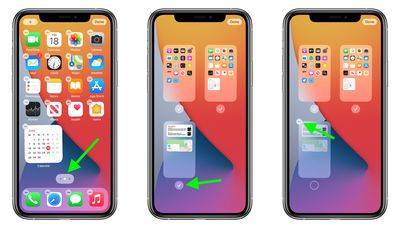
  1. Touch and hold a space on the ‌Home Screen‌ to enter jiggle mode.
  2. Tap the row of dots representing your ‌Home Screen‌ pages.
  3. In the ‌Home Screen‌ grid that appears, tap the checkmark next to a page to uncheck/disable it, or tap the minus (-) icon in the top-left corner of a page to delete it, then tap Delete in the prompt to confirm.
  4. Tap Done in the top-right corner of the screen when you're finished.
home screen
If you disable a ‌Home Screen‌ page, you can re-enable it by tapping the checkmark icon next to it again so that the checkmark reappears. When you delete a ‌Home Screen‌ page, the apps that were on the page are not deleted and remain in the App Library. You will have to drag them out of the App Library if you want to re-add them to the ‌Home Screen‌.

Top Rated Comments

adammusic Avatar
61 months ago
Just let us hide the App Library page that i will Never use ever.
Score: 11 Votes (Like | Disagree)
iDento Avatar
61 months ago
I wish I can set a different wallpaper for each page.
Score: 10 Votes (Like | Disagree)
upthetoffees Avatar
61 months ago
All I want to know is, can we get rid of the app library, I hate that thing so much. So many times scrolling to right when I don't use it.
Score: 10 Votes (Like | Disagree)
TheDailyApple Avatar
61 months ago
I didn’t like the App Library at first. However I then tried making do with just one Home Screen that contained some widgets and my most used apps and using the App Library for everything else. Once I started using the App Library it grew on me. All my most used apps are on top, and I can search for those I use more rarely.
Score: 8 Votes (Like | Disagree)
4jasontv Avatar
61 months ago

All I want to know is, can we get rid of the app library, I hate that thing so much. So many times scrolling to right when I don't use it.

Just let us hide the App Library page then i will Never use ever.
The App Library is born from good intentions, it's just poorly implemented. Apple has no idea how to categorize apps, and the developers can't be trusted to label them either. As a result, Todoist, FedEx, and Venmo get grouped together.

All they need is smart folders based on user-created tags.
Score: 8 Votes (Like | Disagree)
CubeHacker Avatar
61 months ago
Can I finally put app icons anywhere on the screen that I want?
Score: 3 Votes (Like | Disagree)

Popular Stories

iOS 26

iOS 26.3 and iOS 26.4 Will Add These New Features to Your iPhone

Tuesday February 3, 2026 7:47 am PST by
While the iOS 26.3 Release Candidate is now available ahead of a public release, the first iOS 26.4 beta is likely still at least a week away. Following beta testing, iOS 26.4 will likely be released to the general public in March or April. Below, we have recapped known or rumored iOS 26.3 and iOS 26.4 features so far. iOS 26.3 iPhone to Android Transfer Tool iOS 26.3 makes it easier...
imac video apple feature

Apple Makes Its Second-Biggest Acquisition Ever

Tuesday February 3, 2026 12:45 pm PST by
Apple recently acquired Israeli startup Q.ai for close to $2 billion, according to Financial Times sources. That would make this Apple's second-biggest acquisition ever, after it paid $3 billion for the popular headphone maker Beats in 2014. This is also the largest known Apple acquisition since the company purchased Intel's smartphone modem business and patents for $1 billion in 2019....
Apple Logo Zoomed

Tim Cook Teases Plans for Apple's Upcoming 50th Anniversary

Thursday February 5, 2026 12:54 pm PST by
Apple turns 50 this year, and its CEO Tim Cook has promised to celebrate the milestone. The big day falls on April 1, 2026. "I've been unusually reflective lately about Apple because we have been working on what do we do to mark this moment," Cook told employees today, according to Bloomberg's Mark Gurman. "When you really stop and pause and think about the last 50 years, it makes your heart ...
Apple TV Color

Apple TV Announces 12 New Shows and Films Coming This Year

Wednesday February 4, 2026 12:29 pm PST by
Apple on Tuesday previewed 12 new shows and films that will be premiering on the Apple TV streaming service throughout 2026. The new series: Imperfect Women — March 18, 2026 Margo's Got Money Troubles — April 15, 2026 Widow's Bay — April 29, 2026 Maximum Pleasure Guaranteed — May 20, 2026 Cape Fear — June 5, 2026 Lucky — July 15, 2026 The new films: Eternity — ...
iphone 16 pro colors 1

Apple Begins Selling Refurbished iPhone 16 and iPhone 16 Pro Models at Lower Prices

Wednesday February 4, 2026 7:44 am PST by
Apple today began selling certified refurbished iPhone 16, iPhone 16 Plus, iPhone 16 Pro, and iPhone 16 Pro Max models on its online store in the U.S., with prices discounted by 12% to 22% compared to Apple's current or former pricing for the devices. Here were Apple's starting prices when the devices launched in September 2024: iPhone 16: $799 iPhone 16 Plus: $899 iPhone 16 Pro:...