Despite strong competition from the likes of Telegram and Signal, WhatsApp remains the most popular mobile messaging platform by a mile, connecting over a billion active users around the world every day.

Whatsapp Feature
As a smartphone app, WhatsApp messages are principally exchanged between iPhones and Android phones, but WhatsApp is known to be developing an iPad app that would increase the number of active devices on the chat platform.

While the iPad app has yet to to launch, it is already possible to use WhatsApp on an ‌iPad‌ via the web without the iPhone associated with your account having to be connected to the internet. Keep reading to learn how it works.

WhatsApp on iPad

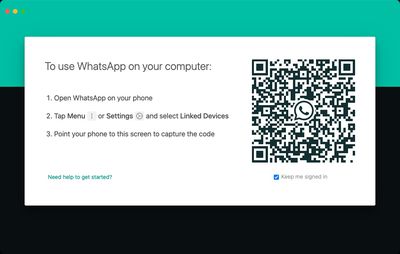
Previously, the WhatsApp mobile app was required to authenticate an account used on another device, such as a computer, and it used a QR code to link a user account to a web browser. While that initial link is still required, the connected phone that has the WhatsApp app on it is no longer required once the link has been made, which means you can continue to use WhatsApp on your ‌iPad‌ without needing your smartphone.

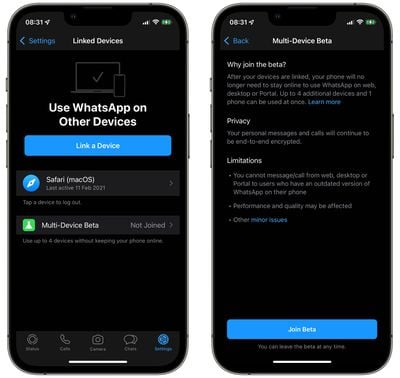
The following steps show you how to link your WhatsApp account to your ‌iPad‌ using the service's new Multi-Device support, currently in beta.

  1. Launch WhatsApp on your ‌iPhone‌.
  2. Select Settings -> Linked Devices.
  3. Tap Multi-Device Beta, then tap the blue Join Beta button.
  4. Tap Back and select Link a Device on the previous screen.
    whatsapp multi device support

  5. On your ‌iPad‌, open Safari or another web browser and go to web.whatsapp.com, then scan the QR code that appears using your ‌iPhone‌.
    whatsapp

After following these steps your device will be linked to your WhatsApp account, and you'll be able to access WhatsApp on your ‌iPad‌ to send and receive messages and view chat threads, without needing to rely on your phone being connected to the internet.

Bear in mind that it's not currently possible to delete WhatsApp messages or conversation threads from your ‌iPad‌. It's also worth noting that you won't get new message notifications on your ‌iPad‌ when you're not using the web app. On the plus side, personal calls and messages remain end-to-end encrypted across devices.

If you don't use your ‌iPhone‌ for over 14 days, your ‌iPad‌ will be disconnected. Lastly, given that the feature is still in beta, WhatsApp cautions that the performance and quality of its service may be affected, although happily, users can leave the beta at any time.


Popular Stories

iPhone Top Left Hole Punch Face ID Feature Purple

iPhone 18 Pro Launching Later This Year With These 12 New Features

Thursday January 15, 2026 10:56 am PST by
While the iPhone 18 Pro and iPhone 18 Pro Max are not expected to launch for another eight months, there are already plenty of rumors about the devices. Below, we have recapped 12 features rumored for the iPhone 18 Pro models, as of January 2026: The same overall design is expected, with 6.3-inch and 6.9-inch display sizes, and a "plateau" housing three rear cameras Under-screen Face ID...
Apple MacBook Pro M4 hero

These 5 Apple Products Will Reportedly Be Upgraded With OLED Displays

Friday January 16, 2026 7:07 pm PST by
Apple plans to upgrade the iPad mini, MacBook Pro, iPad Air, iMac, and MacBook Air with OLED displays between 2026 and 2028, according to DigiTimes. Bloomberg's Mark Gurman previously reported that the iPad mini and MacBook Pro will receive an OLED display as early as this year, but he does not expect the MacBook Air to adopt the technology until 2028 at the earliest. A new iPad Air is...
iOS 27 Mock Quick

iOS 27 Will Add These 8 New Features to Your iPhone

Sunday January 18, 2026 3:51 pm PST by
iOS 27 is still many months away, but there are already plenty of rumors about new features that will be included in the software update. The first beta of iOS 27 will be released during WWDC 2026 in June, and the update should be released to all users with a compatible iPhone in September. Bloomberg's Mark Gurman said that iOS 27 will be similar to Mac OS X Snow Leopard, in the sense...
Apple Wallet ID Illinois

Apple Plans to Expand iPhone Driver's Licenses to These 7 U.S. States

Friday January 16, 2026 12:12 pm PST by
In select U.S. states, residents can add their driver's license or state ID to the Apple Wallet app on the iPhone and Apple Watch, and then use it to display proof of identity or age at select airports and businesses, and in select apps. The feature is currently available in 13 U.S. states and Puerto Rico, and it is expected to launch in at least seven more in the future. To set up the...
14 inch MacBook Pro Keyboard

MacBook Pro Buyers Now Facing Up to a Two-Month Wait Ahead of New Models

Sunday January 18, 2026 6:50 pm PST by
MacBook Pro availability is tightening on Apple's online store, with select configurations facing up to a two-month delivery timeframe in the United States. A few 14-inch and 16-inch MacBook Pro configurations with an M4 Pro chip are not facing any shipping delay, but estimated delivery dates for many configurations with an M4 Max chip range from February 6 to February 24 or even later. At...