Skip to Content

iOS 15: How to Hide App Notification Badges on the Home Screen

by

In iOS 15, Apple includes a new feature called Focus that's designed to help you reduce distractions for a set time. It's a useful tool to have at your fingertips when you want to be left alone to concentrate on something or simply rest.
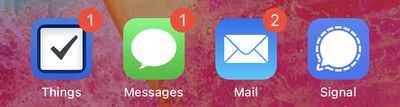
notification badges
With a pre-set Focus mode enabled, you can filter or hide incoming notifications, including notification badges for all apps on your device's Home Screen. The following steps show you how to hide notification badges on your iPhone and iPad.

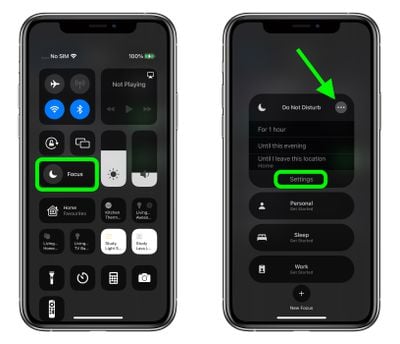
  1. Open Control Center by swiping down diagonally from the top-right corner of the screen.
  2. Tap the Focus button.
  3. Tap the ellipsis (three dots) button next to a Focus mode, then select Settings in the dropdown.
    focus

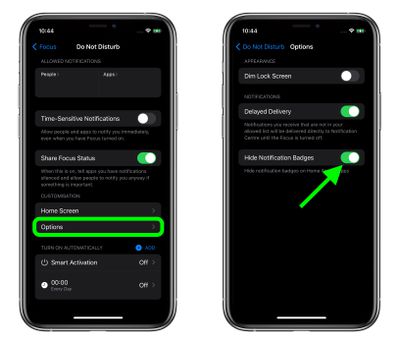
  4. Under "Customization," tap Options.
  5. Tap the switch next to Hide Notification Badges to enable the option.
    Focus

  6. Now open Control Center again, tap Focus, then enable the Focus mode for which you just opted to hide notification badges.
Note that when you have a Focus mode enabled, it syncs across Apple devices, so the same settings will apply to your Mac as well as your iPhone or ‌iPad‌, for example.

Related Forum: iOS 15

Popular Stories

Apple Event Logo

Apple Released Seven New Products Today

Wednesday March 11, 2026 7:05 am PDT by
Starting today, the seven new Apple products that were announced last week are available at Apple Stores and beginning to arrive to customers. The colorful MacBook Neo and all of the other new products are on display at most Apple Store locations around the world starting today. Apple Stores have inventory of the new products for both walk-in customers and Apple Store pickup, but...
iOS 27 Mock Quick

10+ New Features Coming in iOS 27

Friday March 13, 2026 2:13 pm PDT by
We're only three months away from Apple's WWDC 2026 event, which will see the company unveil iOS 27. With the fully revamped version of Siri possibly delayed until September, iOS 27 is shaping up to be the update we wanted iOS 26 to be. There will be new Apple Intelligence features, updates for the iPhone Fold, and more, with the latest rumors summarized below. Foldable iPhone Features...
Apple 50 Years of Thinking Different

Apple Announces 50th Anniversary Plans

Thursday March 12, 2026 6:10 am PDT by
Apple today announced that it will celebrate the company's 50th anniversary over the coming weeks, but it has yet to reveal any specific plans. Apple was founded on April 1, 1976, so the company will turn 50 on April 1, 2026. "While Apple is known for looking forward, this milestone offers a special moment to reflect on the journey that has brought the company here, to celebrate the...