

In macOS, tags provide you with an alternative way to organize your files and folders, and can make items in Finder easier to locate. To tag a file in Finder, simply right-click (or Ctrl-click) it and select one of the colored tags in the dropdown menu.
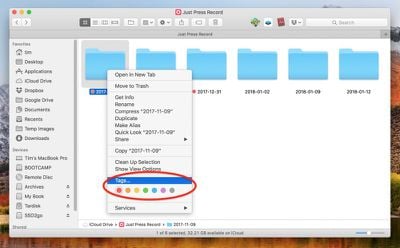
Add a Finder tag
Alternatively, click on Tags... in the same dropdown menu, type in a custom name for a tag, press Enter, and a new tag will be created automatically, ready to be applied again from the dropdown.

How to Customize Tags and Search for Tagged Items

You can customize which tags appear in the dropdown menu by clicking Preferences... in the Finder menu bar, selecting the Tags tab, and dragging your favorite tags to the area at the bottom of the pane.
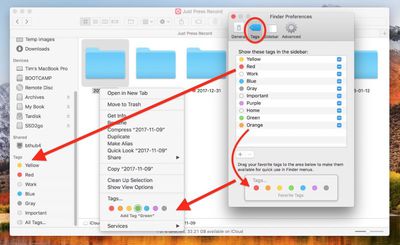
customize tags
You can also create new tags and remove unused ones using the + and - buttons, right-click tags to rename them or change their color, and tick the checkboxes next to them to select which ones appear in the Finder sidebar, because that's where tags show their true worth.
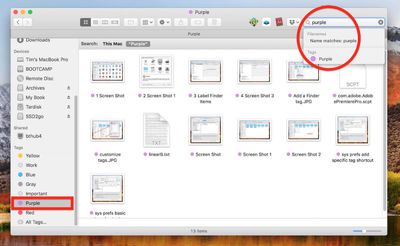
searching for tags
For instance, click a tag in the Finder sidebar, and all the files and folders assigned with that tag will appear in the Finder window, regardless of where they're located on your Mac. You can also search for a tag by entering the tag color or name in Finder's search field, then selecting a tag from the suggestions.

How to Tag Open Files You're Working On

Don't forget, in many macOS applications you can tag the open file you're actively working on. Simply click the arrow next to the document name in the title bar, click in the Tags field and enter a new tag, or select one from the dropdown list.
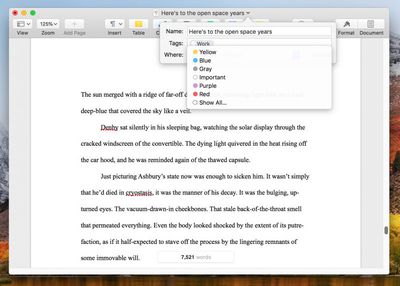
add tags in open files
Similarly, you can also tag new files when you save them. Just select File -> Save from the application's menu bar, and in the Save dialog, click inside the Tags field and enter a new tag, or select one from the list.
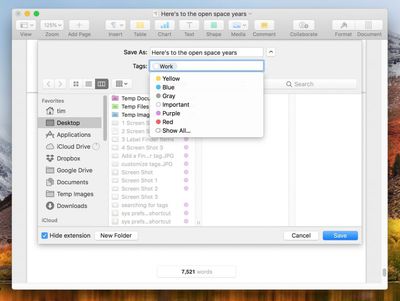
add tags when saving files
Finally, if you don't have a Finder window open, you might find it more convenient to consult Siri to locate all the files that you've assigned a particular tag.
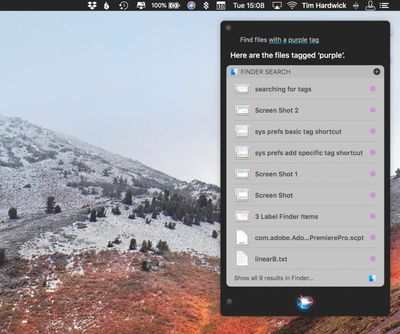
siri find tags
Click the Siri icon in your Mac's menu bar or press Command-Space, then say something like: "Find files with a purple tag." Siri should deliver your results including an option at the bottom to open the tagged files in a Finder window.


Top Rated Comments

Peeetski Avatar
102 months ago
I really can’t get into tags. I wish they hadn’t replaced the old labels with them, they were way more helpful I reckon.
(I appreciate the tips though, thanks!)
Score: 7 Votes (Like | Disagree)
chucker23n1 Avatar
102 months ago
Can you search tags with complex criteria? Example: red or blue tag, and green tag, but no yellow tag, image file, with “project” in the name.
Yes.

Can you save commonly used complex searches?
Yes.

Can you nest tags under other tags like in evernote?
I don't believe so. Nor am I sure that kind of complexity would be a good idea.
[doublepost=1523482212][/doublepost]
What’s lacking is tag support in Mail. Tags in the file system are fantastic, but it would be so much more valuable if we could tag more than files. It gives an organizational structure beyond the folder heirarchy.
I hear MailTags works OK.

Attachment Image

Attachment Image
Score: 6 Votes (Like | Disagree)
flat five Avatar
102 months ago
not mentioned in the article but helpful as well (at least for me personally)—

you can apply multiple tags to the same file.
Score: 5 Votes (Like | Disagree)
tardegrade Avatar
102 months ago
Keep going with these articles. They might be simple things, but sometimes it's good to be reminded about something that you've forgotten about.

Case in point, my file system is a disaster at the moment. And a few tags will be helpful until I get around to sorting it out.
Score: 4 Votes (Like | Disagree)
Blackstick Avatar
102 months ago
Back in the good ole days when Apple actually cared about macOS, tags were labels

I rather preferred it that way.
Score: 3 Votes (Like | Disagree)
opeter Avatar
102 months ago
Back in the good ole days when Apple actually cared about macOS, tags were labels

I rather preferred it that way.
Absolutely. Remember the good old days ...


... and:
Score: 3 Votes (Like | Disagree)

Popular Stories

iPhone Top Left Hole Punch Face ID Feature Purple

iPhone 18 Pro Launching Later This Year With These 12 New Features

Thursday January 15, 2026 10:56 am PST by
While the iPhone 18 Pro and iPhone 18 Pro Max are not expected to launch for another eight months, there are already plenty of rumors about the devices. Below, we have recapped 12 features rumored for the iPhone 18 Pro models, as of January 2026: The same overall design is expected, with 6.3-inch and 6.9-inch display sizes, and a "plateau" housing three rear cameras Under-screen Face ID...
Apple MacBook Pro M4 hero

These 5 Apple Products Will Reportedly Be Upgraded With OLED Displays

Friday January 16, 2026 7:07 pm PST by
Apple plans to upgrade the iPad mini, MacBook Pro, iPad Air, iMac, and MacBook Air with OLED displays between 2026 and 2028, according to DigiTimes. Bloomberg's Mark Gurman previously reported that the iPad mini and MacBook Pro will receive an OLED display as early as this year, but he does not expect the MacBook Air to adopt the technology until 2028 at the earliest. A new iPad Air is...
Apple Wallet ID Illinois

Apple Plans to Expand iPhone Driver's Licenses to These 7 U.S. States

Friday January 16, 2026 12:12 pm PST by
In select U.S. states, residents can add their driver's license or state ID to the Apple Wallet app on the iPhone and Apple Watch, and then use it to display proof of identity or age at select airports and businesses, and in select apps. The feature is currently available in 13 U.S. states and Puerto Rico, and it is expected to launch in at least seven more in the future. To set up the...
iOS 27 Mock Quick

iOS 27 Will Add These 8 New Features to Your iPhone

Sunday January 18, 2026 3:51 pm PST by
iOS 27 is still many months away, but there are already plenty of rumors about new features that will be included in the software update. The first beta of iOS 27 will be released during WWDC 2026 in June, and the update should be released to all users with a compatible iPhone in September. Bloomberg's Mark Gurman said that iOS 27 will be similar to Mac OS X Snow Leopard, in the sense...
14 inch MacBook Pro Keyboard

MacBook Pro Buyers Now Facing Up to a Two-Month Wait Ahead of New Models

Sunday January 18, 2026 6:50 pm PST by
MacBook Pro availability is tightening on Apple's online store, with select configurations facing up to a two-month delivery timeframe in the United States. A few 14-inch and 16-inch MacBook Pro configurations with an M4 Pro chip are not facing any shipping delay, but estimated delivery dates for many configurations with an M4 Max chip range from February 6 to February 24 or even later. At...












