How to Enable Dark Mode in iOS 13 - MacRumors
Skip to Content

How to Enable Dark Mode in iOS 13

by

In iOS 13, Apple has included a system-wide Dark Mode option similar to the one it brought to the Mac in 2018 with the release of macOS Mojave.
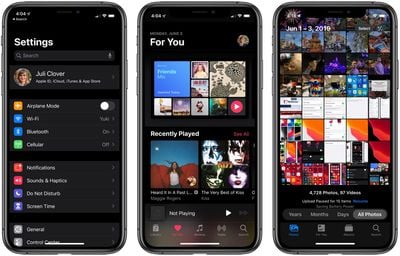
darkmodesettingsmusicphotos
‌Dark Mode‌ is designed to be easier on the eyes by providing less harsh display brightness in situations where ambient lighting is lower, while maintaining contrast and vibrancy.

If you have an OLED iPhone, such as an iPhone X, iPhone XS, or iPhone XS Max, enabling ‌Dark Mode‌ may also conserve battery life whenever true blacks are on screen, since black pixels in an ‌OLED‌ panel basically switch off and consume far less power.

Enabling ‌Dark Mode‌ in iOS 13 is easy – simply follow the steps below.

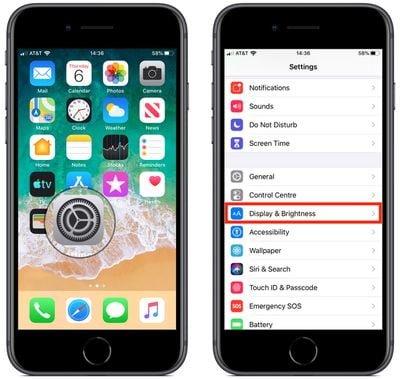
  1. Launch the Settings app on your iPhone or iPad.how to enable dark mode in ios 13 0
  2. Tap Display & Brightness.how to enable dark mode in ios 13 1
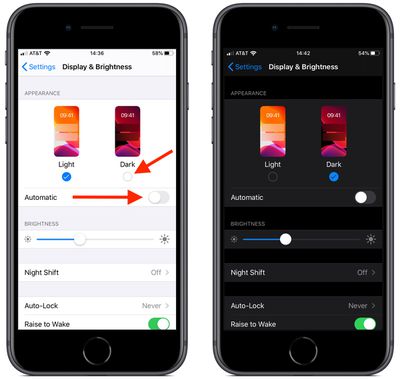
  3. Under Appearance, tap Dark to switch to ‌Dark Mode‌.

Note that the Display & Brightness settings screen also includes an Automatic switch that you can toggle – doing so will cause your device to automatically enable ‌Dark Mode‌ at sunset, and Light Mode at sunrise.

Alternately, you can set a custom schedule for the display change by using the Options menu that appears when you toggle on the Automatic switch.

Related Forum: iOS 13

Top Rated Comments

Chazzle Avatar
95 months ago
Also, through Control Center. Long press or force touch on the brightness controls, then toggle light or dark mode.

Score: 19 Votes (Like | Disagree)
TMRJIJ Avatar
95 months ago
Batman and I are very pleased with this feature.


Attachment Image
Score: 9 Votes (Like | Disagree)
QCassidy352 Avatar
95 months ago
Used dark mode for about a day on mojave, then forgot it existed. I’m glad it’s there for those who want it, but I really don’t see the big deal.
Score: 6 Votes (Like | Disagree)
95 months ago
I’m very happy to hear it can be activated by sunset. Did they add that function to Catalina?
Yes.
Score: 6 Votes (Like | Disagree)
95 months ago
You know it’s official when MR makes a how to on it. Long time coming!
Especially when it’s not even available yet for the masses in September.....
Score: 6 Votes (Like | Disagree)
DogHouseDub Avatar
95 months ago
I feel the same way about dark mode as I do about condiment bottles that stand on the lid. Awesome, but aren’t we a little embarrassed about how long it took?
Score: 5 Votes (Like | Disagree)

Popular Stories

8 CarPlay Features in iOS 27 Feature

Which iOS 27 CarPlay Features Actually Work in Your Car?

Thursday September 17, 2026 4:17 am PDT by
In iOS 27, available now, CarPlay gets its biggest update in years, but some features depend on what type of car you have rather than your iPhone model. Some of the biggest additions won't do anything in the vast majority of vehicles on the road today. Here's how the new features pan out. Works in Any CarPlay Vehicle Custom widgets: In iOS 27, CarPlay is no longer limited to Apple's handful ...
Apple Watch New Charging Puck

Here's Why a New Apple Watch Charging Puck Was Just Released

Wednesday September 16, 2026 8:53 am PDT by
The new Apple Watch Series 12 and Apple Watch Ultra 4 have hardware changes that allow for faster charging, but you will need to use the new version of the Apple Watch Magnetic Fast Charger included in the box in order to achieve this boost. If you need extra ones for your own charging stands or travel or so forth, Apple released the new version of the charger on its online store last week, with...
ios272anniversary

iOS 27.2 Could Save Your Marriage

Wednesday September 16, 2026 1:32 pm PDT by
The iOS 27.2 beta that Apple released today adds a feature that reminds you it's your anniversary when you call someone, as long as you've added the date in the Contacts app. On the date of your anniversary, when you go to call the person, you'll see a reminder that it's an important day so you don't forget to say something. The anniversary alert uses Call Context, a feature Apple added in...