In iOS 17, Apple has added a handy little list function to the Reminders app to help you when you're out to pick up some groceries. Keep reading to learn how to use it and make short work of your trip to the store.
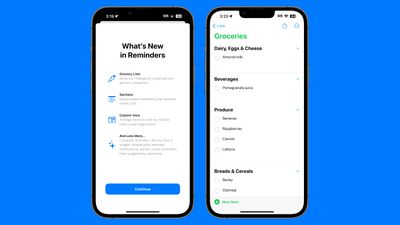
When you create a list with the new "Groceries" list type (named "Shopping" outside the U.S), you can input various foods and sundries and have them organized automatically by category. The organization makes it easier to find what you need when you're at the grocery store, or out shopping.
The available category types in Reminders include Produce, Breads & Cereals, Frozen Foods, Snacks & Candy, Meat, Dairy, Eggs & Cheese, Bakery, Baking Items, Household Items, Personal Care & Health, and Wine, Beer & Spirits.
Here's how to create a Shopping or Groceries reminder list in iOS 17.
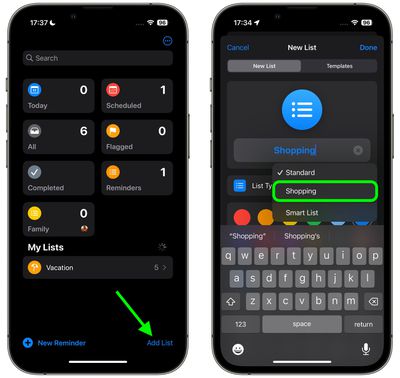
- In the Reminders app, tap Add List.
- Give your list a name, an optional color and icon, and tap the "List Type" and choose Groceries (or Shopping), then tap Done.

- Start populating your Groceries list with items. As you add different category types, the Reminders app will prompt you to move certain items to specific categories. Tap the option in blue to move the item.
- When you've finished your list, it should be organized into separate categories, making it easier to find the related items in the same areas of the store.
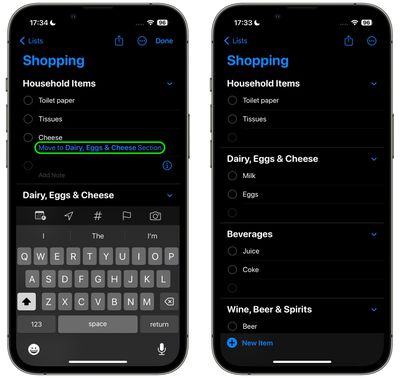
If the iPhone doesn't recognize where an item should go, it remains uncategorized. Note that it will recognize specific brands and types of food like "Sour Patch Kids," so it is a fairly robust solution for grocery shopping.
You can also create your own categories in the grocery list. Simply tap the three dots in a circle icon and select New Section in the dropdown. You can then tap on the new section to give it an identifying name.