In macOS Sonoma 14.1 and later, it's easy to find up-to-date information about your Mac's warranty or AppleCare plan, as well as the warranty status of any AirPods and/or Beats headphones that you own and have paired to the Mac. You can check whether your device is covered and see what kinds of repair and support are included with your cover. You can also find your agreement number, proof of purchase and expiry date.

applecare plus for mac 2021
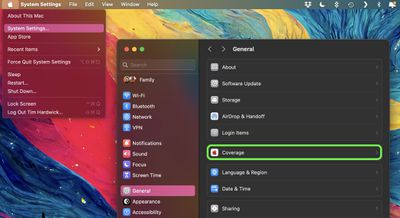
To get information on your Mac's warranty status and/or ‌AppleCare‌+ plan, first make sure your Mac's software is updated to macOS Sonoma 14.1 or later (System Settings ➝ General ➝ Software Update) then follow these steps:

  1. Click the Apple symbol () in the menu bar and select System Settings....
  2. Select General in the side column
  3. Select Coverage.
  4. Click the option under "This Device" to see your Mac warranty information, or click the options under "More Devices" for selected Bluetooth-paired devices.
settings
Apple includes a minimum one-year limited warranty with all hardware and up to 90 days of technical support, so if a manufacturing defect arises within this period, you're automatically covered. If your Mac still comes under Apple's Limited Warranty, you'll see the time remaining before it runs out.

‌AppleCare‌+ for Mac provides unlimited incidents of accidental damage protection every 12 months, each subject to a service fee of $99 for screen damage or external enclosure damage, or $299 for other damage. Customers with an active ‌AppleCare‌+ plan also have 24/7 priority access to Apple's technical support representatives by online chat or phone. If you have purchased ‌AppleCare‌+, the length of your plan will appear on the left of the window.

To get further information on your Mac's coverage, click the Details... button in the device information window. This will take you to mysupport.apple.com, where you can see details about the support that you're eligible for, including hardware repairs and technical support.

For chat and phone support, click the Get Support... button in the device information window. This will take you to mysupport.apple.com, where you can search troubleshooting topics or connect to Apple Support by phone, chat, or email.

Apple allows ‌AppleCare‌+ coverage for Macs to be extended indefinitely in the United States. After paying upfront for an ‌AppleCare‌+ plan for a Mac, the initial coverage period remains three years, but customers now have the option to purchase additional coverage that automatically renews annually until canceled. The new coverage must be purchased within 30 days of the end date of the original coverage, according to Apple.

Previously, there was no way to extend ‌AppleCare‌+ coverage for a Mac once the initial three-year coverage window elapsed. Note that ‌AppleCare‌+ coverage for Mac remains capped at three years outside of the United States.

Popular Stories

top stories 2025 12 20

Top Stories: iOS 26.3 Beta, Major Apple Leaks, and More

Saturday December 20, 2025 6:00 am PST by
You'd think things would be slowing down heading into the holidays, but this week saw a whirlwind of Apple leaks and rumors while Apple started its next cycle of betas following last week's release of iOS 26.2 and related updates. This week also saw the release of a new Apple Music integration with ChatGPT, so read on below for all the details on this week's biggest stories! Top Stories i...
iPhone Top Left Hole Punch Face ID Feature Purple

iPhone 18 Pro Features Leaked in New Report, Including Under-Screen Face ID

Tuesday December 16, 2025 8:44 am PST by
Next year's iPhone 18 Pro and iPhone 18 Pro Max will be equipped with under-screen Face ID, and the front camera will be moved to the top-left corner of the screen, according to a new report from The Information's Wayne Ma and Qianer Liu. As a result of these changes, the report said the iPhone 18 Pro models will not have a pill-shaped Dynamic Island cutout at the top of the screen....
ios 18 security update

Don't Want to Upgrade to iOS 26? Here's How to Stay on iOS 18 [Update: Now Unavailable]

Friday December 19, 2025 10:37 am PST by
Since the beginning of December, Apple has been pushing iPhone users who opted to stay on iOS 18 to install iOS 26 instead. Apple started by making the iOS 18 upgrades less visible, and has now transitioned to making new iOS 18 updates unavailable on any device capable of running iOS 26. If you have an iPhone 11 or later, Apple is no longer offering new versions of iOS 18, even though there...
maxresdefault

Where's the New Apple TV?

Monday December 22, 2025 11:30 am PST by
Apple hasn't updated the Apple TV 4K since 2022, and 2025 was supposed to be the year that we got a refresh. There were rumors suggesting Apple would release the new Apple TV before the end of 2025, but it looks like that's not going to happen now. Subscribe to the MacRumors YouTube channel for more videos. Bloomberg's Mark Gurman said several times across 2024 and 2025 that Apple would...
apple beta 26 lineup

Apple's 2026 and 2027 Product Roadmap: Foldable iPhone, iPhone 18 Pro, M5 Macs, and More

Tuesday December 16, 2025 4:42 pm PST by
There has been a whirlwind of rumors over the last few days, sourced from leaked internal software designed for the iPhone and the Mac, and news sites like The Information. Below, we have a quick recap of everything we've heard this week, which serves as a guide to Apple's product plans in 2026 and beyond. We've organized the info by likely release date, though there are some products that...
apple beta 26 lineup

Apple Leak Confirms Work on Foldable iPhone, AirTag 2, and Dozens More Devices

Monday December 15, 2025 2:05 pm PST by
Last week, details about unreleased Apple devices and future iOS features were shared by Macworld. This week, we learned where the information came from, plus we have more findings from the leak. As it turns out, an Apple prototype device running an early build of iOS 26 was sold, and the person who bought it shared the software. The OS has a version number of 23A5234w, and the first...