

In macOS, when you use the screenshot keyboard shortcuts or the capture tool to grab something on your Mac's screen, the images are saved with a default filename, such as "Screen Shot [date] at [time].png."
screenshot
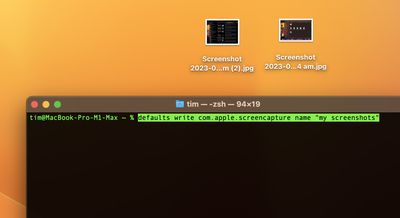
If you work with screenshots a lot, this file naming scheme may not be to your taste. But thanks to a simple Terminal command, you can change this default name to something more useful. The following steps show you how it's done.

  1. Launch the Terminal app (found in Applications/Utilities).
  2. Input the following command, and type your desired screenshot filename inside the double quote marks, then hit Enter: defaults write com.apple.screencapture name "my screenshots"

That's all there is to it. Try taking a screenshot to see your new image filename in action. Subsequent shots saved in the same location will automatically take a bracketed number – (2) or (3) for example – to differentiate them from each other.

If you want to revert back to the default screenshot filename, use the following Terminal command: defaults write com.apple.screencapture "include-date" 1; killall SystemUIServer

Did you know that you can also change the default file format of screenshots as well as the location where they are saved? Follow the links to learn how it's done.


Popular Stories

imac video apple feature

Apple Unveils First New Products of 2026

Monday January 26, 2026 1:55 pm PST by
Apple today introduced its first two physical products of 2026: a second-generation AirTag and the Black Unity Connection Braided Solo Loop for the Apple Watch. Read our coverage of each announcement to learn more:Apple Unveils New AirTag With Longer Range, Louder Speaker, and More Apple Introduces New Black Unity Apple Watch BandBoth the new AirTag and the Black Unity Connection Braided...
Second Generation AirTag Feature

Apple Unveils New AirTag With Longer Range, Louder Speaker, and More

Monday January 26, 2026 6:07 am PST by
Apple today introduced the second-generation AirTag, with key features including longer range for tracking items and a louder speaker. For those who are not familiar, the AirTag is a small accessory that you can attach to your backpack, keys, or other items. Then, you can track the location of those items in the Find My app on the iPhone, iPad, Mac, Apple Watch, and iCloud.com. The new...
iPhone 5s

iPhone 5s Gets New Software Update 13 Years After Launch

Monday January 26, 2026 3:56 pm PST by
Alongside iOS 26.2.1, Apple today released an updated version of iOS 12 for devices that are still running that operating system update, eight years after the software was first released. iOS 12.5.8 is available for the iPhone 5s and the iPhone 6, meaning Apple is continuing to support these devices for 13 and 12 years after launch, respectively. The iPhone 5s came out in September 2013,...
M5 MacBook Pro

Apple Reportedly Aiming to Upgrade the MacBook Pro Twice This Year

Sunday January 25, 2026 11:46 am PST by
Apple plans to release new MacBook Pro, MacBook Air, Mac Studio, and Studio Display models in the first half of this year, according to Bloomberg's Mark Gurman. In his Power On newsletter today, Gurman added that redesigned MacBook Pro models with an OLED touch screen "should be hitting toward the end of 2026," meaning that the MacBook Pro line would be upgraded twice this year. First up...
Apple Logo Spotlight

Apple to Launch These 20+ Products This Year

Sunday January 25, 2026 6:02 pm PST by
2026 promises to be yet another busy year for Apple, with the company rumored to be planning more than 20 product announcements over the coming months. Beyond the usual updates to iPhones, iPads, Macs, and Apple Watches, Apple is expected to release its all-new smart home hub, which was reportedly delayed until the more personalized version of Siri is ready. Other unique products rumored for ...















