Skip to Content

Change iPhone's Default Notification Sound

by

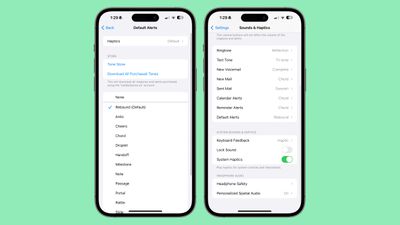
In iOS 17.2 and later, Apple lets you customize the alert tone used by your iPhone for default notifications. This is good news for anyone who does not like the "Rebound" tone that Apple introduced in iOS 17.
ios 17 default alert
In previous versions of iOS, Apple allowed users to choose a ring tone and a text tone, as well as custom alert sounds for email, calendar, and reminder alerts. Anything else that threw up notifications used a default sound, and there was no way to change it.

With iOS 17, Apple then changed the original default alert sound, from "Tri-tone" to "Rebound." Many users disliked the change, with some arguing that the new sound is harder to hear. So the ability in iOS 17.2 and later to change the default sound to whatever you like is a welcome addition.

To change the tone - as well as the haptic vibration – of notifications from apps that use the default sound, follow these steps.

  1. Open the Settings app on your iPhone.
  2. Tap Sounds & Haptics.
  3. Select Default Alerts.
  4. Choose a sound for the alert tone. You can use one from Apple's built-in options, buy a tone from the Tone Store, or opt for no sound (None) instead.
  5. To change the accompanying haptic vibration, tap through to Haptics. There you can choose a vibration from the pre-set options, make your own via Create New Vibration, or opt for None.
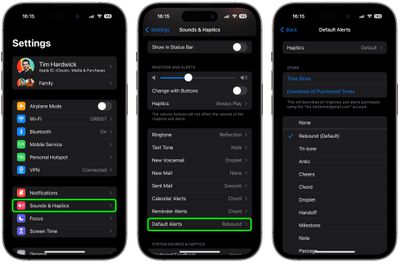
settings

After completing the steps above, any notification sound that uses the default alert tone will use the sound you selected. If you're not happy with your changes, you can use the same steps to revert to the original "Rebound" default alert.
Popular Stories

macbook air blue

What's Coming in the M5 MacBook Air

Thursday February 26, 2026 3:57 pm PST by
Along with the low-cost MacBook, Apple could introduce a refreshed version of the MacBook Air next week. Most of the focus will be on the new machine, but the MacBook Air is expected to get some useful internal updates. M5 Chip The next-generation MacBook Air will adopt the M5 chip, which Apple already introduced in the iPad Pro and MacBook Pro models that came out last year. Apple's M5...
Apple Announces Special Event in New York Feature 1

Apple Teases 'A Big Week Ahead' With Announcements Starting Monday

Thursday February 26, 2026 6:06 am PST by
Apple CEO Tim Cook today teased "a big week ahead," with announcements starting Monday. His post included an #AppleLaunch hashtag with a colorful Apple logo, along with a short video that ultimately shows an Apple logo on the lid of a Mac. Apple is reportedly planning a three-day stretch of product announcements from Monday, March 2 through Wednesday, March 4, with up to five new products...
ipad mini 7 1

Could Apple's OLED iPad Mini Finally Be a Kindle Killer?

Friday February 27, 2026 12:08 pm PST by
With a similar screen size and easy, one-handed grip, the iPad mini has always been the Apple device that overlaps most with dedicated e-readers. Now, amid rumors pointing to an OLED display for the next generation, could the iPad mini finally replace devices such as the Kindle and Kobo? The shift from LCD to OLED could make the iPad mini far more appealing as a reading device. OLED panels...